PixelAudio Library for Processing
You can turn a 2D image into an audio signal or turn a 1D signal (including live or recorded audio) into a 2D image. Once you have loaded an audio file, you can draw a curve on the display image (which may be a visualizaton of the audio) and record its timing information. You can click on the curve to replay the recorded gesture with animation while triggering an audio sampler or granular synthesis engine.
PixelAudio began as a color organ, where sine waves mapped to a Hilbert curve determined the pixel values (RGB colors) in a bitmap traversed by the curve. It later added gesture capture, sampling and granular synthesis audio instruments. To support live performance, it added file i/o for curves, timing information, and audio configuration. The color organ morphed into the WaveSynth class and its supporting classes, with its own file i/o features. The live performance applet Bagatelle.java supports presets for drawing and audio synthesis and can cue them in live performance.
See the GitHub repository for more information and instructions on installation.
How PixelAudio Works
The two core concepts in PixelAudio are lookup table (LUT) mapping and gesture capture. LUT mapping is the core functionality that joins audio and image data, while gesture capture is the core functionality for user interaction.
Lookup Table (LUT) Mapping
In PixelAudio classes, 1D signals and 2D bitmaps are related to each other through lookup tables (LUTs)
that map locations in the signal and bitmap arrays onto one another. You could think of the signal tracing a
path (the signal path) over the bitmap, visiting every pixel. The signal path may be continuous, stepping
from pixel to connected pixel, in which case it is a Hamiltonian Path over a 4-connected or 8-connected
grid, the bitmap. It may even be a loop, where the last pixel connects to the first, but it may also skip
around, as long as it visits every pixel exactly once. The signalToImageLUT in
PixelAudioMapper lists the position index in the bitmap of each pixel the signal visits.
Similarly, the imageToSignalLUT tells you what position in the signal corresponds to a
particular pixel. This makes it easy to click on the bitmap and play an audio sample corresponding exactly
to the location you clicked, or to transcode an audio signal into RGB pixel values and display them in a
bitmap.
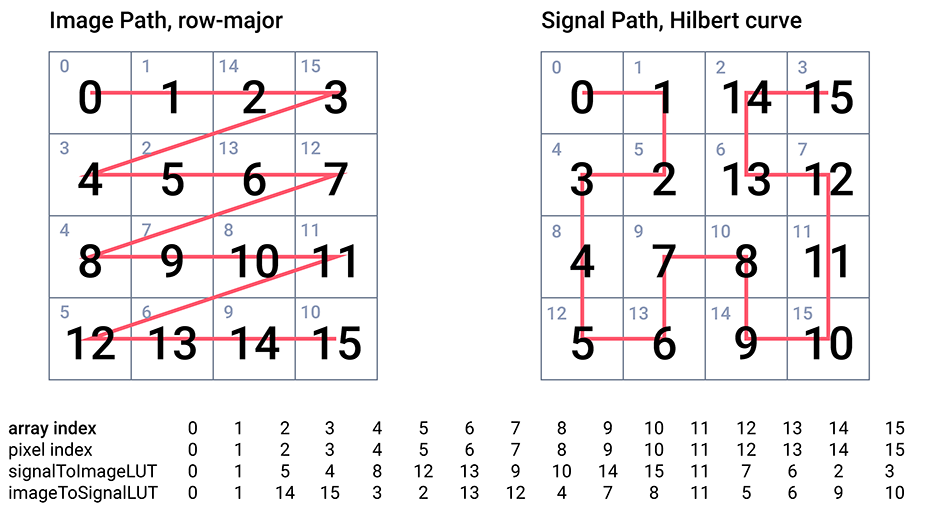
The PixelAudioMapper class and the PixelMapGen class and its subclasses provide
the core functionality of the library and are abundantly commented. PixelMapGen provides a
lightweight framework for creating mappings between audio sample and pixel data arrays. A PixelMapGen
subclass ("gen" for short) generates the (x,y) coordinates of the signal path over the image, and creates
the LUTs from the coordinates. PixelMapGen subclasses plug in to PixelAudioMapper,
which can transcode pixel and audio data and write it to pixel or audio sample arrays while remaining
independent of the actual audio and image formats. The one restriction (at the moment) is that color is
encoded in RGB or RGBA format and audio is encoded as 16-bit floating point values over the interval (-1.0,
1.0). Audio values can exceed these limits in calculations, but should be normalized to the interval for
playing audio or saving to file. PixelAudioMapper includes a trove of methods for color space
operations, array shifting, LUT mapping, and transcoding. While it should be relatively easy to write your
own PixelMapGen child class (you only need a list of coordinates for the signal map),
there are many built-in child classes that can get you up and running.
Gesture Capture
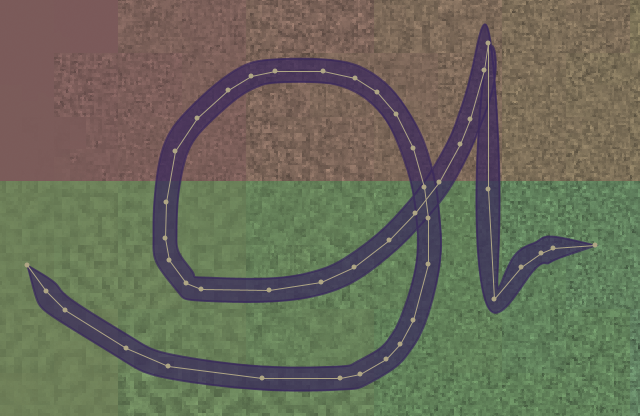
If LUT mapping is the core functionality that joins audio and image data, gesture capture is the core
functionality for user interaction. A Gesture combines location and timing information. The curves
package provides a framework for gesture geometry. The schedule package handles timing. For a
formal definition of a gesture, see the Javadoc for the
PAGesture class.