Class MultiGenLookupTables
- All Implemented Interfaces:
processing.core.PConstants
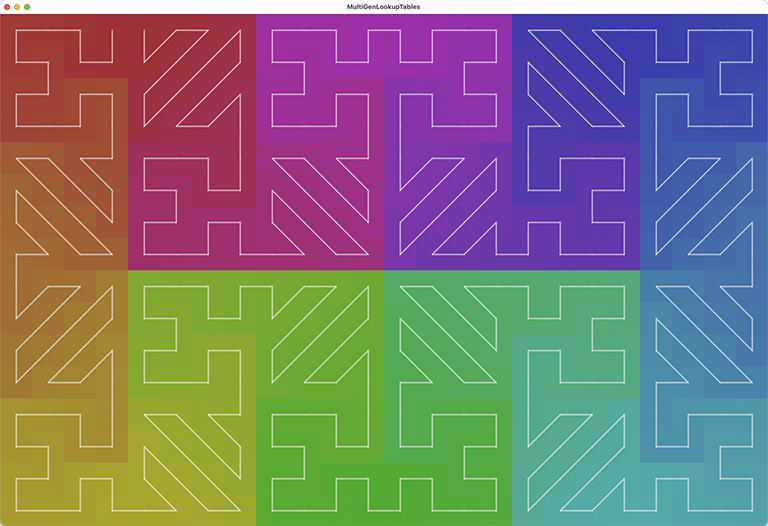
Because they are in one-to-one correspondence, the audio signal and image pixel arrays have the same number of entries. Imagine the audio signal as path that visits every pixel in a bitmap: the signal's lookup table for pixels is a list of the array indices of the pixels it visits, in the order it visits them. In PixelAudio documentation we refer to this path as the "signal path" over the image. By convention, pixel array coordinates start at (0,0) in the upper left corner of a bitmap, and proceed in "row major" order, left to right, top to bottom. We could call this the "image path" over the image. Unlike the signal path, the image path pixel order is fixed. The image has a corresponding lookup table, where the array indices of the audio signal are stored in the order of the pixel coordinates. The signal and bitmap lookup tables are inverses of each other, so that the signal can be mapped to the bitmap and the bitmap can be mapped to the signal. PixelAudio classes that implement the abstract PixelMapGen class just have to provide the coordinates of the signal path, then PixelMapGen will generate the lookup tables for the signal and the image. The coordinates may be generated by mathematical functions, but they only need to be calculated once.
This example also shows basic affine transforms of PixelMapGen objects, such as rotation and reflection, how to change the PixelMapGen a PixelAudioMapper instance is using, and basic animation using array rotation.
Signal path index numbers are small white numbers, bitmap index numbers are big black numbers. Read the imageToSignalLUT values by following the pixel index order and reading the white numbers. Read the signalToImageLUT values by following the signal path order and reading the black numbers. Read the imageToSignalLUT values by following the black pixel numbers in order and reading the white numbers.
This example can be a good place to test your own MultiGen creation methods.
 KEY COMMANDS

 Press 'a' or 'A' to rotate the array of colors one step left or right.
 Press 'g' to display a different generator.
 Press 'n' to hide or show numbers.
 Press 'l' to hide or show lines.
 Press 'd' to print a description of the current generator to the console.
 Press 'k' to print the imageToSignalLUT and the signalToImageLUT to the console.
 Press 't' to print affine maps to the console.
 Press 'r' to rotate 180 degress.
 Press 'x' to flip x-coordinates (reflect on y-axis).
 Press 'y' to flip y-coordinates (reflect on x-axis).
 Press 'h' to show this help text in the console.
-
Field Summary
FieldsModifier and TypeFieldDescription(package private) int(package private) ArrayList<int[]>(package private) int(package private) AffineTransformType(package private) intstatic AffineTransformTypestatic AffineTransformTypestatic AffineTransformTypestatic AffineTransformType(package private) PixelMapGen(package private) int(package private) int(package private) PixelMapGen(package private) int(package private) int[](package private) int(package private) boolean(package private) boolean(package private) boolean(package private) boolean(package private) boolean(package private) PixelAudioMapper(package private) int(package private) int(package private) PixelMapGenstatic AffineTransformType(package private) processing.core.PGraphics(package private) int(package private) PixelAudiostatic AffineTransformTypestatic AffineTransformTypestatic AffineTransformType(package private) PixelMapGen(package private) int(package private) int(package private) int(package private) int(package private) int[](package private) int(package private) int[](package private) float(package private) PixelMapGenFields inherited from class processing.core.PApplet
args, ARGS_BGCOLOR, ARGS_DISABLE_AWT, ARGS_DISPLAY, ARGS_EDITOR_LOCATION, ARGS_EXTERNAL, ARGS_FULL_SCREEN, ARGS_HIDE_STOP, ARGS_LOCATION, ARGS_PRESENT, ARGS_SKETCH_FOLDER, ARGS_STOP_COLOR, ARGS_UI_SCALE, ARGS_WINDOW_COLOR, DEFAULT_HEIGHT, DEFAULT_WIDTH, disableAWT, displayHeight, displayWidth, dmouseX, dmouseY, emouseX, emouseY, exitCalled, EXTERNAL_MOVE, EXTERNAL_STOP, finished, firstMouse, focused, frameCount, frameRate, frameRateLastNanos, g, height, insideDraw, javaPlatform, javaVersion, javaVersionName, key, keyCode, keyEvent, keyPressed, keyRepeatEnabled, looping, matchPatterns, mouseButton, mouseEvent, mousePressed, mouseX, mouseY, pixelDensity, pixelHeight, pixels, pixelWidth, platform, pmouseX, pmouseY, ratioLeft, ratioScale, ratioTop, recorder, redraw, rheight, rmouseX, rmouseY, rwidth, surface, useNativeSelect, width, windowX, windowYFields inherited from interface processing.core.PConstants
ADD, ALPHA, ALT, AMBIENT, ARC, ARGB, ARROW, BACKSPACE, BASELINE, BEVEL, BEZIER_VERTEX, BLEND, BLUR, BOTTOM, BOX, BREAK, BURN, CENTER, CHATTER, CHORD, CLAMP, CLOSE, CODED, COMPLAINT, CONTROL, CORNER, CORNERS, CROSS, CURVE_VERTEX, CUSTOM, DARKEST, DEG_TO_RAD, DELETE, DIAMETER, DIFFERENCE, DILATE, DIRECTIONAL, DISABLE_ASYNC_SAVEFRAME, DISABLE_BUFFER_READING, DISABLE_DEPTH_MASK, DISABLE_DEPTH_SORT, DISABLE_DEPTH_TEST, DISABLE_KEY_REPEAT, DISABLE_NATIVE_FONTS, DISABLE_OPENGL_ERRORS, DISABLE_OPTIMIZED_STROKE, DISABLE_STROKE_PERSPECTIVE, DISABLE_STROKE_PURE, DISABLE_TEXTURE_MIPMAPS, DODGE, DOWN, DXF, ELLIPSE, ENABLE_ASYNC_SAVEFRAME, ENABLE_BUFFER_READING, ENABLE_DEPTH_MASK, ENABLE_DEPTH_SORT, ENABLE_DEPTH_TEST, ENABLE_KEY_REPEAT, ENABLE_NATIVE_FONTS, ENABLE_OPENGL_ERRORS, ENABLE_OPTIMIZED_STROKE, ENABLE_STROKE_PERSPECTIVE, ENABLE_STROKE_PURE, ENABLE_TEXTURE_MIPMAPS, ENTER, EPSILON, ERODE, ESC, EXCLUSION, FX2D, GIF, GRAY, GROUP, HALF_PI, HAND, HARD_LIGHT, HINT_COUNT, HSB, IMAGE, INVERT, JAVA2D, JPEG, LANDSCAPE, LEFT, LIGHTEST, LINE, LINE_LOOP, LINE_STRIP, LINES, LINUX, MACOS, MACOSX, MAX_FLOAT, MAX_INT, MIN_FLOAT, MIN_INT, MITER, MODEL, MODELVIEW, MOVE, MULTIPLY, NORMAL, OPAQUE, OPEN, OPENGL, ORTHOGRAPHIC, OTHER, OVERLAY, P2D, P3D, PATH, PDF, PERSPECTIVE, PI, PIE, platformNames, POINT, POINTS, POLYGON, PORTRAIT, POSTERIZE, PROBLEM, PROJECT, PROJECTION, QUAD, QUAD_BEZIER_VERTEX, QUAD_STRIP, QUADRATIC_VERTEX, QUADS, QUARTER_PI, RAD_TO_DEG, RADIUS, RECT, REPEAT, REPLACE, RETURN, RGB, RIGHT, ROUND, SCREEN, SHAPE, SHIFT, SOFT_LIGHT, SPAN, SPHERE, SPOT, SQUARE, SUBTRACT, SVG, TAB, TARGA, TAU, TEXT, THIRD_PI, THRESHOLD, TIFF, TOP, TRIANGLE, TRIANGLE_FAN, TRIANGLE_STRIP, TRIANGLES, TWO_PI, UP, VERTEX, WAIT, WHITESPACE, WINDOWS, X, Y, Z -
Constructor Summary
Constructors -
Method Summary
Modifier and TypeMethodDescriptionvoiddraw()voidDraw the signal path lines.voidDraw the numbers for image path and signal path.voidDraw background squares.int[]getColors(int size) Creates an array of colors in rainbow (spectrum) order.hilbertZigzagLoop6x4(int genW, int genH) This method creates a MultiGen consisting of a mix of zigzag and Hilbert curves in 6 columns and 4 rows arranged to provide a continuous loop.voidinitGens()voidinitMapper(PixelMapGen gen) void(package private) voidGet a list of available displays and output information about them to the console.voidloadNewGen(PixelMapGen newGen) Load a new PixelMapGenstatic voidvoidPrint the LUTs and gen coordinates to the console.voidToggles display window size between initial dimensions and fit to screen dimensions.voidvoidsetScaling(boolean isVerbose) Calculates window sizes for displaying mapImage at actual size and at full screen.voidsettings()voidsetup()voidshowHelp()voidstepAnimation(int step) voidupdateMapper(PixelMapGen gen) voidMethods inherited from class processing.core.PApplet
abs, abs, acos, alpha, ambient, ambient, ambient, ambientLight, ambientLight, append, append, append, append, append, append, applyMatrix, applyMatrix, applyMatrix, applyMatrix, applyMatrix, arc, arc, arraycopy, arraycopy, arraycopy, arrayCopy, arrayCopy, arrayCopy, asin, atan, atan2, attrib, attrib, attrib, attribColor, attribNormal, attribPosition, background, background, background, background, background, background, background, beginCamera, beginContour, beginPGL, beginRaw, beginRaw, beginRecord, beginRecord, beginShape, beginShape, bezier, bezier, bezierDetail, bezierPoint, bezierTangent, bezierVertex, bezierVertex, binary, binary, binary, binary, blend, blend, blendColor, blendMode, blue, box, box, brightness, calcSketchPath, camera, camera, ceil, checkAlpha, checkExtension, choice, choice, circle, clear, clip, color, color, color, color, color, color, color, color, colorMode, colorMode, colorMode, colorMode, concat, concat, concat, concat, concat, concat, concat, constrain, constrain, copy, copy, copy, cos, createFont, createFont, createFont, createGraphics, createGraphics, createGraphics, createImage, createInput, createInput, createInputRaw, createOutput, createOutput, createPath, createPath, createPrimaryGraphics, createReader, createReader, createReader, createShape, createShape, createShape, createWriter, createWriter, createWriter, cursor, cursor, cursor, cursor, curve, curve, curveDetail, curvePoint, curveTangent, curveTightness, curveVertex, curveVertex, dataFile, dataPath, day, debug, degrees, delay, dequeueEvents, desktopFile, desktopPath, die, die, directionalLight, displayDensity, displayDensity, dispose, dist, dist, edge, ellipse, ellipseMode, emissive, emissive, emissive, endCamera, endContour, endPGL, endRaw, endRecord, endShape, endShape, exec, exec, exit, exitActual, exitCalled, exp, expand, expand, expand, expand, expand, expand, expand, expand, expand, expand, expand, expand, expand, expand, expand, expand, expand, expand, fill, fill, fill, fill, fill, fill, filter, filter, filter, floor, flush, focusGained, focusLost, frameMoved, frameRate, frustum, fullScreen, fullScreen, fullScreen, fullScreen, get, get, get, getExtension, getGraphics, getMatrix, getMatrix, getMatrix, getSurface, green, handleDraw, handleKeyEvent, handleMethods, handleMouseEvent, hex, hex, hex, hex, hideMenuBar, hint, hour, hue, image, image, image, imageMode, initSurface, insertFrame, isLooping, join, join, keyPressed, keyReleased, keyReleased, keyTyped, keyTyped, launch, lerp, lerpColor, lerpColor, lightFalloff, lights, lightSpecular, line, line, link, listFiles, listFiles, listPaths, loadBytes, loadBytes, loadBytes, loadFont, loadImage, loadImage, loadJSONArray, loadJSONArray, loadJSONObject, loadJSONObject, loadPixels, loadShader, loadShader, loadShape, loadShape, loadStrings, loadStrings, loadStrings, loadStrings, loadTable, loadTable, loadXML, loadXML, log, loop, mag, mag, main, main, main, makeGraphics, map, mask, match, matchAll, max, max, max, max, max, max, method, millis, min, min, min, min, min, min, minute, modelX, modelY, modelZ, month, mouseClicked, mouseClicked, mouseDragged, mouseDragged, mouseEntered, mouseEntered, mouseExited, mouseExited, mouseMoved, mouseMoved, mousePressed, mousePressed, mouseReleased, mouseReleased, mouseWheel, mouseWheel, nf, nf, nf, nf, nf, nf, nfc, nfc, nfc, nfc, nfp, nfp, nfp, nfp, nfs, nfs, nfs, nfs, noClip, noCursor, noFill, noise, noise, noise, noiseDetail, noiseDetail, noiseSeed, noLights, noLoop, norm, normal, noSmooth, noStroke, noTexture, noTint, orientation, ortho, ortho, ortho, parseBoolean, parseBoolean, parseBoolean, parseBoolean, parseByte, parseByte, parseByte, parseByte, parseByte, parseByte, parseByte, parseByte, parseChar, parseChar, parseChar, parseChar, parseFloat, parseFloat, parseFloat, parseFloat, parseFloat, parseFloat, parseFloat, parseInt, parseInt, parseInt, parseInt, parseInt, parseInt, parseInt, parseInt, parseInt, parseInt, parseInt, parseInt, parseJSONArray, parseJSONObject, parseXML, parseXML, pause, perspective, perspective, pixelDensity, point, point, pointLight, pop, popMatrix, popStyle, postEvent, postWindowMoved, postWindowResized, pow, print, print, print, print, print, print, print, print, print, printArray, printCamera, println, println, println, println, println, println, println, println, println, println, println, printMatrix, printProjection, printStackTrace, push, pushMatrix, pushStyle, quad, quadraticVertex, quadraticVertex, radians, random, random, randomGaussian, randomSeed, rect, rect, rect, rectMode, red, redraw, registerMethod, requestImage, requestImage, resetMatrix, resetShader, resetShader, resume, reverse, reverse, reverse, reverse, reverse, reverse, reverse, rotate, rotate, rotateX, rotateY, rotateZ, round, runSketch, runSketch, runSketch, saturation, save, saveBytes, saveBytes, saveBytes, saveFile, saveFrame, saveFrame, saveJSONArray, saveJSONArray, saveJSONObject, saveJSONObject, savePath, saveStream, saveStream, saveStream, saveStream, saveStream, saveStrings, saveStrings, saveStrings, saveTable, saveTable, saveXML, saveXML, scale, scale, scale, screenX, screenX, screenY, screenY, screenZ, second, selectCallback, selectFolder, selectFolder, selectFolder, selectInput, selectInput, selectInput, selectOutput, selectOutput, selectOutput, set, set, setMatrix, setMatrix, setMatrix, setSize, shader, shader, shape, shape, shape, shapeMode, shearX, shearY, shell, shininess, shorten, shorten, shorten, shorten, shorten, shorten, shorten, showDepthWarning, showDepthWarningXYZ, showMethodWarning, showMissingWarning, showSurface, showVariationWarning, sin, size, size, size, sketchDisplay, sketchFile, sketchFullScreen, sketchHeight, sketchOutputPath, sketchOutputStream, sketchPath, sketchPath, sketchPixelDensity, sketchRenderer, sketchSmooth, sketchWidth, sketchWindowColor, smooth, smooth, sort, sort, sort, sort, sort, sort, sort, sort, sort, sort, specular, specular, specular, sphere, sphereDetail, sphereDetail, splice, splice, splice, splice, splice, splice, splice, splice, splice, splice, splice, splice, splice, split, split, splitTokens, splitTokens, spotLight, sq, sqrt, square, start, startSurface, stop, str, str, str, str, str, str, str, str, str, str, stroke, stroke, stroke, stroke, stroke, stroke, strokeCap, strokeJoin, strokeWeight, style, subset, subset, subset, subset, subset, subset, subset, subset, subset, subset, subset, subset, subset, subset, subset, subset, subset, subset, tan, text, text, text, text, text, text, text, text, text, text, text, textAlign, textAlign, textAscent, textDescent, textFont, textFont, textLeading, textMode, textSize, texture, textureMode, textureWrap, textWidth, textWidth, textWidth, thread, tint, tint, tint, tint, tint, tint, translate, translate, triangle, trim, trim, unbinary, unhex, unregisterMethod, updatePixels, updatePixels, urlDecode, urlEncode, vertex, vertex, vertex, vertex, vertex, windowMove, windowMoved, windowRatio, windowResizable, windowResize, windowResized, windowTitle, year
-
Field Details
-
pixelaudio
PixelAudio pixelaudio -
hilb6x4Loop
PixelMapGen hilb6x4Loop -
mixGen
PixelMapGen mixGen -
zz6x4Loop
PixelMapGen zz6x4Loop -
randoBou
PixelMapGen randoBou -
gen
PixelMapGen gen -
mapper
PixelAudioMapper mapper -
spectrum
int[] spectrum -
coords
ArrayList<int[]> coords -
imageLUT
int[] imageLUT -
signalLUT
int[] signalLUT -
imageWidth
int imageWidth -
imageHeight
int imageHeight -
genW
int genW -
genH
int genH -
drawingScale
int drawingScale -
offset
int offset -
bigTextSize
int bigTextSize -
smallTextSize
int smallTextSize -
coordsSize
int coordsSize -
isHideNumbers
boolean isHideNumbers -
isHideLines
boolean isHideLines -
offscreen
processing.core.PGraphics offscreen -
r270
-
r90
-
r180
-
flipx
-
fx270
-
fx90
-
flipy
-
nada
-
currentTransform
AffineTransformType currentTransform -
isOversize
boolean isOversize -
isFitToScreen
boolean isFitToScreen -
maxWindowWidth
int maxWindowWidth -
maxWindowHeight
int maxWindowHeight -
scaledWindowWidth
int scaledWindowWidth -
scaledWindowHeight
int scaledWindowHeight -
windowScale
float windowScale -
isSecondScreen
boolean isSecondScreen -
screen2x
int screen2x -
screen2y
int screen2y
-
-
Constructor Details
-
MultiGenLookupTables
public MultiGenLookupTables()
-
-
Method Details
-
main
-
settings
public void settings()- Overrides:
settingsin classprocessing.core.PApplet
-
setup
public void setup()- Overrides:
setupin classprocessing.core.PApplet
-
setDrawingVars
public void setDrawingVars() -
hilbertZigzagLoop6x4
This method creates a MultiGen consisting of a mix of zigzag and Hilbert curves in 6 columns and 4 rows arranged to provide a continuous loop. This method shows one approach to mixing different PixelMapGens in a MultiGen. We use "gen" as an abbreviated name for a PixelMapGen.- Parameters:
genW-genH-- Returns:
-
initGens
public void initGens() -
initMapper
-
updateMapper
-
updateWindow
public void updateWindow() -
draw
public void draw()- Overrides:
drawin classprocessing.core.PApplet
-
keyPressed
public void keyPressed()- Overrides:
keyPressedin classprocessing.core.PApplet
-
loadNewGen
Load a new PixelMapGen -
getColors
public int[] getColors(int size) Creates an array of colors in rainbow (spectrum) order.- Parameters:
size- size of the desired array- Returns:
- an array of colors in rainbow (spectrum) order
-
printLUTs
public void printLUTs()Print the LUTs and gen coordinates to the console. -
drawSquares
public void drawSquares()Draw background squares. -
drawLines
public void drawLines()Draw the signal path lines. -
drawNumbers
public void drawNumbers()Draw the numbers for image path and signal path. -
stepAnimation
public void stepAnimation(int step) -
showHelp
public void showHelp() -
listDisplays
void listDisplays()Get a list of available displays and output information about them to the console. Sets screen2x, screen2y, displayWidth and displayHeight from dimensions of a second display. -
setScaling
public void setScaling(boolean isVerbose) Calculates window sizes for displaying mapImage at actual size and at full screen. Press the 'r' key to resize the display window. This method will result in display on a second screen, if one is available. If mapImage is smaller than the screen, mapImage is displayed at size on startup and resizing zooms the image. If mapImage is bigger than the display, mapImage is fit to the screen on startup and resizing shows it at full size, partially filling the window.- Parameters:
isVerbose- if true, post comments to the console
-
resizeWindow
public void resizeWindow()Toggles display window size between initial dimensions and fit to screen dimensions.
-