Class TutorialOne_01_FileIO
- All Implemented Interfaces:
processing.core.PConstants
If you are just starting to work with PixelAudio coding, I suggest looking through these sketches before doing the TutorialOne sequence:
LookupTables: an introduction to a core concept in PixelAudio, lookup tables. Start here.Starter: basics of creating a PixelMapGen instance and plugging it into a PixelAudioMapper.SimpleAnimation: a simple way to animate a bitmap using PixelAudioMapper.MultiGenDemo: chain PixelMapGens together to generate a large image.MultiGenLookupTables: lookup tables in MultiGens, a useful place to test your MultiGenCode.TransformPImage(optional): introduces the affine transforms available in the BitmapTransform class.
This series of example sketches shows the basics of loading the PixelAudio library and using it to display a rainbow array of colors along the signal path. It also provides a first look at how to create MultiGen objects, which can use multiple PixelMapGen objects to create a composite PixelMapGen class. You don't need to create your own custom MultiGen classes. The PixelMapGen subclasses HilbertGen, DiagonalZigzagGen, and BoustropheGen include various static methods to generate MultiGen objects. The TutorialOne sequence provides examples of creating and using MultiGen objects that you can modify.
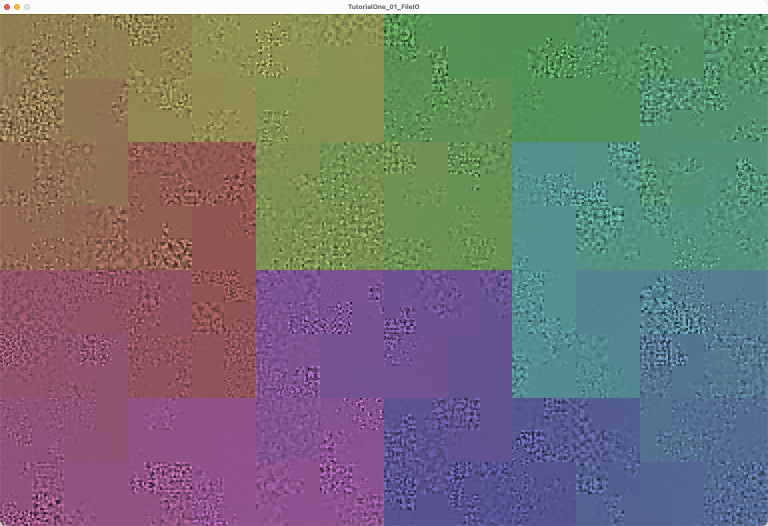
TutorialOne_01_FileIO can open and display audio and image files, transcode RGB pixel data to audio samples and transcode audio samples to RGB pixel data. It can also save audio and image files. It responds to mouse clicks by playing the audio samples corresponding to the click location in the display image. To help you visualize the signal path, the 'k' command key generates a rainbow color array that follows the signal path but keeps the brightness information in the image intact. The image also appears when you launch the sketch.
1. Launch the sketch and then press the 'o' key to open a image or an audio file. Files for the example sketches are located in the "examples/example_data/" folder. The "Saucer_mixdown.wav" and "snowfence.jpg" files are good for experimenting. To see the signal path as a color overlay, press the 'k' key.
2. Saucer_mixdown.wav is loaded into an audio buffer, playBuffer, and then
transcoded into the PImage mapImage, which is displayed on screen. Audio
samples are floating point values from -1.0 to +1.0. They are transcoded to RGB
color values in the range (0, 255). The samples are mapped to a path over the image
that visits every pixel, the "signal path". In this sketch, the signal path consists
of 6 connected Hilbert curves. A Hilbert curve is a 2D fractal curve which is
often used in scientific visualization to reveal hidden patterns in 1D data.
In the image created from Saucer_mixdown, high frequency sounds create fine-grained
patterns and low frequency sounds create coarse-grained patterns.
3. Snowfence.jpg is loaded into mapImage and then transcoded from to the playBuffer and
audioSignal variables. If you click in the image, you can hear the sound created
by reading the brightness levels of pixels along the signal path and changing
them into audio sample data. The sky, with very little variation in texture, is
relatively quiet. The fence and other areas are noisy. Most images result in
different sorts of noise; however, if you save the image created by loading an
audio file, it will transcode back into audio. You could send messages this way.
As long as sender and receiver use the same signal path to encode audio, they can
communicate with pictures. Try loading "saucer_image.png" to hear how this works.
Image data doesn't have as good a resolution as audio data, so there is some
loss of quality in saving audio as an image and then reloading it as audio.
Note: If you press 'k' to load the color overlay, you will not affect audio
quality. Loading the hue and saturation channels of an image has very little
effect on the brightness levels, which are the source of the audio signal.
4. Transcoding is automated in this tutorial, but we'll provide separate loading of audio and image in later tutorials.
5. Experiment with different image and audio files.
Press 'c' to load only color data (hue and saturation) from an image file.
Click in the image or hover and press the spacebar to play an audio sample.
Press 'r' to toggle selection of a random ADSR envelope for the audio sample.
Audio events are generated with a PASamplerInstrument.
PASamplerInstrument lets us add an ADSR (attack, decay, sustain, release) envelope to
audio output from audio samples. It can also shift pitch and set stereo panning. It
can support multiple voices -- in the initAudio() method we set the number to 8,
a reasonable number of voices for tracking rapid mouse clicks, which you can change.
In this sketch, audio events are triggered with one of two methods:
  int actualSampleCount = playSample(int samplePos, int sampleCount, float amplitude)
  int actualSampleCount = playSample(int samplePos, int sampleCount, float amplitude, ADSRParams env)
The first method uses the built-in ADSR supplied on initializing PASamplerInstrument. The second method allows you to supply your own ADSR. Press the 'r' key to have this sketch trigger sounds with a randomly selected envelope from adsrList.
PASamplerInstrument and the other audio instruments in net.paulhertz.pixelaudio.sampler play an audio event for the requested duration (samplelen) using the attack, decay, and sustain portion of the envelope. When the duration ends, the release portion of the envelope controls how the audio fades away. Calls to the instruments playSample() methods return the amount of time the envelope will actually take, which is greater than or equal to the requested duration.
Still to come, as the tutorial advances:- animation and saving to video
- setting pitch and panning with playSample()
- drawing to trigger audio events
- UDP communication with Max and other media applications
- loading a file to memory and traversing it with a windowed buffer
See also: example sketch LoadImageToAudio, with a complete set of commands for loading
images and audio to different color channels.
 KEY COMMANDS

 Press 'c' to apply color from image file to display image.
 Press 'k' to apply the hue and saturation in the colors array to mapImage.
 Press 'o' or 'O' to open an audio or image file.
 Press 'r' or 'R' to use the default envelope or a random envelope from a list.
 Press 'w' or 'W' to toggle audio buffer wrap around.
 Press 'h' or 'H' to show help and key commands in console.
-
Field Summary
FieldsModifier and TypeFieldDescription(package private) ArrayList<ADSRParams>(package private) float(package private) File(package private) int(package private) String(package private) String(package private) String(package private) float(package private) int(package private) ddf.minim.AudioOutput(package private) float[](package private) float(package private) PixelAudioMapper.ChannelNames(package private) int(package private) float(package private) ADSRParams(package private) boolean(package private) int(package private) float(package private) int(package private) int(package private) File(package private) int(package private) String(package private) String(package private) String(package private) int(package private) boolean(package private) boolean(package private) processing.core.PImage(package private) PixelAudioMapper(package private) int(package private) float(package private) ddf.minim.MinimMinim audio library(package private) MultiGen(package private) int(package private) PixelAudio(package private) ddf.minim.MultiChannelBuffer(package private) float(package private) float(package private) float(package private) int[](package private) float(package private) PASamplerInstrument(package private) ArrayList<TimedLocation>Fields inherited from class processing.core.PApplet
args, ARGS_BGCOLOR, ARGS_DISABLE_AWT, ARGS_DISPLAY, ARGS_EDITOR_LOCATION, ARGS_EXTERNAL, ARGS_FULL_SCREEN, ARGS_HIDE_STOP, ARGS_LOCATION, ARGS_PRESENT, ARGS_SKETCH_FOLDER, ARGS_STOP_COLOR, ARGS_UI_SCALE, ARGS_WINDOW_COLOR, DEFAULT_HEIGHT, DEFAULT_WIDTH, disableAWT, displayHeight, displayWidth, dmouseX, dmouseY, emouseX, emouseY, exitCalled, EXTERNAL_MOVE, EXTERNAL_STOP, finished, firstMouse, focused, frameCount, frameRate, frameRateLastNanos, g, height, insideDraw, javaPlatform, javaVersion, javaVersionName, key, keyCode, keyEvent, keyPressed, keyRepeatEnabled, looping, matchPatterns, mouseButton, mouseEvent, mousePressed, mouseX, mouseY, pixelDensity, pixelHeight, pixels, pixelWidth, platform, pmouseX, pmouseY, ratioLeft, ratioScale, ratioTop, recorder, redraw, rheight, rmouseX, rmouseY, rwidth, surface, useNativeSelect, width, windowX, windowYFields inherited from interface processing.core.PConstants
ADD, ALPHA, ALT, AMBIENT, ARC, ARGB, ARROW, BACKSPACE, BASELINE, BEVEL, BEZIER_VERTEX, BLEND, BLUR, BOTTOM, BOX, BREAK, BURN, CENTER, CHATTER, CHORD, CLAMP, CLOSE, CODED, COMPLAINT, CONTROL, CORNER, CORNERS, CROSS, CURVE_VERTEX, CUSTOM, DARKEST, DEG_TO_RAD, DELETE, DIAMETER, DIFFERENCE, DILATE, DIRECTIONAL, DISABLE_ASYNC_SAVEFRAME, DISABLE_BUFFER_READING, DISABLE_DEPTH_MASK, DISABLE_DEPTH_SORT, DISABLE_DEPTH_TEST, DISABLE_KEY_REPEAT, DISABLE_NATIVE_FONTS, DISABLE_OPENGL_ERRORS, DISABLE_OPTIMIZED_STROKE, DISABLE_STROKE_PERSPECTIVE, DISABLE_STROKE_PURE, DISABLE_TEXTURE_MIPMAPS, DODGE, DOWN, DXF, ELLIPSE, ENABLE_ASYNC_SAVEFRAME, ENABLE_BUFFER_READING, ENABLE_DEPTH_MASK, ENABLE_DEPTH_SORT, ENABLE_DEPTH_TEST, ENABLE_KEY_REPEAT, ENABLE_NATIVE_FONTS, ENABLE_OPENGL_ERRORS, ENABLE_OPTIMIZED_STROKE, ENABLE_STROKE_PERSPECTIVE, ENABLE_STROKE_PURE, ENABLE_TEXTURE_MIPMAPS, ENTER, EPSILON, ERODE, ESC, EXCLUSION, FX2D, GIF, GRAY, GROUP, HALF_PI, HAND, HARD_LIGHT, HINT_COUNT, HSB, IMAGE, INVERT, JAVA2D, JPEG, LANDSCAPE, LEFT, LIGHTEST, LINE, LINE_LOOP, LINE_STRIP, LINES, LINUX, MACOS, MACOSX, MAX_FLOAT, MAX_INT, MIN_FLOAT, MIN_INT, MITER, MODEL, MODELVIEW, MOVE, MULTIPLY, NORMAL, OPAQUE, OPEN, OPENGL, ORTHOGRAPHIC, OTHER, OVERLAY, P2D, P3D, PATH, PDF, PERSPECTIVE, PI, PIE, platformNames, POINT, POINTS, POLYGON, PORTRAIT, POSTERIZE, PROBLEM, PROJECT, PROJECTION, QUAD, QUAD_BEZIER_VERTEX, QUAD_STRIP, QUADRATIC_VERTEX, QUADS, QUARTER_PI, RAD_TO_DEG, RADIUS, RECT, REPEAT, REPLACE, RETURN, RGB, RIGHT, ROUND, SCREEN, SHAPE, SHIFT, SOFT_LIGHT, SPAN, SPHERE, SPOT, SQUARE, SUBTRACT, SVG, TAB, TARGA, TAU, TEXT, THIRD_PI, THRESHOLD, TIFF, TOP, TRIANGLE, TRIANGLE_FAN, TRIANGLE_STRIP, TRIANGLES, TWO_PI, UP, VERTEX, WAIT, WHITESPACE, WINDOWS, X, Y, Z -
Constructor Summary
Constructors -
Method Summary
Modifier and TypeMethodDescriptionint[]applyColor(int[] colorSource, int[] graySource, int[] lut) Utility method for applying hue and saturation values from a source array of RGB values to the brightness values in a target array of RGB values, using a lookup table to redirect indexing.voidapplyImageColor(File imgFile, processing.core.PImage targetImage) Apply the hue and saturation of a chosen image file to the brightness channel of the display image.voidaudioFileSelectedWrite(File selection) voidaudioMouseClick(int x, int y) Typically called from mouseClicked with mouseX and mouseY, generates audio events.intCalculates a numerical value using a Gaussian variable, with average value over time equal to noteDuration.voidCall to initiate process of opening an image file to get its color data.voidWrapper method for Processing's selectInput commandintclipToHeight(int y) intclipToWidth(int x) voidcolorFileSelected(File selectedFile) callback method for chooseColorImage()voidvoiddraw()voiddrawCircle(int x, int y) Draws a circle at the location of an audio trigger (mouseDown event).(package private) voidPrepares Sampler instruments and assetsvoidfileSelected(File selectedFile) callback method for chooseFile(), handles standard audio and image formats for Processing.int[]getColors(int size) Generates an array of rainbow colors using the HSB color space.intgetSamplePos(int x, int y) Calculate position of the image pixel within the signal path.voidimageFileSelectedWrite(File selection) voidvoidCALL THIS METHOD IN SETUP() Initializes Minim audio library and audio variables.voidInitialize mapImage with the colors array.voidbuilt-in keyPressed handler, forwards events to parseKeyvoidloadAudioFile(File audFile) Attempts to load audio data from a selected file into playBuffer, then calls writeAudioToImage() to transcode audio data and write it to mapImage.voidloadImageFile(File imgFile) Attempts to load image data from a selected file into mapImage, then calls writeImageToAudio() to transcode HSB brightness color data from the image to audio and writes it to playBuffer and audioSignal.static voidvoidvoidThe built-in mousePressed handler for Processing, not used yet...voidparseKey(char key, int keyCode) Handles key press events passed on by the built-in keyPressed method.intplaySample(int samplePos, int samplelen, float amplitude) Plays an audio sample with PASamplerInstrument and default ADSR.intplaySample(int samplePos, int samplelen, float amplitude, ADSRParams env) Plays an audio sample with PASamplerInstrument and custom ADSR.voidWrites a specified channel of mapImage to audioSignal.voidTracks and runs TimedLocation events in the timeLocsArray list, which is associated with mouse clicks that trigger audio a the click point.voidsaveAudioToFile(float[] samples, float sampleRate, String fileName) Saves audio data to 16-bit integer PCM format, which Processing can also open.voidsaveImageToFile(processing.core.PImage img, String fileName) voidvoidvoidsettings()voidsetup()voidshowHelp()To generate help output, run RegEx search/replace on parseKey case lines with: find: case ('.'): // (.+) replace: println(" * Press $1 to $2.");voidstop()(package private) voidupdateAudioChain(float[] sig) (package private) voidupdateAudioChain(float[] sig, float bufferSampleRate) Bottleneck "commit" method for audio state.voidwriteAudioToImage(float[] sig, PixelAudioMapper mapper, processing.core.PImage img, PixelAudioMapper.ChannelNames chan) Transcodes audio data in sig[] and writes it to color channel chan of mapImage using the lookup tables in mapper to redirect indexing.voidwriteImageToAudio(processing.core.PImage img, PixelAudioMapper mapper, float[] sig, PixelAudioMapper.ChannelNames chan) This method writes a color channel from an image to playBuffer, fulfilling a central concept of the PixelAudio library: image is sound.Methods inherited from class processing.core.PApplet
abs, abs, acos, alpha, ambient, ambient, ambient, ambientLight, ambientLight, append, append, append, append, append, append, applyMatrix, applyMatrix, applyMatrix, applyMatrix, applyMatrix, arc, arc, arraycopy, arraycopy, arraycopy, arrayCopy, arrayCopy, arrayCopy, asin, atan, atan2, attrib, attrib, attrib, attribColor, attribNormal, attribPosition, background, background, background, background, background, background, background, beginCamera, beginContour, beginPGL, beginRaw, beginRaw, beginRecord, beginRecord, beginShape, beginShape, bezier, bezier, bezierDetail, bezierPoint, bezierTangent, bezierVertex, bezierVertex, binary, binary, binary, binary, blend, blend, blendColor, blendMode, blue, box, box, brightness, calcSketchPath, camera, camera, ceil, checkAlpha, checkExtension, choice, choice, circle, clear, clip, color, color, color, color, color, color, color, color, colorMode, colorMode, colorMode, colorMode, concat, concat, concat, concat, concat, concat, concat, constrain, constrain, copy, copy, copy, cos, createFont, createFont, createFont, createGraphics, createGraphics, createGraphics, createImage, createInput, createInput, createInputRaw, createOutput, createOutput, createPath, createPath, createPrimaryGraphics, createReader, createReader, createReader, createShape, createShape, createShape, createWriter, createWriter, createWriter, cursor, cursor, cursor, cursor, curve, curve, curveDetail, curvePoint, curveTangent, curveTightness, curveVertex, curveVertex, dataFile, dataPath, day, debug, degrees, delay, dequeueEvents, desktopFile, desktopPath, die, die, directionalLight, displayDensity, displayDensity, dispose, dist, dist, edge, ellipse, ellipseMode, emissive, emissive, emissive, endCamera, endContour, endPGL, endRaw, endRecord, endShape, endShape, exec, exec, exit, exitActual, exitCalled, exp, expand, expand, expand, expand, expand, expand, expand, expand, expand, expand, expand, expand, expand, expand, expand, expand, expand, expand, fill, fill, fill, fill, fill, fill, filter, filter, filter, floor, flush, focusGained, focusLost, frameMoved, frameRate, frustum, fullScreen, fullScreen, fullScreen, fullScreen, get, get, get, getExtension, getGraphics, getMatrix, getMatrix, getMatrix, getSurface, green, handleDraw, handleKeyEvent, handleMethods, handleMouseEvent, hex, hex, hex, hex, hideMenuBar, hint, hour, hue, image, image, image, imageMode, initSurface, insertFrame, isLooping, join, join, keyPressed, keyReleased, keyReleased, keyTyped, keyTyped, launch, lerp, lerpColor, lerpColor, lightFalloff, lights, lightSpecular, line, line, link, listFiles, listFiles, listPaths, loadBytes, loadBytes, loadBytes, loadFont, loadImage, loadImage, loadJSONArray, loadJSONArray, loadJSONObject, loadJSONObject, loadPixels, loadShader, loadShader, loadShape, loadShape, loadStrings, loadStrings, loadStrings, loadStrings, loadTable, loadTable, loadXML, loadXML, log, loop, mag, mag, main, main, main, makeGraphics, map, mask, match, matchAll, max, max, max, max, max, max, method, millis, min, min, min, min, min, min, minute, modelX, modelY, modelZ, month, mouseClicked, mouseDragged, mouseDragged, mouseEntered, mouseEntered, mouseExited, mouseExited, mouseMoved, mouseMoved, mousePressed, mouseReleased, mouseReleased, mouseWheel, mouseWheel, nf, nf, nf, nf, nf, nf, nfc, nfc, nfc, nfc, nfp, nfp, nfp, nfp, nfs, nfs, nfs, nfs, noClip, noCursor, noFill, noise, noise, noise, noiseDetail, noiseDetail, noiseSeed, noLights, noLoop, norm, normal, noSmooth, noStroke, noTexture, noTint, orientation, ortho, ortho, ortho, parseBoolean, parseBoolean, parseBoolean, parseBoolean, parseByte, parseByte, parseByte, parseByte, parseByte, parseByte, parseByte, parseByte, parseChar, parseChar, parseChar, parseChar, parseFloat, parseFloat, parseFloat, parseFloat, parseFloat, parseFloat, parseFloat, parseInt, parseInt, parseInt, parseInt, parseInt, parseInt, parseInt, parseInt, parseInt, parseInt, parseInt, parseInt, parseJSONArray, parseJSONObject, parseXML, parseXML, pause, perspective, perspective, pixelDensity, point, point, pointLight, pop, popMatrix, popStyle, postEvent, postWindowMoved, postWindowResized, pow, print, print, print, print, print, print, print, print, print, printArray, printCamera, println, println, println, println, println, println, println, println, println, println, println, printMatrix, printProjection, printStackTrace, push, pushMatrix, pushStyle, quad, quadraticVertex, quadraticVertex, radians, random, random, randomGaussian, randomSeed, rect, rect, rect, rectMode, red, redraw, registerMethod, requestImage, requestImage, resetMatrix, resetShader, resetShader, resume, reverse, reverse, reverse, reverse, reverse, reverse, reverse, rotate, rotate, rotateX, rotateY, rotateZ, round, runSketch, runSketch, runSketch, saturation, save, saveBytes, saveBytes, saveBytes, saveFile, saveFrame, saveFrame, saveJSONArray, saveJSONArray, saveJSONObject, saveJSONObject, savePath, saveStream, saveStream, saveStream, saveStream, saveStream, saveStrings, saveStrings, saveStrings, saveTable, saveTable, saveXML, saveXML, scale, scale, scale, screenX, screenX, screenY, screenY, screenZ, second, selectCallback, selectFolder, selectFolder, selectFolder, selectInput, selectInput, selectInput, selectOutput, selectOutput, selectOutput, set, set, setMatrix, setMatrix, setMatrix, setSize, shader, shader, shape, shape, shape, shapeMode, shearX, shearY, shell, shininess, shorten, shorten, shorten, shorten, shorten, shorten, shorten, showDepthWarning, showDepthWarningXYZ, showMethodWarning, showMissingWarning, showSurface, showVariationWarning, sin, size, size, size, sketchDisplay, sketchFile, sketchFullScreen, sketchHeight, sketchOutputPath, sketchOutputStream, sketchPath, sketchPath, sketchPixelDensity, sketchRenderer, sketchSmooth, sketchWidth, sketchWindowColor, smooth, smooth, sort, sort, sort, sort, sort, sort, sort, sort, sort, sort, specular, specular, specular, sphere, sphereDetail, sphereDetail, splice, splice, splice, splice, splice, splice, splice, splice, splice, splice, splice, splice, splice, split, split, splitTokens, splitTokens, spotLight, sq, sqrt, square, start, startSurface, str, str, str, str, str, str, str, str, str, str, stroke, stroke, stroke, stroke, stroke, stroke, strokeCap, strokeJoin, strokeWeight, style, subset, subset, subset, subset, subset, subset, subset, subset, subset, subset, subset, subset, subset, subset, subset, subset, subset, subset, tan, text, text, text, text, text, text, text, text, text, text, text, textAlign, textAlign, textAscent, textDescent, textFont, textFont, textLeading, textMode, textSize, texture, textureMode, textureWrap, textWidth, textWidth, textWidth, thread, tint, tint, tint, tint, tint, tint, translate, translate, triangle, trim, trim, unbinary, unhex, unregisterMethod, updatePixels, updatePixels, urlDecode, urlEncode, vertex, vertex, vertex, vertex, vertex, windowMove, windowMoved, windowRatio, windowResizable, windowResize, windowResized, windowTitle, year
-
Field Details
-
pixelaudio
PixelAudio pixelaudio -
multigen
MultiGen multigen -
genWidth
int genWidth -
genHeight
int genHeight -
mapper
PixelAudioMapper mapper -
mapSize
int mapSize -
mapImage
processing.core.PImage mapImage -
chan
-
spectrum
int[] spectrum -
audioFile
File audioFile -
audioFilePath
String audioFilePath -
audioFileName
String audioFileName -
audioFileTag
String audioFileTag -
audioFileLength
int audioFileLength -
imageFile
File imageFile -
imageFilePath
String imageFilePath -
imageFileName
String imageFileName -
imageFileTag
String imageFileTag -
imageFileWidth
int imageFileWidth -
imageFileHeight
int imageFileHeight -
minim
ddf.minim.Minim minimMinim audio library -
audioOut
ddf.minim.AudioOutput audioOut -
audioGain
float audioGain -
sampleRate
float sampleRate -
fileSampleRate
float fileSampleRate -
bufferSampleRate
float bufferSampleRate -
doResample
boolean doResample -
audioSignal
float[] audioSignal -
playBuffer
ddf.minim.MultiChannelBuffer playBuffer -
audioLength
int audioLength -
noteDuration
int noteDuration -
synth
PASamplerInstrument synth -
samplerGain
float samplerGain -
isWrapAround
boolean isWrapAround -
defaultEnv
ADSRParams defaultEnv -
maxAmplitude
float maxAmplitude -
attackTime
float attackTime -
decayTime
float decayTime -
sustainLevel
float sustainLevel -
releaseTime
float releaseTime -
adsrList
ArrayList<ADSRParams> adsrList -
isRandomADSR
boolean isRandomADSR -
timeLocsArray
ArrayList<TimedLocation> timeLocsArray -
count
int count -
fileIndex
int fileIndex
-
-
Constructor Details
-
TutorialOne_01_FileIO
public TutorialOne_01_FileIO()
-
-
Method Details
-
main
- Parameters:
args-
-
settings
public void settings()- Overrides:
settingsin classprocessing.core.PApplet
-
setup
public void setup()- Overrides:
setupin classprocessing.core.PApplet
-
stop
public void stop()- Overrides:
stopin classprocessing.core.PApplet
-
getColors
public int[] getColors(int size) Generates an array of rainbow colors using the HSB color space.- Parameters:
size- the number of entries in the colors array- Returns:
- an array of RGB colors ordered by hue
-
initImages
public void initImages()Initialize mapImage with the colors array. MapImage will handle the color data for mapper and also serve as our display image. -
draw
public void draw()- Overrides:
drawin classprocessing.core.PApplet
-
mousePressed
public void mousePressed()The built-in mousePressed handler for Processing, not used yet...- Overrides:
mousePressedin classprocessing.core.PApplet
-
mouseClicked
public void mouseClicked()- Overrides:
mouseClickedin classprocessing.core.PApplet
-
keyPressed
public void keyPressed()built-in keyPressed handler, forwards events to parseKey- Overrides:
keyPressedin classprocessing.core.PApplet
-
parseKey
public void parseKey(char key, int keyCode) Handles key press events passed on by the built-in keyPressed method. By moving key event handling outside the built-in keyPressed method, we make it possible to post key commands without an actual key event. Methods and interfaces and even other threads can call parseKey(). This opens up many possibilities and a some risks, too.- Parameters:
key-keyCode-
-
showHelp
public void showHelp()To generate help output, run RegEx search/replace on parseKey case lines with: find: case ('.'): // (.+) replace: println(" * Press $1 to $2."); -
applyColor
public int[] applyColor(int[] colorSource, int[] graySource, int[] lut) Utility method for applying hue and saturation values from a source array of RGB values to the brightness values in a target array of RGB values, using a lookup table to redirect indexing.- Parameters:
colorSource- a source array of RGB data from which to obtain hue and saturation valuesgraySource- an target array of RGB data from which to obtain brightness valueslut- a lookup table, must be the same size as colorSource and graySource- Returns:
- the graySource array of RGB values, with hue and saturation values changed
- Throws:
IllegalArgumentException- if array arguments are null or if they are not the same length
-
chooseColorImage
public void chooseColorImage()Call to initiate process of opening an image file to get its color data. -
colorFileSelected
callback method for chooseColorImage()- Parameters:
selectedFile- the File the user selected
-
applyImageColor
Apply the hue and saturation of a chosen image file to the brightness channel of the display image.- Parameters:
imgFile- selected image file, source of hue and saturation valuestargetImage- target image where brightness will remain unchanged
-
chooseFile
public void chooseFile()Wrapper method for Processing's selectInput command -
fileSelected
callback method for chooseFile(), handles standard audio and image formats for Processing. If a file has been successfully selected, continues with a call to loadAudioFile() or loadImageFile().- Parameters:
selectedFile- the File the user selected
-
loadAudioFile
Attempts to load audio data from a selected file into playBuffer, then calls writeAudioToImage() to transcode audio data and write it to mapImage. If doResample is true, resamples files whose sample rate differs from the current audio output. If you want to load the image file and audio file separately, comment out writeAudioToImage().- Parameters:
audFile- an audio file
-
writeAudioToImage
public void writeAudioToImage(float[] sig, PixelAudioMapper mapper, processing.core.PImage img, PixelAudioMapper.ChannelNames chan) Transcodes audio data in sig[] and writes it to color channel chan of mapImage using the lookup tables in mapper to redirect indexing. Calls mapper.mapSigToImg(), which will throw an IllegalArgumentException if sig.length != img.pixels.length or sig.length != mapper.getSize(). We typically use PixelAudioMapper.ChannelNames.ALL or PixelAudioMapper.ChannelNames.L as the chan value. Both result in gray values, with PixelAudioMapper.ChannelNames.L maintaining previous hue and saturation color values in the image.- Parameters:
sig- an array of float, should be audio data in the range [-1.0, 1.0]mapper- a PixelAudioMapperimg- a PImagechan- a color channel
-
loadImageFile
Attempts to load image data from a selected file into mapImage, then calls writeImageToAudio() to transcode HSB brightness color data from the image to audio and writes it to playBuffer and audioSignal.- Parameters:
imgFile- an image file
-
writeImageToAudio
public void writeImageToAudio(processing.core.PImage img, PixelAudioMapper mapper, float[] sig, PixelAudioMapper.ChannelNames chan) This method writes a color channel from an image to playBuffer, fulfilling a central concept of the PixelAudio library: image is sound. Calls mapper.mapImgToSig(), which will throw an IllegalArgumentException if img.pixels.length != sig.length or img.width * img.height != mapper.getWidth() * mapper.getHeight(). Sets totalShift = 0 on completion: the image and audio are now in sync. TODO- Parameters:
img- a PImage, a source of datamapper- a PixelAudioMapper, handles mapping between image and audio signalsig- an target array of float in audio formatchan- a color channel
-
renderMapImageToAudio
Writes a specified channel of mapImage to audioSignal.- Parameters:
chan- the selected color channel
-
commitMapImageToAudio
public void commitMapImageToAudio() -
saveToAudio
public void saveToAudio() -
audioFileSelectedWrite
-
saveAudioToFile
public void saveAudioToFile(float[] samples, float sampleRate, String fileName) throws IOException, UnsupportedAudioFileException Saves audio data to 16-bit integer PCM format, which Processing can also open. This same method can be called as a static method in PixelAudio.- Parameters:
samples- an array of floats in the audio range (-1.0f, 1.0f)sampleRate- audio sample rate for the filefileName- name of the file to save to- Throws:
IOException- an Exception you'll need to handle to call this methodUnsupportedAudioFileException- another Exception
-
saveToImage
public void saveToImage() -
imageFileSelectedWrite
-
saveImageToFile
-
initAudio
public void initAudio()CALL THIS METHOD IN SETUP() Initializes Minim audio library and audio variables. -
ensureSamplerReady
void ensureSamplerReady()Prepares Sampler instruments and assets -
initADSRList
public void initADSRList() -
updateAudioChain
void updateAudioChain(float[] sig, float bufferSampleRate) Bottleneck "commit" method for audio state. Takes an arbitrary input signal and installs it as the canonical audio signal used by the system. This method: - Resizes/pads/truncates the input to mapper.getSize() - Copies the data to ensure no external aliasing - Updates audioSignal (canonical signal handled by application code) - Updates playBuffer (audio buffer used by Minim audio library methods) - Propagates the buffer to active instruments: edit this part for your own code === This is the ONLY method that should mutate the global audio signal state. === In PixelAudio examples, the signal is typically loaded from a file, but it could also be signal cached in memory, a signal generated by code, audio captured live, etc.- Parameters:
sig- an audio signalbufferSampleRate- audio sample rate for sig, usually obtained when reading an audio file
-
updateAudioChain
void updateAudioChain(float[] sig) -
audioMouseClick
public void audioMouseClick(int x, int y) Typically called from mouseClicked with mouseX and mouseY, generates audio events.- Parameters:
x- x-coordinate within a PixelAudioMapper's widthy- y-coordinate within a PixelAudioMapper's height
-
clipToWidth
public int clipToWidth(int x) - Parameters:
x- a value to constrain to the current window width- Returns:
- the constrained value
-
clipToHeight
public int clipToHeight(int y) - Parameters:
y- a value to constrain to the current window height- Returns:
- the constrained value
-
getSamplePos
public int getSamplePos(int x, int y) Calculate position of the image pixel within the signal path.- Parameters:
x- x-coordinate, must be clipped to window widthy- y-coordinate, must be clipped to window height- Returns:
- index position in audio signal array corresponding to (x, y)
-
playSample
Plays an audio sample with PASamplerInstrument and custom ADSR.- Parameters:
samplePos- position of the sample in the audio buffersamplelen- length of the sample (will be adjusted)amplitude- linear amplitude of the sample on playbackenv- an ADSR envelope for the sample- Returns:
- the calculated sample length in samples
-
playSample
public int playSample(int samplePos, int samplelen, float amplitude) Plays an audio sample with PASamplerInstrument and default ADSR.- Parameters:
samplePos- position of the sample in the audio buffersamplelen- length of the sample (will be adjusted)amplitude- linear amplitude of the sample on playback- Returns:
- the calculated sample length in samples
-
calcSampleLen
public int calcSampleLen()Calculates a numerical value using a Gaussian variable, with average value over time equal to noteDuration.- Returns:
- a duration value in milliseconds that varies randomly from the global value noteDuration
-
runTimeArray
public void runTimeArray()Tracks and runs TimedLocation events in the timeLocsArray list, which is associated with mouse clicks that trigger audio a the click point. -
drawCircle
public void drawCircle(int x, int y) Draws a circle at the location of an audio trigger (mouseDown event).- Parameters:
x- x coordinate of circley- y coordinate of circle
-