Class TutorialOne_04_Network
- All Implemented Interfaces:
PANetworkClientINF,processing.core.PConstants
TutorialOne_04_Network is a copy of TutorialOne_03_Drawing with networking features added.
Refer to the notes for TutorialOne_03_Drawing for information about drawing and audio synthesis
in TutorialOne_04_Network. Here, we're going to explain just the networking features.
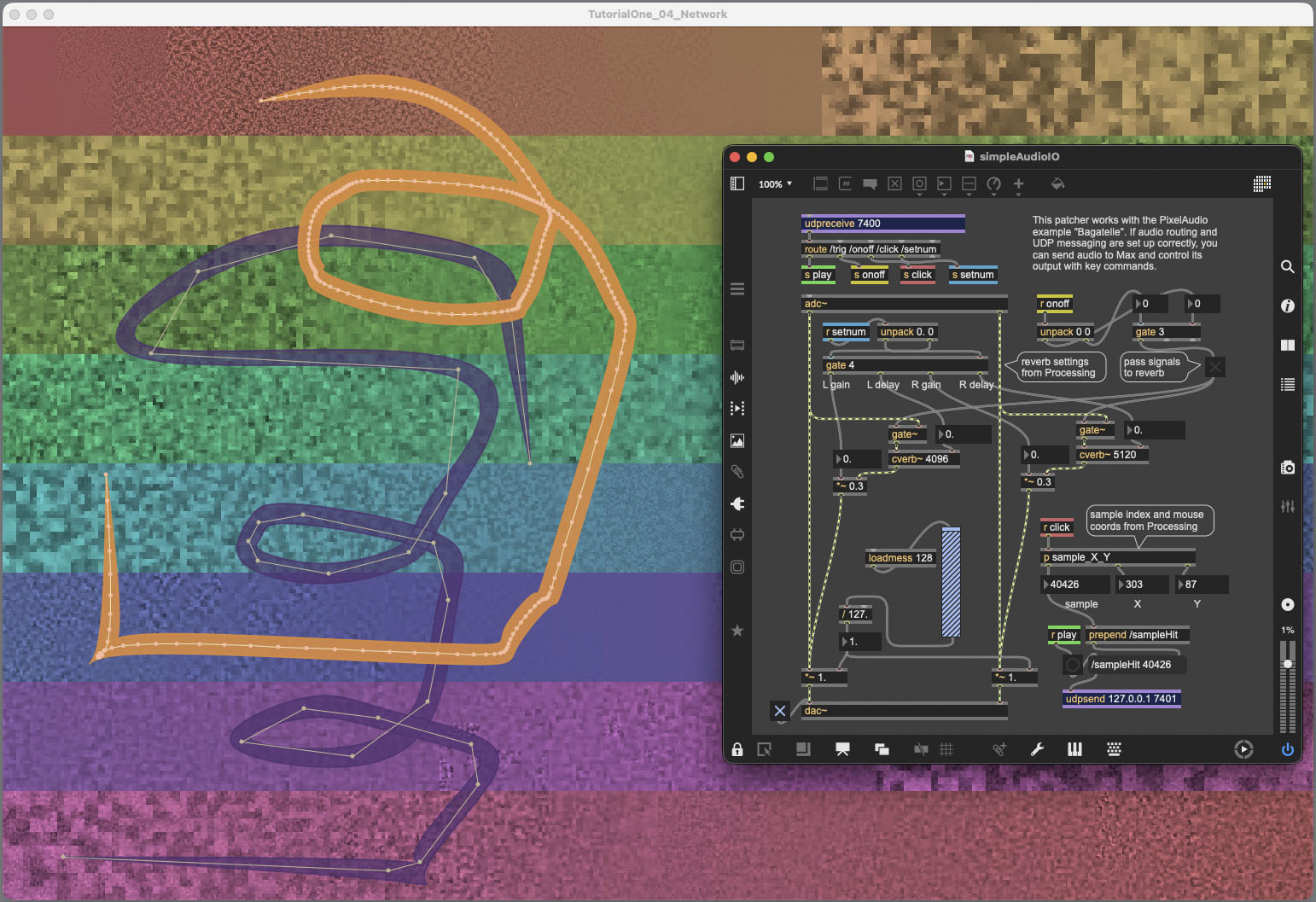
TutorialOne_04_Network is designed to work with a Max patch, simpleAudioIO.maxpat, which is
included in the example code for PixelAudio. The simpleAudioIO patch is designed to process
audio output from TutorialOne_04_Network and to respond to UDP messages from TutorialOne_04_Network.
We'll discuss the audio setup first, for MacOS (something similar can be done in the Windows OS).
You can use the audio signal flow without using UDP. It's handy for situations where you want to
add a layer of audio processing and it will function with many audio applications besides Max.
Next, we'll discuss UDP network messaging. Finally we'll look at the PANetworkClientINF interface
and its implementation in NetworkDelegate, an inner class of TutorialOne_04_Network.
Audio Setup with Blackhole in MacOS
Using the System Settings for Sound in MacOS and the BlackHole audio routing tool (https://existential.audio/blackhole/), you can set up a wide range of inputs and outputs, depending on your system software and hardware. Here's how to route between this sketch and Max.
- Open simpleAudioIO.maxpat
- Open MacOS System Settings control panel and select the Sound tab.
- In the Input and Output section, select BlackHole 16ch as the Output.
- In the Max Audio Status control panel, set Input Device to BlackHole 16ch.
- In Max, if you have external audio hardware, set that to your output.
- In simpleAudioIO.maxpat in Max, turn on audio processing.
- Run TutorialOne_04_Network and play some sounds.
UDP: User Datagram Protocol
UDP (User Datagram Protocol) is a network communications protocol that is apt for sending relatively short, real-time messages over a network. In Processing, it is implemented with external libraries. I'm using the oscP5 library by Andreas Schlegel, which is included in Processing's Contributed Libraries. You can install it with the Sketch -> Import Library... -> Manage Libraries... menu command in Processing. UDP requires an IP address and a port number to enable communications. In this example, we use 127.0.0.1 as the IP address. The address 127.0.0.1 is the standard address for IPv4 loopback traffic, i.e., for services running on the host computer. If you are communicating with a remote computer, you will need the IP address for that computer and your own, either on the local area network or on the internet, if the addresses are static. We're using ports 7400 and 7401. TutorialOne_04_Network sends messages out on port 7400. The Max application simpleAudioIO receives messages on 7400, using the udpreceive objects. It sends messages to TutorialOne_04_Network via IP address 127.0.0.1 on port 7401 using the udpsend object. TutorialOne_04_Network receives messages over port 7401. See the examples for oscP5 in Processing for more information.
PANetworkClientINF and NetworkDelegate
Since UDP communications are independent of the PixelAudio library, they are implemented in the
example code, not in the library. The PANetworkClientINF interface is included in the example software.
It defines the methods that an implementing class must provide:
- public PixelAudioMapper getMapper();
- public int playSample(int samplePos);
- public void
playPoints(ArrayList<PVector> pts); - public void parseKey(char key, int keyCode);
- public void controlMsg(String control, float val);
- public PApplet getPApplet();
If you are running Processing in an IDE like Eclipse, the PApplet class you create should implement
PANetworkClientINF and provide these methods. In Processing, the PApplet host class doesn't provide
a way to implement an interface directly, but you can still provide all the required methods and
create a network delegate to handle UDP communications. In TutorialOne_04_Network we use the
NetworkDelegate subclass. In Eclipse, NetworkDelegate's constructors require a
PANetworkClientINF object as their first argument. In Processing, the constructors should require
an instance of your PApplet class, which is indicated with the name of your application.
- Eclipse:
NetworkDelegate(PANetworkClientINF app, String remoteFromAddr, String remoteToAddr, int inPort, int outPort) - Processing:
NetworkDelegate(TutorialOne_04_Network app, String remoteFromAddr, String remoteToAddr, int inPort, int outPort)
Messages and Methods
To find the points at which networking code is implemented in methods in this sketch,
search for "// *****]]] NETWORKING [[[***** //".
The NetworkDelegate class provides a number of messaging methods, each prefaced with "oscSend".
For receiving remote messages, it calls oscP5's "plug" method (in initOscPlugs()) to link
incoming messages to local methods. In addition, it provides some boolean toggles, such as
isNetSendDrawingPoints, to turn features on or off at various points in the
TutorialOne_04_Network code--if you aren't going to use data, don't send it.
In this sketch, we concentrate on:
- sending mouse coordinates and audio buffer position to simpleAudioIO
- turning Max reverb on or off with the ']' or '[' keys (we've left '{' and '}' open in simpleAudioIO)
- changing Max reverb settings with 'q' or 'Q' keys
See NetworkDelegate comments for more information. There is quite a lot more that can be accomplished with UDP communications. In my collaborations with composer Christopher Walczak, it's been very useful in performances where we use mouse position to control objects in Max or trigger brushstrokes to send control values to Max. It's not an integral part of PixelAudio, but I will post useful examples as I chance to develop them.
 Here are the key commands for this sketch:

 Press UP ARROW to increase audio gain by 3 dB.
 Press DOWN ARROW to decrease audio gain by 3 dB.
 Press RIGHT ARROW to increase Sampler audio gain by 3 dB.
 Press LEFT ARROW to decrease Sampler audio gain by 3 dB.
 Press SHIFT-RIGHT ARROW to increase Granular audio gain by 3 dB.
 Press SHIFT-LEFT ARROW to decrease Granular audio gain by 3 dB.
 Press ' ' (spacebar) to trigger a brush if we're hovering over a brush, otherwise trigger a point event.
 Press '1' to set brushstroke under cursor to PathMode ALL_POINTS.
 Press '2' to set brushstroke under cursor to PathMode REDUCED_POINTS.
 Press '3' to set brushstroke under cursor to PathMode CURVE_POINTS.
 Press 't' to set brushstroke under cursor to use Sampler or Granular synth.
 Press 'f' to set brushstroke under cursor to FIXED hop mode for granular events.
 Press 'g' to set brushstroke under cursor to GESTURE hop mode for granular events.
 Press 'y' to select granular or sampler synth for click response.
 Press 'r' to select long or short grain duration .
 Press 'b' to toggle between long burst grains and short burst grains.
 Press 'p' to jitter the pitch of granular gestures.
 Press 'P' to adjust pitch of current brushstroke.
 Press '.' to increment epsilon value of current brush (reduced points decrease).
 Press ',' to decrement epsilon value of current brush (reduced points increase).
 Press '>' to increment curve steps value of current brush.
 Press '<' to decrement curve steps value of current brush.
 Press 'm' to change the Sampler noise reduction profile.
 Press 'e' to change the envelope we're using .
 Press 'E' to toggle whether we adjust envelope duration in relation to gesture duration.
 Press 'a' to  start or stop animation (bitmap rotation along the signal path).
 Press 'd' to toggle play audio on new brush .
 Press 'c' to apply color from image file to display image.
 Press 'k' to apply the hue and saturation in the colors array to mapImage (not to baseImage).
 Press 'K' to apply hue and saturation in colors to baseImage and mapImage.
 Press 'j' to turn audio and image blending on or off.
 Press 'n' to normalize the audio buffer to -6.0dB.
 Press 'L' or 'l' to determine whether to load a new file to both image and audio or not.
 Press 'o' or 'O' to open an audio or image file and load to image or audio buffer or both.
 Press 's' to save display image to a PNG file.
 Press 'S' to save audio buffer to a .wav file.
 Press 'w' to write the image HSB Brightness channel to the audio buffer as transcoded sample values .
 Press 'W' to write the audio buffer samples to the image as color values.
 Press 'x' to delete the current active brush shape or the oldest brush shape.
 Press 'X' to delete the most recent brush shape.
 Press 'u' to mute audio.
 Press 'V' to record a video.
 Press ']' to send UDP message to Max (simpleAudioIO.maxpat): reverb ON.
 Press '[' to send UDP message to Max (simpleAudioIO.maxpat): reverb OFF.
 Press '}' to send UDP message to Max (simpleAudioIO.maxpat): unused.
 Press '{' to send UDP message to Max (simpleAudioIO.maxpat): unused.
 Press 'q' to send UDP message to Max (simpleAudioIO.maxpat): small reverb settings.
 Press 'Q' to send UDP message to Max (simpleAudioIO.maxpat): big reverb settings.
 Press 'h' or 'H' to show help message in the console.
-
Nested Class Summary
Nested ClassesModifier and TypeClassDescriptionstatic final classA light-weight version of the AudioBrush class for combining gestures and audio synthesis.static final classDefines the curve drawing model for a brush using PACurveMaker.static final classA class to store a hit-test result, recording an AudioBrushLite instance and its index in brush list.static enumSelect audio synthesis modelstatic enumSelect audio gesture sequence timing model.classA class to handle network connections over UDP, for example, with a Max or Pd patch.static enumSelect PACurveMaker gesture points model. -
Field Summary
FieldsModifier and TypeFieldDescriptionArrayList<processing.core.PVector>(package private) int(package private) File(package private) int(package private) String(package private) String(package private) String(package private) int(package private) ddf.minim.AudioOutput(package private) float[](package private) processing.core.PImage(package private) PABoundsPolicy.PABoundaryMode(package private) PABoundsPolicy(package private) float(package private) int(package private) PixelAudioMapper.ChannelNames(package private) intprocessing.core.PVector(package private) PACurveMakerint(package private) String(package private) String(package private) ADSRParams(package private) float(package private) int(package private) int(package private) boolean(package private) booleanintfloat(package private) int(package private) int(package private) int(package private) String[]float(package private) float(package private) int(package private) intint(package private) GestureGranularParams(package private) GestureGranularParams(package private) ArrayList<TimedLocation>(package private) int(package private) intfloat[]floatfloat(package private) float(package private) int(package private) int(package private) int(package private) intint(package private) File(package private) int(package private) String(package private) String(package private) String(package private) int(package private) boolean(package private) boolean(package private) boolean(package private) booleanboolean(package private) boolean(package private) boolean(package private) boolean(package private) boolean(package private) boolean(package private) boolean(package private) boolean(package private) boolean(package private) boolean(package private) int(package private) int(package private) float(package private) processing.core.PImage(package private) PixelAudioMapper(package private) int(package private) float(package private) int(package private) int(package private) ddf.minim.Minim(package private) MultiGen(package private) TutorialOne_04_Network.NetworkDelegate(package private) final int(package private) boolean(package private) float(package private) float(package private) float(package private) PixelAudio(package private) ddf.minim.MultiChannelBuffer(package private) ArrayList<TimedLocation>int(package private) PASamplerInstrumentPool(package private) int(package private) int(package private) int(package private) int(package private) int(package private) int(package private) int(package private) float(package private) float(package private) int(package private) float(package private) int(package private) int(package private) int(package private) int(package private) boolean(package private) int(package private) int[]int(package private) int(package private) int(package private) boolean(package private) boolean(package private) boolean(package private) boolean(package private) int(package private) int(package private) com.hamoid.VideoExportFields inherited from class processing.core.PApplet
args, ARGS_BGCOLOR, ARGS_DISABLE_AWT, ARGS_DISPLAY, ARGS_EDITOR_LOCATION, ARGS_EXTERNAL, ARGS_FULL_SCREEN, ARGS_HIDE_STOP, ARGS_LOCATION, ARGS_PRESENT, ARGS_SKETCH_FOLDER, ARGS_STOP_COLOR, ARGS_UI_SCALE, ARGS_WINDOW_COLOR, DEFAULT_HEIGHT, DEFAULT_WIDTH, disableAWT, displayHeight, displayWidth, dmouseX, dmouseY, emouseX, emouseY, exitCalled, EXTERNAL_MOVE, EXTERNAL_STOP, finished, firstMouse, focused, frameCount, frameRate, frameRateLastNanos, g, height, insideDraw, javaPlatform, javaVersion, javaVersionName, key, keyCode, keyEvent, keyPressed, keyRepeatEnabled, looping, matchPatterns, mouseButton, mouseEvent, mousePressed, mouseX, mouseY, pixelDensity, pixelHeight, pixels, pixelWidth, platform, pmouseX, pmouseY, ratioLeft, ratioScale, ratioTop, recorder, redraw, rheight, rmouseX, rmouseY, rwidth, surface, useNativeSelect, width, windowX, windowYFields inherited from interface processing.core.PConstants
ADD, ALPHA, ALT, AMBIENT, ARC, ARGB, ARROW, BACKSPACE, BASELINE, BEVEL, BEZIER_VERTEX, BLEND, BLUR, BOTTOM, BOX, BREAK, BURN, CENTER, CHATTER, CHORD, CLAMP, CLOSE, CODED, COMPLAINT, CONTROL, CORNER, CORNERS, CROSS, CURVE_VERTEX, CUSTOM, DARKEST, DEG_TO_RAD, DELETE, DIAMETER, DIFFERENCE, DILATE, DIRECTIONAL, DISABLE_ASYNC_SAVEFRAME, DISABLE_BUFFER_READING, DISABLE_DEPTH_MASK, DISABLE_DEPTH_SORT, DISABLE_DEPTH_TEST, DISABLE_KEY_REPEAT, DISABLE_NATIVE_FONTS, DISABLE_OPENGL_ERRORS, DISABLE_OPTIMIZED_STROKE, DISABLE_STROKE_PERSPECTIVE, DISABLE_STROKE_PURE, DISABLE_TEXTURE_MIPMAPS, DODGE, DOWN, DXF, ELLIPSE, ENABLE_ASYNC_SAVEFRAME, ENABLE_BUFFER_READING, ENABLE_DEPTH_MASK, ENABLE_DEPTH_SORT, ENABLE_DEPTH_TEST, ENABLE_KEY_REPEAT, ENABLE_NATIVE_FONTS, ENABLE_OPENGL_ERRORS, ENABLE_OPTIMIZED_STROKE, ENABLE_STROKE_PERSPECTIVE, ENABLE_STROKE_PURE, ENABLE_TEXTURE_MIPMAPS, ENTER, EPSILON, ERODE, ESC, EXCLUSION, FX2D, GIF, GRAY, GROUP, HALF_PI, HAND, HARD_LIGHT, HINT_COUNT, HSB, IMAGE, INVERT, JAVA2D, JPEG, LANDSCAPE, LEFT, LIGHTEST, LINE, LINE_LOOP, LINE_STRIP, LINES, LINUX, MACOS, MACOSX, MAX_FLOAT, MAX_INT, MIN_FLOAT, MIN_INT, MITER, MODEL, MODELVIEW, MOVE, MULTIPLY, NORMAL, OPAQUE, OPEN, OPENGL, ORTHOGRAPHIC, OTHER, OVERLAY, P2D, P3D, PATH, PDF, PERSPECTIVE, PI, PIE, platformNames, POINT, POINTS, POLYGON, PORTRAIT, POSTERIZE, PROBLEM, PROJECT, PROJECTION, QUAD, QUAD_BEZIER_VERTEX, QUAD_STRIP, QUADRATIC_VERTEX, QUADS, QUARTER_PI, RAD_TO_DEG, RADIUS, RECT, REPEAT, REPLACE, RETURN, RGB, RIGHT, ROUND, SCREEN, SHAPE, SHIFT, SOFT_LIGHT, SPAN, SPHERE, SPOT, SQUARE, SUBTRACT, SVG, TAB, TARGA, TAU, TEXT, THIRD_PI, THRESHOLD, TIFF, TOP, TRIANGLE, TRIANGLE_FAN, TRIANGLE_STRIP, TRIANGLES, TWO_PI, UP, VERTEX, WAIT, WHITESPACE, WINDOWS, X, Y, Z -
Constructor Summary
Constructors -
Method Summary
Modifier and TypeMethodDescriptionvoidaddDrawingPoint(int x, int y) While user is dragging the mouses and isDrawMode == true, accumulates new points to allPoints and event times to allTimes.voidadjustAudioGain(float g) Adjusts audioOut.gain.voidadjustGranGain(float g) Sets Granular instrument gain in dB.voidadjustPoolGain(float g) Sets Sampler instrumentpoolgain in dB.voidanimate()int[]applyColor(int[] colorSource, int[] graySource, int[] lut) Utility method for applying hue and saturation values from a source array of RGB values to the brightness values in a target array of RGB values, using a lookup table to redirect indexing.voidapplyColorMapToDisplay(boolean updateBaseImage) Apply color map hue and saturation to mapImage or baseImage.int[]applyColorShifted(int[] colorSource, int[] graySource, int[] lut, int shift) Utility method for applying hue and saturation values from a source array of RGB values to the brightness values in a target array of RGB values, using a lookup table to redirect indexing, taking into account any pixels that were shifted.voidapplyImageColor(File imgFile, processing.core.PImage targetImage) Apply the hue and saturation of a chosen image file to the brightness channel of the display image.voidaudioFileSelectedWrite(File selection) static voidblendInto(ddf.minim.MultiChannelBuffer dest, ddf.minim.MultiChannelBuffer src, float weight, boolean normalize, float targetDB) Blends audio data from buffer "src" into buffer "dest" in place.buildGranSynth(ddf.minim.AudioOutput out, ADSRParams env, int numVoices) Initializes a new PAGranularSynth instance that you probably would pass to a PAGranularInstrumentDirector.intcalcGranularOptHints(String tag, int N, float Tms, int hopSamples, int grainLenSamples, float sr, List<processing.core.PVector> scheduledPoints, float targetSpacingPx, float wt, float ws, StringBuffer sb) Calculate optimal configuration settings for a granular brush.intintcalcSampleLen(int durMs, double mean, double variance) calculateEnvelopeDb(float gainDb, int totalSamples, float sampleRate) Calculate an envelope of length totalSamples.calculateEnvelopeLinear(float gainDb, float totalMs) Calculate an envelope of length totalSamples.voidCall to initiate process of opening an image file to get its color data.voidWrapper method for Processing's selectInput commandintclipToHeight(int i) Clips parameter i to the interval (0..width-1)intclipToWidth(int i) Clips parameter i to the interval (0..width-1)voidcolorFileSelected(File selectedFile) callback method for chooseColorImage()voidvoidWrites the mapImage, which may change with animation, to the baseImage, a reference image that usually only changes when a new file is loaded.voidcommitNewBaseImage(processing.core.PImage img) Copies the supplied PImage to mapImage and baseImage, sets totalShift to 0 (the images are identical).(package private) intcomputeEnvDurationMs(GestureSchedule sched, String envName, int fallbackMs) voidcontrolMsg(String control, float val) (package private) TutorialOne_04_Network.PathModeDetermines the path mode for a particular BrushOutput.voiddraw()voidDraw brushstrokes on the display image.voidEntry point for drawing brushstrokes on the screen.voiddrawCircle(int x, int y) Draws a circle at the location of an audio trigger (mouseDown event).(package private) voidEnsures that all resources and variable necessary for the Granular synth are ready to go.(package private) voidEnsures that all resources and variable necessary for the Sampler synth are ready to go.(package private) static ADSRParamsvoidfileSelected(File selectedFile) callback method for chooseFile(), handles standard audio and image formats for Processing.(package private) TutorialOne_04_Network.BrushHit(package private) static Stringfmt(float v, int decimals) (package private) float[]generateJitterPitch(int length, float deviationPitch) Generates an array of Gaussian values for shifting pitch, where 1.0 = no shift.(package private) float[]generateJitterPitch(int length, float deviationPitch, float centerPitch) Generates an array of Gaussian values for shifting pitch, where 1.0 = no shift.int[]getColors(int size) Generates an array of rainbow colors using the HSB color space.processing.core.PVectorgetCoordFromSignalPos(int pos) Calculates the display image coordinates corresponding to a specified audio sample index.processing.core.PApplet(package private) ArrayList<processing.core.PVector>Get the path points of a brushstroke, with the representation determined by the BrushConfig's path mode.(package private) GestureScheduleintgetSamplePos(int x, int y) Calculates the index of the image pixel within the signal path, taking the shifting of pixels and audioSignal into account.Get a GestureSchedule (points + timing) for an AudioBrushLite instance.inthandleClickOutsideBrush(int x, int y) voidHandles user's drawing actions: draws previously recorded brushstrokes, tracks and generates interactive animation and audio events.voidimageFileSelectedWrite(File selection) voidInitializes allPoints and adds the current mouse location to it.voidCALL THIS METHOD IN SETUP() Initializes Minim audio library and audio variables.Initializes a PACurveMaker instance with allPoints as an argument to the factory method PACurveMaker.buildCurveMaker() and then fills in PACurveMaker instance variables from variables in the calling class (TutorialOneDrawing, here).voidInitializes drawing and drawing interaction variables.voidInitializes global variables gParamsGesture and gParamsFixed, which provide basic settings for granular synthesis the follows gesture timing or fixed hop timing between grains.voidInitializes mapImage with the colors array.(package private) voidSets up network for UDP communication.processing.core.PVectorjitterCoord(int x, int y, int deviationPx) Displaces a supplied point by a random Gaussian variable.voidBuilt-in keyPressed handler, forwards events to parseKey.voidvoidloadAudioFile(File audFile) Attempts to load audio data from a selected file into playBuffer, then calls writeAudioToImage() to transcode audio data and write it to mapImage.voidloadImageFile(File imgFile) Attempts to load image data from a selected file into mapImage, then calls writeImageToAudio() to transcode HSB brightness channel to audio and writes it to playBuffer and audioSignal.static voidvoidvoidbooleanmouseInPoly(ArrayList<processing.core.PVector> poly) voidThe built-in mousePressed handler for Processing, clicks are handled in mouseClicked().voidstatic voidnormalize(float[] signal, float targetPeakDB) Normalizes a single-channel signal array to a target RMS level in dBFS (decibels relative to full scale).voidoptimizeActiveBrush(float alpha) voidparseKey(char key, int keyCode) Handles key press events passed on by the built-in keyPressed method.voidplayGranularGesture(float[] buf, GestureSchedule sched, GestureGranularParams params, float pitchRatio) Calls PAGranularInstrumentDirector gDir to play a granular audio event.voidplayPoints(ArrayList<processing.core.PVector> pts) intplaySample(int samplePos) intplaySample(int samplePos, int samplelen, float amplitude, float pan) Plays an audio sample with default envelope and stereo pan.intplaySample(int samplePos, int samplelen, float amplitude, ADSRParams env, float pan) Plays an audio sample with a custom envelope and stereo pan.intplaySample(int samplePos, int samplelen, float amplitude, ADSRParams env, float pitch, float pan) Plays an audio sample with with a custom envelope, pitch and stereo pan.voidpreloadFiles(String path, String filename) Preload an audio file using a file path and a filename.voidWrites baseImage to mapImage with an index position offset of totalShift.voidRemoves the current active AudioBrushLite instance.voidRemoves the most recent AudioBrushLite instance.voidrenderAudioToMapImage(PixelAudioMapper.ChannelNames chan, int shift) Transcodes audio data in audioSignal and writes it to color channel chan of mapImage.voidrenderFrame(int step) Renders a frame of pixel-shifting animation: moving along the signal path, copies baseImage pixels to mapImage pixels, adjusting the index position of the copy using totalShift -- i.e.voidWrites a specified channel of mapImage to audioSignal.voidTracks and runs TimedLocation events in the grainLocsArray list, which is associated with granular synthesis gestures.voidTracks and runs TimedLocation events in the timeLocsArray list, which is associated with mouse clicks that trigger audio a the click point.voidExecute audio / animation events for Sampler brushstrokes.voidsaveAudioToFile(float[] samples, float sampleRate, String fileName) Saves audio data to 16-bit integer PCM format, which Processing can also open.voidsaveImageToFile(processing.core.PImage img, String fileName) voidCalls Processing's selectOutput method to start the process of saving the current audio signal to a .wav file.voidCalls Processing's selectOutput method to start the process of saving the mapImage (the offscreen copy of the display image) to a .png file.(package private) voidSchedule a Granular brush audio / animation event.(package private) voidSchedule a Sampler brush audio / animation event.voidsendCoordsUDP(int x, int y) Send coordinates and corresponding sample position through network connection.static intsetAlpha(int argb, int alpha) Sets the alpha channel of an RGBA color.intsetAlphaWithBlack(int argb, int alpha) Sets the alpha channel of an RGBA color, conditionally setting alpha = 0 if all other channels = 0.voidSets epsilon value for the PACurveMaker associated with an AudioBrushLite instance.voidsetBrushEpsilon(TutorialOne_04_Network.AudioBrushLite b, float e) Sets epsilon value for the PACurveMaker associated with an AudioBrushLite instance.voidsettings()voidsetup()voidshowHelp()to generate help output, run RegEx search/replace on parseKey case lines with: // case ('.'): // (.+) // println(" * Press $1 to $2.");voidStep through the animation, called by the draw() method.voidstop()turn off audio processing when we exitvoidstoreGranularCurveTL(GestureSchedule sched, int startTime, boolean isGesture) Store scheduled granular synth / animation events for future activation.voidstoreSamplerCurveTL(TutorialOne_04_Network.AudioBrushLite b, GestureSchedule sched, int startTime) Store scheduled sampler synth / animation events for future activation.(package private) voidupdateAudioChain(float[] sig) (package private) voidupdateAudioChain(float[] sig, float bufferSampleRate) Bottleneck "commit" method for audio state.(package private) voidUpdate the hoverBrush and hoverIndex global variables.voidwriteAudioToImage(float[] sig, PixelAudioMapper mapper, processing.core.PImage img, PixelAudioMapper.ChannelNames chan, int shift) Transcodes audio data in sig[] and writes it to color channel chan of img using the lookup tables in mapper to redirect indexing.voidwriteImageToAudio(processing.core.PImage img, PixelAudioMapper mapper, float[] sig, PixelAudioMapper.ChannelNames chan, int shift) This method writes a color channel from an image to playBuffer, fulfilling a central concept of the PixelAudio library: image is sound.voidwriteToScreen(String msg, int x, int y, int weight, boolean isWhite) Displays a line of text to the screen, usually in the draw loop.Methods inherited from class processing.core.PApplet
abs, abs, acos, alpha, ambient, ambient, ambient, ambientLight, ambientLight, append, append, append, append, append, append, applyMatrix, applyMatrix, applyMatrix, applyMatrix, applyMatrix, arc, arc, arraycopy, arraycopy, arraycopy, arrayCopy, arrayCopy, arrayCopy, asin, atan, atan2, attrib, attrib, attrib, attribColor, attribNormal, attribPosition, background, background, background, background, background, background, background, beginCamera, beginContour, beginPGL, beginRaw, beginRaw, beginRecord, beginRecord, beginShape, beginShape, bezier, bezier, bezierDetail, bezierPoint, bezierTangent, bezierVertex, bezierVertex, binary, binary, binary, binary, blend, blend, blendColor, blendMode, blue, box, box, brightness, calcSketchPath, camera, camera, ceil, checkAlpha, checkExtension, choice, choice, circle, clear, clip, color, color, color, color, color, color, color, color, colorMode, colorMode, colorMode, colorMode, concat, concat, concat, concat, concat, concat, concat, constrain, constrain, copy, copy, copy, cos, createFont, createFont, createFont, createGraphics, createGraphics, createGraphics, createImage, createInput, createInput, createInputRaw, createOutput, createOutput, createPath, createPath, createPrimaryGraphics, createReader, createReader, createReader, createShape, createShape, createShape, createWriter, createWriter, createWriter, cursor, cursor, cursor, cursor, curve, curve, curveDetail, curvePoint, curveTangent, curveTightness, curveVertex, curveVertex, dataFile, dataPath, day, debug, degrees, delay, dequeueEvents, desktopFile, desktopPath, die, die, directionalLight, displayDensity, displayDensity, dispose, dist, dist, edge, ellipse, ellipseMode, emissive, emissive, emissive, endCamera, endContour, endPGL, endRaw, endRecord, endShape, endShape, exec, exec, exit, exitActual, exitCalled, exp, expand, expand, expand, expand, expand, expand, expand, expand, expand, expand, expand, expand, expand, expand, expand, expand, expand, expand, fill, fill, fill, fill, fill, fill, filter, filter, filter, floor, flush, focusGained, focusLost, frameMoved, frameRate, frustum, fullScreen, fullScreen, fullScreen, fullScreen, get, get, get, getExtension, getGraphics, getMatrix, getMatrix, getMatrix, getSurface, green, handleDraw, handleKeyEvent, handleMethods, handleMouseEvent, hex, hex, hex, hex, hideMenuBar, hint, hour, hue, image, image, image, imageMode, initSurface, insertFrame, isLooping, join, join, keyPressed, keyReleased, keyTyped, keyTyped, launch, lerp, lerpColor, lerpColor, lightFalloff, lights, lightSpecular, line, line, link, listFiles, listFiles, listPaths, loadBytes, loadBytes, loadBytes, loadFont, loadImage, loadImage, loadJSONArray, loadJSONArray, loadJSONObject, loadJSONObject, loadPixels, loadShader, loadShader, loadShape, loadShape, loadStrings, loadStrings, loadStrings, loadStrings, loadTable, loadTable, loadXML, loadXML, log, loop, mag, mag, main, main, main, makeGraphics, map, mask, match, matchAll, max, max, max, max, max, max, method, millis, min, min, min, min, min, min, minute, modelX, modelY, modelZ, month, mouseClicked, mouseDragged, mouseEntered, mouseEntered, mouseExited, mouseExited, mouseMoved, mouseMoved, mousePressed, mouseReleased, mouseWheel, mouseWheel, nf, nf, nf, nf, nf, nf, nfc, nfc, nfc, nfc, nfp, nfp, nfp, nfp, nfs, nfs, nfs, nfs, noClip, noCursor, noFill, noise, noise, noise, noiseDetail, noiseDetail, noiseSeed, noLights, noLoop, norm, normal, noSmooth, noStroke, noTexture, noTint, orientation, ortho, ortho, ortho, parseBoolean, parseBoolean, parseBoolean, parseBoolean, parseByte, parseByte, parseByte, parseByte, parseByte, parseByte, parseByte, parseByte, parseChar, parseChar, parseChar, parseChar, parseFloat, parseFloat, parseFloat, parseFloat, parseFloat, parseFloat, parseFloat, parseInt, parseInt, parseInt, parseInt, parseInt, parseInt, parseInt, parseInt, parseInt, parseInt, parseInt, parseInt, parseJSONArray, parseJSONObject, parseXML, parseXML, pause, perspective, perspective, pixelDensity, point, point, pointLight, pop, popMatrix, popStyle, postEvent, postWindowMoved, postWindowResized, pow, print, print, print, print, print, print, print, print, print, printArray, printCamera, println, println, println, println, println, println, println, println, println, println, println, printMatrix, printProjection, printStackTrace, push, pushMatrix, pushStyle, quad, quadraticVertex, quadraticVertex, radians, random, random, randomGaussian, randomSeed, rect, rect, rect, rectMode, red, redraw, registerMethod, requestImage, requestImage, resetMatrix, resetShader, resetShader, resume, reverse, reverse, reverse, reverse, reverse, reverse, reverse, rotate, rotate, rotateX, rotateY, rotateZ, round, runSketch, runSketch, runSketch, saturation, save, saveBytes, saveBytes, saveBytes, saveFile, saveFrame, saveFrame, saveJSONArray, saveJSONArray, saveJSONObject, saveJSONObject, savePath, saveStream, saveStream, saveStream, saveStream, saveStream, saveStrings, saveStrings, saveStrings, saveTable, saveTable, saveXML, saveXML, scale, scale, scale, screenX, screenX, screenY, screenY, screenZ, second, selectCallback, selectFolder, selectFolder, selectFolder, selectInput, selectInput, selectInput, selectOutput, selectOutput, selectOutput, set, set, setMatrix, setMatrix, setMatrix, setSize, shader, shader, shape, shape, shape, shapeMode, shearX, shearY, shell, shininess, shorten, shorten, shorten, shorten, shorten, shorten, shorten, showDepthWarning, showDepthWarningXYZ, showMethodWarning, showMissingWarning, showSurface, showVariationWarning, sin, size, size, size, sketchDisplay, sketchFile, sketchFullScreen, sketchHeight, sketchOutputPath, sketchOutputStream, sketchPath, sketchPath, sketchPixelDensity, sketchRenderer, sketchSmooth, sketchWidth, sketchWindowColor, smooth, smooth, sort, sort, sort, sort, sort, sort, sort, sort, sort, sort, specular, specular, specular, sphere, sphereDetail, sphereDetail, splice, splice, splice, splice, splice, splice, splice, splice, splice, splice, splice, splice, splice, split, split, splitTokens, splitTokens, spotLight, sq, sqrt, square, start, startSurface, str, str, str, str, str, str, str, str, str, str, stroke, stroke, stroke, stroke, stroke, stroke, strokeCap, strokeJoin, strokeWeight, style, subset, subset, subset, subset, subset, subset, subset, subset, subset, subset, subset, subset, subset, subset, subset, subset, subset, subset, tan, text, text, text, text, text, text, text, text, text, text, text, textAlign, textAlign, textAscent, textDescent, textFont, textFont, textLeading, textMode, textSize, texture, textureMode, textureWrap, textWidth, textWidth, textWidth, thread, tint, tint, tint, tint, tint, tint, translate, translate, triangle, trim, trim, unbinary, unhex, unregisterMethod, updatePixels, updatePixels, urlDecode, urlEncode, vertex, vertex, vertex, vertex, vertex, windowMove, windowMoved, windowRatio, windowResizable, windowResize, windowResized, windowTitle, year
-
Field Details
-
pixelaudio
PixelAudio pixelaudio -
multigen
MultiGen multigen -
genWidth
int genWidth -
genHeight
int genHeight -
mapper
PixelAudioMapper mapper -
mapSize
int mapSize -
baseImage
processing.core.PImage baseImage -
mapImage
processing.core.PImage mapImage -
chan
-
spectrum
int[] spectrum -
audioFile
File audioFile -
audioFilePath
String audioFilePath -
audioFileName
String audioFileName -
audioFileTag
String audioFileTag -
audioFileLength
int audioFileLength -
imageFile
File imageFile -
imageFilePath
String imageFilePath -
imageFileName
String imageFileName -
imageFileTag
String imageFileTag -
imageFileWidth
int imageFileWidth -
imageFileHeight
int imageFileHeight -
isLoadToBoth
boolean isLoadToBoth -
isBlending
boolean isBlending -
daPath
String daPath -
daFile
String daFile -
minim
ddf.minim.Minim minim -
audioOut
ddf.minim.AudioOutput audioOut -
outputGain
float outputGain -
isBufferStale
boolean isBufferStale -
sampleRate
float sampleRate -
fileSampleRate
float fileSampleRate -
bufferSampleRate
float bufferSampleRate -
doResample
boolean doResample -
audioSignal
float[] audioSignal -
playBuffer
ddf.minim.MultiChannelBuffer playBuffer -
samplePos
int samplePos -
audioLength
int audioLength -
noteDuration
final int noteDuration- See Also:
-
envDuration
int envDuration -
isAdjustEnvelope
boolean isAdjustEnvelope -
envPresets
String[] envPresets -
presetIndex
int presetIndex -
overlapFactor
float overlapFactor -
envMinDurationMs
int envMinDurationMs -
envMaxDurationMs
int envMaxDurationMs -
samplelen
int samplelen -
samplerGain
float samplerGain -
samplerPointGain
float samplerPointGain -
isMuted
boolean isMuted -
pool
-
poolSize
int poolSize -
samplerMaxVoices
int samplerMaxVoices -
maxAmplitude
float maxAmplitude -
defaultEnv
ADSRParams defaultEnv -
pitchScaling
float pitchScaling -
defaultPitchScaling
float defaultPitchScaling -
lowPitchScaling
float lowPitchScaling -
highPitchScaling
float highPitchScaling -
useGranularSynth
boolean useGranularSynth -
granEnvDuration
int granEnvDuration -
granSignal
public float[] granSignal -
gSynth
-
gDir
-
granularGain
public float granularGain -
granularPointGain
public float granularPointGain -
useShortGrain
boolean useShortGrain -
longSample
int longSample -
shortSample
int shortSample -
granSamples
int granSamples -
hopSamples
int hopSamples -
gParamsGesture
GestureGranularParams gParamsGesture -
gParamsFixed
GestureGranularParams gParamsFixed -
curveSteps
public int curveSteps -
gMaxVoices
public int gMaxVoices -
useLongBursts
boolean useLongBursts -
maxBurstGrains
int maxBurstGrains -
minBurstGrains
int minBurstGrains -
burstGrains
int burstGrains -
usePitchedGrains
boolean usePitchedGrains -
shift
int shift -
totalShift
int totalShift -
isAnimating
boolean isAnimating -
oldIsAnimating
boolean oldIsAnimating -
videoSteps
int videoSteps -
isRecordingVideo
boolean isRecordingVideo -
videoFrameRate
int videoFrameRate -
step
int step -
videx
com.hamoid.VideoExport videx -
curveMaker
PACurveMaker curveMaker -
isDrawMode
public boolean isDrawMode -
epsilon
public float epsilon -
currentPoint
public processing.core.PVector currentPoint -
allPoints
-
allTimes
-
startTime
public int startTime -
dragColor
public int dragColor -
dragWeight
public float dragWeight -
polySteps
public int polySteps -
brushes
-
hoverBrush
-
hoverIndex
public int hoverIndex -
activeBrush
-
readyBrushColor
int readyBrushColor -
hoverBrushColor
int hoverBrushColor -
selectedBrushColor
int selectedBrushColor -
readyBrushColor1
int readyBrushColor1 -
hoverBrushColor1
int hoverBrushColor1 -
selectedBrushColor1
int selectedBrushColor1 -
readyBrushColor2
int readyBrushColor2 -
hoverBrushColor2
int hoverBrushColor2 -
selectedBrushColor2
int selectedBrushColor2 -
lineColor
int lineColor -
dimLineColor
int dimLineColor -
circleColor
int circleColor -
dimCircleColor
int dimCircleColor -
samplerTimeLocs
-
pointTimeLocs
ArrayList<TimedLocation> pointTimeLocs -
grainTimeLocs
ArrayList<TimedLocation> grainTimeLocs -
animatedCircleColor
int animatedCircleColor -
boundaryMode
PABoundsPolicy.PABoundaryMode boundaryMode -
boundsPolicy
PABoundsPolicy boundsPolicy -
nd
-
isUseNetworkDelegate
boolean isUseNetworkDelegate -
isNetSendDrawingPoints
boolean isNetSendDrawingPoints -
isNetSendOutsideBrushPoints
boolean isNetSendOutsideBrushPoints -
isNetSendBrushTriggers
boolean isNetSendBrushTriggers -
isNetSendFileInfo
boolean isNetSendFileInfo -
isNetSendGestures
boolean isNetSendGestures -
doPlayOnNewBrush
boolean doPlayOnNewBrush -
shiftIsDown
boolean shiftIsDown
-
-
Constructor Details
-
TutorialOne_04_Network
public TutorialOne_04_Network()
-
-
Method Details
-
main
-
settings
public void settings()- Overrides:
settingsin classprocessing.core.PApplet
-
setup
public void setup()- Overrides:
setupin classprocessing.core.PApplet
-
stop
public void stop()turn off audio processing when we exit- Overrides:
stopin classprocessing.core.PApplet
-
getColors
public int[] getColors(int size) Generates an array of rainbow colors using the HSB color space.- Parameters:
size- the number of entries in the colors array- Returns:
- an array of RGB colors ordered by hue
-
initImages
public void initImages()Initializes mapImage with the colors array. MapImage handles the color data for mapper and also serves as our display image. BaseImage is intended as a reference image that typically only changes when you load a new image. -
initDrawing
public void initDrawing()Initializes drawing and drawing interaction variables. -
initNetwork
void initNetwork()Sets up network for UDP communication. -
preloadFiles
Preload an audio file using a file path and a filename.- Parameters:
path- the fully qualified path to the file's directory, ending with a '/'filename- the name of the file
-
draw
public void draw()- Overrides:
drawin classprocessing.core.PApplet
-
animate
public void animate() -
stepAnimation
public void stepAnimation()Step through the animation, called by the draw() method. Will also record a frame of video, if we're recording. -
renderFrame
public void renderFrame(int step) Renders a frame of pixel-shifting animation: moving along the signal path, copies baseImage pixels to mapImage pixels, adjusting the index position of the copy using totalShift -- i.e. we don't actually rotate the pixels, we just shift the position they're copied to.- Parameters:
step- current animation step
-
handleDrawing
public void handleDrawing()Handles user's drawing actions: draws previously recorded brushstrokes, tracks and generates interactive animation and audio events. -
findHoverHit
TutorialOne_04_Network.BrushHit findHoverHit()- Returns:
- a reference to the brushstroke the mouse is over, or null if there's no brushstroke.
-
updateHover
void updateHover()Update the hoverBrush and hoverIndex global variables. -
writeToScreen
Displays a line of text to the screen, usually in the draw loop. Handy for debugging. typical call: writeToScreen("When does the mind stop and the world begin?", 64, 1000, 24, true);- Parameters:
msg- message to writex- x coordinatey- y coordinateweight- font weightisWhite- if true, white text, otherwise, black text
-
mousePressed
public void mousePressed()The built-in mousePressed handler for Processing, clicks are handled in mouseClicked().- Overrides:
mousePressedin classprocessing.core.PApplet
-
mouseDragged
public void mouseDragged()- Overrides:
mouseDraggedin classprocessing.core.PApplet
-
mouseReleased
public void mouseReleased()- Overrides:
mouseReleasedin classprocessing.core.PApplet
-
mouseClicked
public void mouseClicked()- Overrides:
mouseClickedin classprocessing.core.PApplet
-
sendCoordsUDP
public void sendCoordsUDP(int x, int y) Send coordinates and corresponding sample position through network connection. Coords will be clipped to display and sent with sample index if isNetSendOutsideBrushPoints == true. -
keyPressed
public void keyPressed()Built-in keyPressed handler, forwards events to parseKey.- Overrides:
keyPressedin classprocessing.core.PApplet
-
keyReleased
public void keyReleased()- Overrides:
keyReleasedin classprocessing.core.PApplet
-
parseKey
public void parseKey(char key, int keyCode) Handles key press events passed on by the built-in keyPressed method. By moving key event handling outside the built-in keyPressed method, we make it possible to post key commands without an actual key event. Methods and interfaces and even other threads can call parseKey(). This opens up many possibilities and a some risks, too.- Specified by:
parseKeyin interfacePANetworkClientINF- Parameters:
key- the key that was pressed, as a charkeyCode- keyCode for the key that was pressed
-
showHelp
public void showHelp()to generate help output, run RegEx search/replace on parseKey case lines with: // case ('.'): // (.+) // println(" * Press $1 to $2."); -
adjustAudioGain
public void adjustAudioGain(float g) Adjusts audioOut.gain.- Parameters:
g- value to add to audioOut.gain, in decibels
-
adjustPoolGain
public void adjustPoolGain(float g) Sets Sampler instrumentpoolgain in dB.- Parameters:
g- gain increment or decrement, in decibels
-
adjustGranGain
public void adjustGranGain(float g) Sets Granular instrument gain in dB.- Parameters:
g- gain value for audioOut, in decibels
-
applyColor
public int[] applyColor(int[] colorSource, int[] graySource, int[] lut) Utility method for applying hue and saturation values from a source array of RGB values to the brightness values in a target array of RGB values, using a lookup table to redirect indexing.- Parameters:
colorSource- a source array of RGB data from which to obtain hue and saturation valuesgraySource- a target array of RGB data from which to obtain brightness valueslut- a lookup table, must be the same size as colorSource and graySource- Returns:
- the graySource array of RGB values, with hue and saturation values changed
- Throws:
IllegalArgumentException- if array arguments are null or if they are not the same length
-
applyColorShifted
public int[] applyColorShifted(int[] colorSource, int[] graySource, int[] lut, int shift) Utility method for applying hue and saturation values from a source array of RGB values to the brightness values in a target array of RGB values, using a lookup table to redirect indexing, taking into account any pixels that were shifted.- Parameters:
colorSource- a source array of RGB data from which to obtain hue and saturation valuesgraySource- a target array of RGB data from which to obtain brightness valueslut- a lookup table, must be the same size as colorSource and graySourceshift- pixel shift from array rotation, windowed buffer, etc.- Returns:
- the graySource array of RGB values, with hue and saturation values changed
- Throws:
IllegalArgumentException- if array arguments are null or if they are not the same length
-
applyColorMapToDisplay
public void applyColorMapToDisplay(boolean updateBaseImage) Apply color map hue and saturation to mapImage or baseImage.- Parameters:
updateBaseImage- if true, update baseImage, otherwise just update mapImage
-
optimizeActiveBrush
public void optimizeActiveBrush(float alpha) -
calcGranularOptHints
public int calcGranularOptHints(String tag, int N, float Tms, int hopSamples, int grainLenSamples, float sr, List<processing.core.PVector> scheduledPoints, float targetSpacingPx, float wt, float ws, StringBuffer sb) Calculate optimal configuration settings for a granular brush.- Returns:
- optimal number of samples if time duration is kept as is
-
fmt
-
chooseColorImage
public void chooseColorImage()Call to initiate process of opening an image file to get its color data. -
colorFileSelected
callback method for chooseColorImage()- Parameters:
selectedFile- the File the user selected
-
applyImageColor
Apply the hue and saturation of a chosen image file to the brightness channel of the display image.- Parameters:
imgFile- selected image file, source of hue and saturation valuestargetImage- target image where brightness will remain unchanged
-
chooseFile
public void chooseFile()Wrapper method for Processing's selectInput command -
fileSelected
callback method for chooseFile(), handles standard audio and image formats for Processing. If a file has been successfully selected, continues with a call to loadAudioFile() or loadImageFile().- Parameters:
selectedFile- the File the user selected
-
loadAudioFile
Attempts to load audio data from a selected file into playBuffer, then calls writeAudioToImage() to transcode audio data and write it to mapImage. If you want to load the image file and audio file separately, comment out writeAudioToImage().- Parameters:
audFile- an audio file
-
blendInto
public static void blendInto(ddf.minim.MultiChannelBuffer dest, ddf.minim.MultiChannelBuffer src, float weight, boolean normalize, float targetDB) Blends audio data from buffer "src" into buffer "dest" in place. The formula per sample is: dest[i] = weight * src[i] + (1 - weight) * dest[i]- Parameters:
dest- Destination buffer (will be modified)src- Source buffer to blend into destweight- Blend ratio (0.0 = keep dest, 1.0 = replace with src)
-
normalize
public static void normalize(float[] signal, float targetPeakDB) Normalizes a single-channel signal array to a target RMS level in dBFS (decibels relative to full scale). 0 is the maximum digital amplitude. -6.0 dB is 50% of the maximum level.- Parameters:
signal-targetPeakDB-
-
renderAudioToMapImage
Transcodes audio data in audioSignal and writes it to color channel chan of mapImage.- Parameters:
chan- A color channelshift- number of index positions to shift the audio signal
-
writeAudioToImage
public void writeAudioToImage(float[] sig, PixelAudioMapper mapper, processing.core.PImage img, PixelAudioMapper.ChannelNames chan, int shift) Transcodes audio data in sig[] and writes it to color channel chan of img using the lookup tables in mapper to redirect indexing. Calls mapper.mapSigToImgShifted(), which will throw an IllegalArgumentException if sig.length != img.pixels.length or sig.length != mapper.getSize().- Parameters:
sig- an array of float, should be audio data in the range [-1.0, 1.0]mapper- a PixelAudioMapperimg- a PImagechan- a color channelshift- the number of indices to shift when writing audio
-
loadImageFile
Attempts to load image data from a selected file into mapImage, then calls writeImageToAudio() to transcode HSB brightness channel to audio and writes it to playBuffer and audioSignal.- Parameters:
imgFile- an image file
-
setAlphaWithBlack
public int setAlphaWithBlack(int argb, int alpha) Sets the alpha channel of an RGBA color, conditionally setting alpha = 0 if all other channels = 0.- Parameters:
argb- an RGBA color valuealpha- the desired alpha value to apply to argb- Returns:
- the argb color with changed alpha channel value
-
setAlpha
public static int setAlpha(int argb, int alpha) Sets the alpha channel of an RGBA color.- Parameters:
argb- an RGBA color valuealpha- the desired alpha value to apply to argb- Returns:
- the argb color with changed alpha channel value
-
writeImageToAudio
public void writeImageToAudio(processing.core.PImage img, PixelAudioMapper mapper, float[] sig, PixelAudioMapper.ChannelNames chan, int shift) This method writes a color channel from an image to playBuffer, fulfilling a central concept of the PixelAudio library: image is sound. Calls mapper.mapImgToSig(), which will throw an IllegalArgumentException if img.pixels.length != sig.length or img.width * img.height != mapper.getWidth() * mapper.getHeight(). Sets totalShift = 0 on completion: the image and audio are now in sync.- Parameters:
img- a PImage, a source of datamapper- a PixelAudioMapper, handles mapping between image and audio signalsig- a target array of float in audio formatchan- a color channelshift- number of indices to shift
-
renderMapImageToAudio
Writes a specified channel of mapImage to audioSignal.- Parameters:
chan- the selected color channel
-
commitMapImageToAudio
public void commitMapImageToAudio() -
commitMapImageToBaseImage
public void commitMapImageToBaseImage()Writes the mapImage, which may change with animation, to the baseImage, a reference image that usually only changes when a new file is loaded. -
commitNewBaseImage
public void commitNewBaseImage(processing.core.PImage img) Copies the supplied PImage to mapImage and baseImage, sets totalShift to 0 (the images are identical).- Parameters:
img-
-
refreshMapImageFromBase
public void refreshMapImageFromBase()Writes baseImage to mapImage with an index position offset of totalShift. -
saveToAudio
public void saveToAudio()Calls Processing's selectOutput method to start the process of saving the current audio signal to a .wav file. -
audioFileSelectedWrite
- Parameters:
selection- a File to write as audio
-
saveAudioToFile
public void saveAudioToFile(float[] samples, float sampleRate, String fileName) throws IOException, UnsupportedAudioFileException Saves audio data to 16-bit integer PCM format, which Processing can also open. This same method can be called as a static method in AudioUtility.- Parameters:
samples- an array of floats in the audio range (-1.0f, 1.0f)sampleRate- audio sample rate for the filefileName- name of the file to save to- Throws:
IOException- an Exception you'll need to handle to call this methodUnsupportedAudioFileException- another Exception
-
saveToImage
public void saveToImage()Calls Processing's selectOutput method to start the process of saving the mapImage (the offscreen copy of the display image) to a .png file. -
imageFileSelectedWrite
-
saveImageToFile
-
initAudio
public void initAudio()CALL THIS METHOD IN SETUP() Initializes Minim audio library and audio variables. -
ensureSamplerReady
void ensureSamplerReady()Ensures that all resources and variable necessary for the Sampler synth are ready to go. -
ensureGranularReady
void ensureGranularReady()Ensures that all resources and variable necessary for the Granular synth are ready to go. -
initGranularParams
public void initGranularParams()Initializes global variables gParamsGesture and gParamsFixed, which provide basic settings for granular synthesis the follows gesture timing or fixed hop timing between grains. -
handleClickOutsideBrush
public int handleClickOutsideBrush(int x, int y) - Parameters:
x-y-
-
getSamplePos
public int getSamplePos(int x, int y) Calculates the index of the image pixel within the signal path, taking the shifting of pixels and audioSignal into account. See MusicBoxBuffer for use of a windowed buffer in this calculation.- Parameters:
x- an x coordinate within mapImage and display boundsy- a y coordinate within mapImage and display bounds- Returns:
- the index of the sample corresponding to (x,y) on the signal path
-
getCoordFromSignalPos
public processing.core.PVector getCoordFromSignalPos(int pos) Calculates the display image coordinates corresponding to a specified audio sample index.- Parameters:
pos- an index into an audio signal, must be between 0 and width * height - 1.- Returns:
- a PVector with the x and y coordinates
-
drawCircle
public void drawCircle(int x, int y) Draws a circle at the location of an audio trigger (mouseDown event).- Parameters:
x- x coordinate of circley- y coordinate of circle
-
playSample
public int playSample(int samplePos, int samplelen, float amplitude, float pan) Plays an audio sample with default envelope and stereo pan.- Parameters:
samplePos- position of the sample in the audio buffersamplelen- length of the sample (will be adjusted)amplitude- amplitude of the sample on playback- Returns:
- the calculated sample length in samples
-
playSample
Plays an audio sample with a custom envelope and stereo pan.- Parameters:
samplePos- position of the sample in the audio buffersamplelen- length of the sample (will be adjusted)amplitude- amplitude of the sample on playbackenv- an ADSR envelope for the samplepan- position of sound in the stereo audio field (-1.0 = left, 0.0 = center, 1.0 = right)- Returns:
- the calculated sample length in samples
-
playSample
public int playSample(int samplePos, int samplelen, float amplitude, ADSRParams env, float pitch, float pan) Plays an audio sample with with a custom envelope, pitch and stereo pan.- Parameters:
samplePos- position of the sample in the audio buffersamplelen- length of the sample (will be adjusted)amplitude- amplitude of the sample on playbackenv- an ADSR envelope for the samplepitch- pitch scaling as deviation from default (1.0), where 0.5 = octave lower, 2.0 = octave higherpan- position of sound in the stereo audio field (-1.0 = left, 0.0 = center, 1.0 = right)- Returns:
-
calcSampleLen
public int calcSampleLen(int durMs, double mean, double variance) - Returns:
- a length in samples with some Gaussian variation
-
calcSampleLen
public int calcSampleLen()- Returns:
- a length in samples with some Gaussian variation
-
buildGranSynth
public PAGranularInstrument buildGranSynth(ddf.minim.AudioOutput out, ADSRParams env, int numVoices) Initializes a new PAGranularSynth instance that you probably would pass to a PAGranularInstrumentDirector.- Parameters:
out- and AudioOutput, most likely the one used by this sketchenv- an ADSRParams envelopenumVoices- the number of voices to use for synthesizing simultaneous grains- Returns:
- a PAGranularSynth instance
-
envPreset
- Parameters:
name- the name of the ADSRParams envelope to return- Returns:
- the specified ADSRParams envelope
-
updateAudioChain
void updateAudioChain(float[] sig, float bufferSampleRate) Bottleneck "commit" method for audio state. Takes an arbitrary input signal and installs it as the canonical audio signal used by the application. This method: - Resizes/pads/truncates the input to mapper.getSize() - Copies the data to ensure no external aliasing - Updates audioSignal (canonical signal handled by application code) - Updates playBuffer (audio buffer used by Minim audio library methods) - Propagates the buffer to active instruments: edit for your own instruments This is the ONLY method that should mutate the global audio signal state. In PixelAudio examples, the signal is typically loaded from a file, but it could also be signal cached in memory, a signal generated by code, audio captured live, etc.- Parameters:
sig- an audio signalbufferSampleRate- audio sample rate for sig, usually obtained when reading from an audio file
-
updateAudioChain
void updateAudioChain(float[] sig) -
playGranularGesture
public void playGranularGesture(float[] buf, GestureSchedule sched, GestureGranularParams params, float pitchRatio) Calls PAGranularInstrumentDirector gDir to play a granular audio event.- Parameters:
buf- an audio signal as an array of floatsched- an GestureSchedule with coordinate and timing informationparams- a bundle of control parameters for granular synthesis
-
calculateEnvelopeDb
Calculate an envelope of length totalSamples.- Parameters:
gainDb- desired gain in dB, currently ignoredtotalSamples- number of samples the envelope should coversampleRate- sample rate of the audio buffer the envelope is applied to- Returns:
- and ADSRParams envelope
-
calculateEnvelopeLinear
Calculate an envelope of length totalSamples.- Parameters:
gainDb- desired gain in dB, currently ignoredtotalMs- desired duration of the envelope in milliseconds- Returns:
- an ADSRParams envelope
-
initAllPoints
public void initAllPoints()Initializes allPoints and adds the current mouse location to it. -
addDrawingPoint
public void addDrawingPoint(int x, int y) While user is dragging the mouses and isDrawMode == true, accumulates new points to allPoints and event times to allTimes. Sets sampleX, sampleY and samplePos variables. We constrain points outside the bounds of the display window. An alternative approach is be to ignore them, which may give a more "natural" appearance for fast drawing.- Parameters:
x- x-coordinate of point to add to allPointsy- y-coordinate of point to add to allPoints
-
clipToWidth
public int clipToWidth(int i) Clips parameter i to the interval (0..width-1)- Parameters:
i- integer to clip to width- Returns:
- value within the range 0..width-1
-
clipToHeight
public int clipToHeight(int i) Clips parameter i to the interval (0..width-1)- Parameters:
i- integer to clip to height- Returns:
- value within the range 0..height-1
-
jitterCoord
public processing.core.PVector jitterCoord(int x, int y, int deviationPx) Displaces a supplied point by a random Gaussian variable.- Parameters:
x- x-coordinatey- y-coordinatedeviationPx- average deviation, in pixels- Returns:
- a displaced coordinate point as a PVector
-
generateJitterPitch
float[] generateJitterPitch(int length, float deviationPitch) Generates an array of Gaussian values for shifting pitch, where 1.0 = no shift.- Parameters:
length- length of the returned arraydeviationPitch- expected average deviation of the pitch- Returns:
- an array of Gaussian values centered on 1.0
-
generateJitterPitch
float[] generateJitterPitch(int length, float deviationPitch, float centerPitch) Generates an array of Gaussian values for shifting pitch, where 1.0 = no shift.- Parameters:
length- length of the returned arraydeviationPitch- expected average deviation of the pitch around center pitch ratiocenterPitch- ratio of center pitch, 1.0 => no change in source- Returns:
- an array of Gaussian values centered on 1.0
-
initCurveMakerAndAddBrush
Initializes a PACurveMaker instance with allPoints as an argument to the factory method PACurveMaker.buildCurveMaker() and then fills in PACurveMaker instance variables from variables in the calling class (TutorialOneDrawing, here). -
defaultPathModeFor
Determines the path mode for a particular BrushOutput.- Parameters:
out- a BrushOutput (SAMPLER of GRANULAR)- Returns:
- a PathMode (ALL_POINTS for Sampler instruments, CURVE_POINTS for Granular instruments)
-
drawBrushShapes
public void drawBrushShapes()Entry point for drawing brushstrokes on the screen. -
drawBrushes
Draw brushstrokes on the display image.- Parameters:
list- a list of all the brushstrokes (AudioBrushLite)
-
setBrushEpsilon
Sets epsilon value for the PACurveMaker associated with an AudioBrushLite instance.- Parameters:
b- an AudioBrushLite instancee- desired epsilon value to control point reduction
-
setBrushCurveSteps
Sets epsilon value for the PACurveMaker associated with an AudioBrushLite instance.- Parameters:
b- an AudioBrushLite instancecs- desired epsilon value to control point reduction
-
getPathPoints
Get the path points of a brushstroke, with the representation determined by the BrushConfig's path mode.- Parameters:
b- an AudioBrushLite instance- Returns:
- an all points, reduced, or curve representation of the path points of an AudioBrushLite instance
-
getScheduleForBrush
Get a GestureSchedule (points + timing) for an AudioBrushLite instance.- Parameters:
b- an AudioBrushLite instance- Returns:
- GestureSchedule for the current pathMode of the brush
-
getPlaybackScheduleForBrush
- Parameters:
b- an AudioBrushLIte instance- Returns:
- a GestureSchedule filtered by boundsPolicy to provide only in-bounds points
-
computeEnvDurationMs
- Parameters:
sched- aGestureScheduleto access for calculating an envelope durationenvName- name of an envelope presetfallbackMs- default duration in milliseconds- Returns:
- calculated sample length in samples of an envelope
-
scheduleSamplerBrushClick
Schedule a Sampler brush audio / animation event.- Parameters:
sb- an AudioBrushLite instance
-
storeSamplerCurveTL
public void storeSamplerCurveTL(TutorialOne_04_Network.AudioBrushLite b, GestureSchedule sched, int startTime) Store scheduled sampler synth / animation events for future activation.- Parameters:
sched- a GestureSchedule (points + timing for a brush)startTime- time to start a series of events
-
runSamplerBrushEvents
public void runSamplerBrushEvents()Execute audio / animation events for Sampler brushstrokes. -
scheduleGranularBrushClick
Schedule a Granular brush audio / animation event.- Parameters:
gb- an AudioBrushLite instance
-
storeGranularCurveTL
Store scheduled granular synth / animation events for future activation.- Parameters:
sched- a GestureSchedule (points + timing for a brush)startTime- time to start a series of eventsisGesture- is the schedule for a GESTURE or FIXED granular event (ignored)
-
runGrainEvents
public void runGrainEvents()Tracks and runs TimedLocation events in the grainLocsArray list, which is associated with granular synthesis gestures. -
runPointEvents
public void runPointEvents()Tracks and runs TimedLocation events in the timeLocsArray list, which is associated with mouse clicks that trigger audio a the click point. -
mouseInPoly
- Parameters:
poly- a polygon described by an ArrayList of PVector- Returns:
- true if the mouse is within the bounds of the polygon, false otherwise
-
removeHoveredOrOldestBrush
public void removeHoveredOrOldestBrush()Removes the current active AudioBrushLite instance. -
removeNewestBrush
public void removeNewestBrush()Removes the most recent AudioBrushLite instance. -
getPApplet
public processing.core.PApplet getPApplet()- Specified by:
getPAppletin interfacePANetworkClientINF
-
getMapper
- Specified by:
getMapperin interfacePANetworkClientINF
-
controlMsg
- Specified by:
controlMsgin interfacePANetworkClientINF
-
playSample
public int playSample(int samplePos) - Specified by:
playSamplein interfacePANetworkClientINF
-
playPoints
- Specified by:
playPointsin interfacePANetworkClientINF
-