Class MultiGenZoo
- All Implemented Interfaces:
processing.core.PConstants
ArgosyMixer.
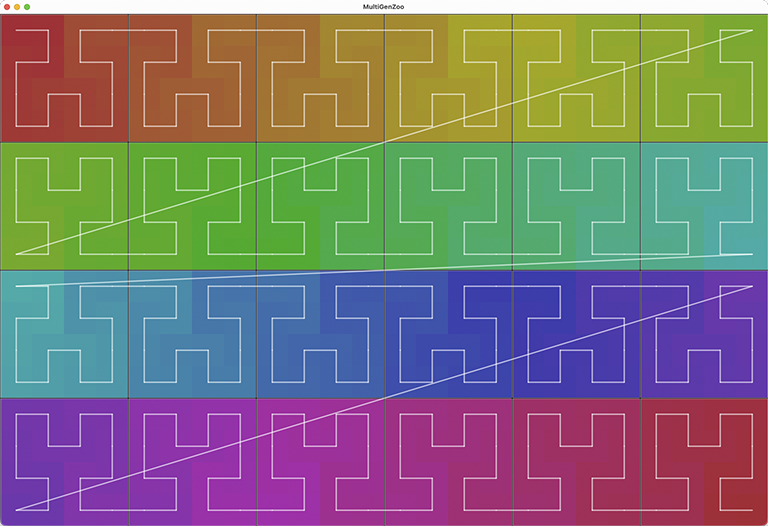
The display framework borrows the useful parts of MultiGenLookupTables: each MultiGen is drawn as a colored signal path, with optional path lines, so the orientation of the component PixelMapGens is easy to inspect.
NAMING CONVENTIONS
As all the methods that follow below, hilbertLoop3x2() creates a MultiGen instance from a list of PixelMapGen objects (genList) and coordinate points (offsetList) where they will be displayed. MultiGen creates a single signal path over all the PixelMapGen objects. The path may be *continuous*, which is to say that the path through each PixelMapGen object ("gen" for short) only has to step one pixel up, down, left, or right to connect to the next gen. It may even create a loop, where the last pixel in the path is one step away from the first pixel. This is reflected in the naming conventions.
In the method names, "ortho" refers to gens that are aligned in rows (or columns) where each new row begins one unit down from the previous row, always adding new gens in the same direction. In the "bou" methods (named for boustrophodon, a method of writing text in alternating directions), each successive row or column goes in the opposite direction from the previous one. The bou methods may provide continuous paths, the ortho methods are inherently discontinous, like row major bitmaps or video scanlines.
Looping methods are are almost always more complex than bou and necessarily more complex than ortho methods. Like the Hilbert curve, they involve changes in direction reminiscent of folding. Looping methods often have constraints on the numbers of rows and columns that can produce a loop. The constraints arise from the connectivity offered by the different PixelMapGen child classes: Hilbert gens have connections at two adjacent corners, DiagonalZigzag gens have connections at opposite corners. Moore gens are loops to begin with, and have no connections, but are good for very symmetrical pattern-making.
 KEY COMMANDS

 Press 'g' or RIGHT to show the next MultiGen.
 Press 'G' or LEFT to show the previous MultiGen.
 Press 'a' to toggle animation along the signal path.
 Press 'A' to step animation backward.
 Press 'n' to hide or show numbers.
 Press 'l' to hide or show path lines.
 Press 'o' to hide or show outlines around the component gens.
 Press 't' to hide or show the title text.
 Press 'd' to print a description of the current MultiGen.
 Press 'h' to show this help text.
-
Field Summary
FieldsModifier and TypeFieldDescription(package private) int(package private) int(package private) int(package private) ArrayList<int[]>(package private) intstatic AffineTransformTypestatic AffineTransformTypestatic AffineTransformTypestatic AffineTransformType(package private) PixelMapGen(package private) int(package private) int(package private) int(package private) int[](package private) int(package private) boolean(package private) boolean(package private) boolean(package private) boolean(package private) boolean(package private) PixelAudioMapperstatic AffineTransformType(package private) processing.core.PGraphics(package private) int(package private) int(package private) String[](package private) PixelAudiostatic AffineTransformTypestatic AffineTransformTypestatic AffineTransformType(package private) Random(package private) int[](package private) int(package private) int[]Fields inherited from class processing.core.PApplet
args, ARGS_BGCOLOR, ARGS_DISABLE_AWT, ARGS_DISPLAY, ARGS_EDITOR_LOCATION, ARGS_EXTERNAL, ARGS_FULL_SCREEN, ARGS_HIDE_STOP, ARGS_LOCATION, ARGS_PRESENT, ARGS_SKETCH_FOLDER, ARGS_STOP_COLOR, ARGS_UI_SCALE, ARGS_WINDOW_COLOR, DEFAULT_HEIGHT, DEFAULT_WIDTH, disableAWT, displayHeight, displayWidth, dmouseX, dmouseY, emouseX, emouseY, exitCalled, EXTERNAL_MOVE, EXTERNAL_STOP, finished, firstMouse, focused, frameCount, frameRate, frameRateLastNanos, g, height, insideDraw, javaPlatform, javaVersion, javaVersionName, key, keyCode, keyEvent, keyPressed, keyRepeatEnabled, looping, matchPatterns, mouseButton, mouseEvent, mousePressed, mouseX, mouseY, pixelDensity, pixelHeight, pixels, pixelWidth, platform, pmouseX, pmouseY, ratioLeft, ratioScale, ratioTop, recorder, redraw, rheight, rmouseX, rmouseY, rwidth, surface, useNativeSelect, width, windowX, windowYFields inherited from interface processing.core.PConstants
ADD, ALPHA, ALT, AMBIENT, ARC, ARGB, ARROW, BACKSPACE, BASELINE, BEVEL, BEZIER_VERTEX, BLEND, BLUR, BOTTOM, BOX, BREAK, BURN, CENTER, CHATTER, CHORD, CLAMP, CLOSE, CODED, COMPLAINT, CONTROL, CORNER, CORNERS, CROSS, CURVE_VERTEX, CUSTOM, DARKEST, DEG_TO_RAD, DELETE, DIAMETER, DIFFERENCE, DILATE, DIRECTIONAL, DISABLE_ASYNC_SAVEFRAME, DISABLE_BUFFER_READING, DISABLE_DEPTH_MASK, DISABLE_DEPTH_SORT, DISABLE_DEPTH_TEST, DISABLE_KEY_REPEAT, DISABLE_NATIVE_FONTS, DISABLE_OPENGL_ERRORS, DISABLE_OPTIMIZED_STROKE, DISABLE_STROKE_PERSPECTIVE, DISABLE_STROKE_PURE, DISABLE_TEXTURE_MIPMAPS, DODGE, DOWN, DXF, ELLIPSE, ENABLE_ASYNC_SAVEFRAME, ENABLE_BUFFER_READING, ENABLE_DEPTH_MASK, ENABLE_DEPTH_SORT, ENABLE_DEPTH_TEST, ENABLE_KEY_REPEAT, ENABLE_NATIVE_FONTS, ENABLE_OPENGL_ERRORS, ENABLE_OPTIMIZED_STROKE, ENABLE_STROKE_PERSPECTIVE, ENABLE_STROKE_PURE, ENABLE_TEXTURE_MIPMAPS, ENTER, EPSILON, ERODE, ESC, EXCLUSION, FX2D, GIF, GRAY, GROUP, HALF_PI, HAND, HARD_LIGHT, HINT_COUNT, HSB, IMAGE, INVERT, JAVA2D, JPEG, LANDSCAPE, LEFT, LIGHTEST, LINE, LINE_LOOP, LINE_STRIP, LINES, LINUX, MACOS, MACOSX, MAX_FLOAT, MAX_INT, MIN_FLOAT, MIN_INT, MITER, MODEL, MODELVIEW, MOVE, MULTIPLY, NORMAL, OPAQUE, OPEN, OPENGL, ORTHOGRAPHIC, OTHER, OVERLAY, P2D, P3D, PATH, PDF, PERSPECTIVE, PI, PIE, platformNames, POINT, POINTS, POLYGON, PORTRAIT, POSTERIZE, PROBLEM, PROJECT, PROJECTION, QUAD, QUAD_BEZIER_VERTEX, QUAD_STRIP, QUADRATIC_VERTEX, QUADS, QUARTER_PI, RAD_TO_DEG, RADIUS, RECT, REPEAT, REPLACE, RETURN, RGB, RIGHT, ROUND, SCREEN, SHAPE, SHIFT, SOFT_LIGHT, SPAN, SPHERE, SPOT, SQUARE, SUBTRACT, SVG, TAB, TARGA, TAU, TEXT, THIRD_PI, THRESHOLD, TIFF, TOP, TRIANGLE, TRIANGLE_FAN, TRIANGLE_STRIP, TRIANGLES, TWO_PI, UP, VERTEX, WAIT, WHITESPACE, WINDOWS, X, Y, Z -
Constructor Summary
Constructors -
Method Summary
Modifier and TypeMethodDescriptionboustrophRowRandom(int cols, int rows, int genW, int genH) Creates a MultiGen with rows * cols BoustropheGens.createPattern(int selector) voiddraw()voidvoidvoidvoidvoidvoidintfloorMod(int x, int y) int[]getColors(int size) hilbertColumnOrtho(int cols, int rows, int genW, int genH) This variation on hilbertRowOrtho arranges the gens vertically, in columns.hilbertLoop3x2(int genW, int genH) hilbertLoop3x2() returns a looping fractal signal path consisting of 6 Hilbert gens, 3 wide by 2 tall, to fit a 3 * genW by 2 * genH image.hilbertLoop6x4(int genW) Generates a MultiGen with 6 * 4 HilbertGen components and a continuous signal path.hilbertRowOrtho(int cols, int rows, int genW, int genH) This method creates rows of HilbertGens, starting each row from the left and adding gens.hilbertRowRandomFlip(int cols, int rows, int genW, int genH) Creates a MultiGen with rows * cols HilbertGens.hilbertStackBou(int stacks, int rows, int units, int genW, int genH) This method creates a vertical stacks of rows of HilbertGens.hilbertStackOrtho(int stacks, int rows, int units, int genW, int genH) This method creates a vertical stacks of rows of HilbertGens.hilbertZigzagLoop6x4(int genW, int genH) This method creates a MultiGen consisting of a mix of zigzag and Hilbert curves in 6 columns and 4 rows arranged to provide a continuous loop.voidvoidloadPattern(int nextIndex) static voidvoidsetComponentSize(int selector) voidvoidsettings()voidsetup()voidshowHelp()voidstepAnimation(int step) zigzagColumnAltOrtho(int cols, int rows, int genW, int genH) Creates a MultiGen with rows * cols DiagonalZigzagGens.zigzagColumnOrtho(int cols, int rows, int genW, int genH) Creates a MultiGen with rows * cols DiagonalZigzagGens.zigzagLoop6x4(int genW, int genH) zigzagRowAltOrtho(int cols, int rows, int genW, int genH) Creates a MultiGen with rows * cols DiagonalZigzagGens.zigzagRowOrtho(int cols, int rows, int genW, int genH) Creates a MultiGen with rows * cols DiagonalZigzagGens.zigzagRowRandomFlip(int cols, int rows, int genW, int genH) Creates a MultiGen with rows * cols DiagonalZigzagGens.Methods inherited from class processing.core.PApplet
abs, abs, acos, alpha, ambient, ambient, ambient, ambientLight, ambientLight, append, append, append, append, append, append, applyMatrix, applyMatrix, applyMatrix, applyMatrix, applyMatrix, arc, arc, arraycopy, arraycopy, arraycopy, arrayCopy, arrayCopy, arrayCopy, asin, atan, atan2, attrib, attrib, attrib, attribColor, attribNormal, attribPosition, background, background, background, background, background, background, background, beginCamera, beginContour, beginPGL, beginRaw, beginRaw, beginRecord, beginRecord, beginShape, beginShape, bezier, bezier, bezierDetail, bezierPoint, bezierTangent, bezierVertex, bezierVertex, binary, binary, binary, binary, blend, blend, blendColor, blendMode, blue, box, box, brightness, calcSketchPath, camera, camera, ceil, checkAlpha, checkExtension, choice, choice, circle, clear, clip, color, color, color, color, color, color, color, color, colorMode, colorMode, colorMode, colorMode, concat, concat, concat, concat, concat, concat, concat, constrain, constrain, copy, copy, copy, cos, createFont, createFont, createFont, createGraphics, createGraphics, createGraphics, createImage, createInput, createInput, createInputRaw, createOutput, createOutput, createPath, createPath, createPrimaryGraphics, createReader, createReader, createReader, createShape, createShape, createShape, createWriter, createWriter, createWriter, cursor, cursor, cursor, cursor, curve, curve, curveDetail, curvePoint, curveTangent, curveTightness, curveVertex, curveVertex, dataFile, dataPath, day, debug, degrees, delay, dequeueEvents, desktopFile, desktopPath, die, die, directionalLight, displayDensity, displayDensity, dispose, dist, dist, edge, ellipse, ellipseMode, emissive, emissive, emissive, endCamera, endContour, endPGL, endRaw, endRecord, endShape, endShape, exec, exec, exit, exitActual, exitCalled, exp, expand, expand, expand, expand, expand, expand, expand, expand, expand, expand, expand, expand, expand, expand, expand, expand, expand, expand, fill, fill, fill, fill, fill, fill, filter, filter, filter, floor, flush, focusGained, focusLost, frameMoved, frameRate, frustum, fullScreen, fullScreen, fullScreen, fullScreen, get, get, get, getExtension, getGraphics, getMatrix, getMatrix, getMatrix, getSurface, green, handleDraw, handleKeyEvent, handleMethods, handleMouseEvent, hex, hex, hex, hex, hideMenuBar, hint, hour, hue, image, image, image, imageMode, initSurface, insertFrame, isLooping, join, join, keyPressed, keyReleased, keyReleased, keyTyped, keyTyped, launch, lerp, lerpColor, lerpColor, lightFalloff, lights, lightSpecular, line, line, link, listFiles, listFiles, listPaths, loadBytes, loadBytes, loadBytes, loadFont, loadImage, loadImage, loadJSONArray, loadJSONArray, loadJSONObject, loadJSONObject, loadPixels, loadShader, loadShader, loadShape, loadShape, loadStrings, loadStrings, loadStrings, loadStrings, loadTable, loadTable, loadXML, loadXML, log, loop, mag, mag, main, main, main, makeGraphics, map, mask, match, matchAll, max, max, max, max, max, max, method, millis, min, min, min, min, min, min, minute, modelX, modelY, modelZ, month, mouseClicked, mouseClicked, mouseDragged, mouseDragged, mouseEntered, mouseEntered, mouseExited, mouseExited, mouseMoved, mouseMoved, mousePressed, mousePressed, mouseReleased, mouseReleased, mouseWheel, mouseWheel, nf, nf, nf, nf, nf, nf, nfc, nfc, nfc, nfc, nfp, nfp, nfp, nfp, nfs, nfs, nfs, nfs, noClip, noCursor, noFill, noise, noise, noise, noiseDetail, noiseDetail, noiseSeed, noLights, noLoop, norm, normal, noSmooth, noStroke, noTexture, noTint, orientation, ortho, ortho, ortho, parseBoolean, parseBoolean, parseBoolean, parseBoolean, parseByte, parseByte, parseByte, parseByte, parseByte, parseByte, parseByte, parseByte, parseChar, parseChar, parseChar, parseChar, parseFloat, parseFloat, parseFloat, parseFloat, parseFloat, parseFloat, parseFloat, parseInt, parseInt, parseInt, parseInt, parseInt, parseInt, parseInt, parseInt, parseInt, parseInt, parseInt, parseInt, parseJSONArray, parseJSONObject, parseXML, parseXML, pause, perspective, perspective, pixelDensity, point, point, pointLight, pop, popMatrix, popStyle, postEvent, postWindowMoved, postWindowResized, pow, print, print, print, print, print, print, print, print, print, printArray, printCamera, println, println, println, println, println, println, println, println, println, println, println, printMatrix, printProjection, printStackTrace, push, pushMatrix, pushStyle, quad, quadraticVertex, quadraticVertex, radians, random, random, randomGaussian, randomSeed, rect, rect, rect, rectMode, red, redraw, registerMethod, requestImage, requestImage, resetMatrix, resetShader, resetShader, resume, reverse, reverse, reverse, reverse, reverse, reverse, reverse, rotate, rotate, rotateX, rotateY, rotateZ, round, runSketch, runSketch, runSketch, saturation, save, saveBytes, saveBytes, saveBytes, saveFile, saveFrame, saveFrame, saveJSONArray, saveJSONArray, saveJSONObject, saveJSONObject, savePath, saveStream, saveStream, saveStream, saveStream, saveStream, saveStrings, saveStrings, saveStrings, saveTable, saveTable, saveXML, saveXML, scale, scale, scale, screenX, screenX, screenY, screenY, screenZ, second, selectCallback, selectFolder, selectFolder, selectFolder, selectInput, selectInput, selectInput, selectOutput, selectOutput, selectOutput, set, set, setMatrix, setMatrix, setMatrix, setSize, shader, shader, shape, shape, shape, shapeMode, shearX, shearY, shell, shininess, shorten, shorten, shorten, shorten, shorten, shorten, shorten, showDepthWarning, showDepthWarningXYZ, showMethodWarning, showMissingWarning, showSurface, showVariationWarning, sin, size, size, size, sketchDisplay, sketchFile, sketchFullScreen, sketchHeight, sketchOutputPath, sketchOutputStream, sketchPath, sketchPath, sketchPixelDensity, sketchRenderer, sketchSmooth, sketchWidth, sketchWindowColor, smooth, smooth, sort, sort, sort, sort, sort, sort, sort, sort, sort, sort, specular, specular, specular, sphere, sphereDetail, sphereDetail, splice, splice, splice, splice, splice, splice, splice, splice, splice, splice, splice, splice, splice, split, split, splitTokens, splitTokens, spotLight, sq, sqrt, square, start, startSurface, stop, str, str, str, str, str, str, str, str, str, str, stroke, stroke, stroke, stroke, stroke, stroke, strokeCap, strokeJoin, strokeWeight, style, subset, subset, subset, subset, subset, subset, subset, subset, subset, subset, subset, subset, subset, subset, subset, subset, subset, subset, tan, text, text, text, text, text, text, text, text, text, text, text, textAlign, textAlign, textAscent, textDescent, textFont, textFont, textLeading, textMode, textSize, texture, textureMode, textureWrap, textWidth, textWidth, textWidth, thread, tint, tint, tint, tint, tint, tint, translate, translate, triangle, trim, trim, unbinary, unhex, unregisterMethod, updatePixels, updatePixels, urlDecode, urlEncode, vertex, vertex, vertex, vertex, vertex, windowMove, windowMoved, windowRatio, windowResizable, windowResize, windowResized, windowTitle, year
-
Field Details
-
pixelaudio
PixelAudio pixelaudio -
mapper
PixelAudioMapper mapper -
gen
PixelMapGen gen -
offscreen
processing.core.PGraphics offscreen -
coords
ArrayList<int[]> coords -
imageLUT
int[] imageLUT -
signalLUT
int[] signalLUT -
spectrum
int[] spectrum -
imageWidth
int imageWidth -
imageHeight
int imageHeight -
genW
int genW -
genH
int genH -
drawingScale
int drawingScale -
offset
int offset -
bigTextSize
int bigTextSize -
smallTextSize
int smallTextSize -
componentWidth
int componentWidth -
componentHeight
int componentHeight -
patternIndex
int patternIndex -
isAnimating
boolean isAnimating -
isHideNumbers
boolean isHideNumbers -
isHideLines
boolean isHideLines -
isHideOutlines
boolean isHideOutlines -
isHideTitle
boolean isHideTitle -
rand
Random rand -
patternNames
String[] patternNames -
r270
-
r90
-
r180
-
flipx
-
fx270
-
fx90
-
flipy
-
nada
-
-
Constructor Details
-
MultiGenZoo
public MultiGenZoo()
-
-
Method Details
-
main
-
settings
public void settings()- Overrides:
settingsin classprocessing.core.PApplet
-
setup
public void setup()- Overrides:
setupin classprocessing.core.PApplet
-
draw
public void draw()- Overrides:
drawin classprocessing.core.PApplet
-
keyPressed
public void keyPressed()- Overrides:
keyPressedin classprocessing.core.PApplet
-
loadPattern
public void loadPattern(int nextIndex) -
createPattern
-
setComponentSize
public void setComponentSize(int selector) -
setDrawingVars
public void setDrawingVars() -
hilbertLoop3x2
hilbertLoop3x2() returns a looping fractal signal path consisting of 6 Hilbert gens, 3 wide by 2 tall, to fit a 3 * genW by 2 * genH image. This method is available as a static method of HilbertGen. Note that genH must equal genW and both must be powers of 2.- Parameters:
genW- width of each HilbertGengenH- height of each HilbertGen- Returns:
- a MultiGen consisting of 6 HilbertGens linked together by one signal path
-
hilbertLoop6x4
Generates a MultiGen with 6 * 4 HilbertGen components and a continuous signal path.- Parameters:
genW- width of a single PixelMapGen- Returns:
- a MultiGen with 6 * 4 HilbertGen components
-
hilbertZigzagLoop6x4
This method creates a MultiGen consisting of a mix of zigzag and Hilbert curves in 6 columns and 4 rows arranged to provide a continuous loop.- Parameters:
genW- width of a single PixelMapGen composing the MultiGengenH- height of a single PixelMapGen composing the MultiGen- Returns:
- a MultiGen with a signal path composed of HilbertGens and DiagonalZigzagGens.
-
hilbertStackOrtho
This method creates a vertical stacks of rows of HilbertGens. Each row begins genH pixels down from the previous row, back at the beginning of the previous row (i.e., in "row major" order, like a bitmap). This method pairs nicely with an image with 3 columns of with 8 rows of words, using the image as a control surface for sampling an audio file with words recorded at the appropriate locations to match the screen order. The signal path jumps from the end of the last gen in each row to the beginning of the first gen in the next row. The path in each row is continuous, which provides some interesting optical effects.- Parameters:
stacks- the number of stacksrows- the number of rows in each stackunits- the number of gens in each rowgenW- the width of each gen, a power of 2genH- the height of each gen, equal to genW- Returns:
- a MultiGen consisting of stacks * rows * units PixelMapGens
-
hilbertStackBou
This method creates a vertical stacks of rows of HilbertGens. Each row begins genH pixels down from the previous row. Alternating rows add units in opposite directions. This means path continuity is possible in each stack by changing the orientation of the gens; however, it isn't fully implemented in this example. Hint: choosing the right orientation for each gen will assure path continuity.- Parameters:
stacks- the number of stacksrows- the number of rows in each stackunits- the number of gens in each rowgenW- the width of each gen, a power of 2genH- the height of each gen, equal to genW- Returns:
- a MultiGen consisting of stacks * rows * units PixelMapGens
-
hilbertRowOrtho
This method creates rows of HilbertGens, starting each row from the left and adding gens. The odd rows are flipped vertically and the even rows are unchanged. The unchanged HilbertGen starts at upper left corner and ends at upper right corner, so this provides some possibilities of symmetry between rows. The path is not continuous.- Parameters:
cols- number of columns of gens widerows- number of rows of gens highgenW- width of each gen (same as genH and a power of 2)genH- height of each gen- Returns:
- a MultiGen composed of cols * rows PixelMapGens
-
hilbertColumnOrtho
This variation on hilbertRowOrtho arranges the gens vertically, in columns.- Parameters:
cols- number of columns of gens widerows- number of rows of gens highgenW- width of each gen (same as genH and a power of 2)genH- height of each gen- Returns:
- a MultiGen composed of cols * rows PixelMapGens
-
zigzagLoop6x4
- Parameters:
genW- width of each zigzag gengenH- height of each zigzag gen- Returns:
- a looping MultiGen with 6 rows x 4 columns of DiagonalZigzagGen instances
-
zigzagRowOrtho
Creates a MultiGen with rows * cols DiagonalZigzagGens. Note that you should set values for such that: (rows * genW) == width and (cols * genH) == height. "Ortho" implies that each row starts at the left edge. The orientation of the the diagonals changes for alternate rows.- Parameters:
cols- number of vertical columnsrows- number of horizontal rowsgenW- width of an individual PixelMapGengenH- height of an individual PixelMapGen- Returns:
- a MultiGen created from rows * cols PixelMapGens
-
zigzagRowAltOrtho
Creates a MultiGen with rows * cols DiagonalZigzagGens. Note that you should set values for such that: (rows * genW) == width and (cols * genH) == height. "Ortho" implies that each row starts at the left edge. The orientation of the the diagonals is more complex than zigzagRowOrtho(), hence the "Alt" in the method name.- Parameters:
cols- number of vertical columnsrows- number of horizontal rowsgenW- width of an individual PixelMapGengenH- height of an individual PixelMapGen- Returns:
- a MultiGen created from rows * cols PixelMapGens
-
zigzagColumnOrtho
Creates a MultiGen with rows * cols DiagonalZigzagGens. Note that you should set values for such that: (rows * genW) == width and (cols * genH) == height. The MultiGen steps along columns rather than rows. "Ortho" implies that each column starts at the top edge. The orientation of the diagonals alternates one column to the next.- Parameters:
cols- number of vertical columnsrows- number of horizontal rowsgenW- width of an individual PixelMapGengenH- height of an individual PixelMapGen- Returns:
- a MultiGen created from rows * cols PixelMapGens
-
zigzagColumnAltOrtho
Creates a MultiGen with rows * cols DiagonalZigzagGens. Note that you should set values for such that: (rows * genW) == width and (cols * genH) == height. The MultiGen steps along columns rather than rows. "Ortho" implies that each column starts at the top edge. The orientation of the diagonals is more complex than zigzagColumnOrtho(), hence "Alt" in the method name.- Parameters:
cols- number of vertical columns widerows- number of horizontal rows highgenW- width of an individual PixelMapGengenH- height of an individual PixelMapGen- Returns:
- a MultiGen created from rows * cols PixelMapGens
-
zigzagRowRandomFlip
Creates a MultiGen with rows * cols DiagonalZigzagGens. Note that you should set values for such that: (rows * genW) == width and (cols * genH) == height. The MultiGen steps along rows. "Ortho" implies that each row starts at the left edge. The orientation of the diagonals is randomized.- Parameters:
cols- number of vertical columnsrows- number of horizontal rowsgenW- width of an individual PixelMapGengenH- height of an individual PixelMapGen- Returns:
- a MultiGen created from rows * cols PixelMapGens
-
boustrophRowRandom
Creates a MultiGen with rows * cols BoustropheGens. Note that you should set values for such that: (rows * genW) == width and (cols * genH) == height.- Parameters:
cols- number of vertical columns widerows- number of horizontal rows highgenW- width of an individual PixelMapGengenH- height of an individual PixelMapGen- Returns:
- a MultiGen created from rows * cols PixelMapGens
-
hilbertRowRandomFlip
Creates a MultiGen with rows * cols HilbertGens. Note that you should set values for such that: (rows * genW) == width and (cols * genH) == height and that genH == genW and both are powers of 2. The orientation of the HilbertGens is randomized.- Parameters:
cols- number of vertical columns widerows- number of horizontal rows highgenW- width of an individual PixelMapGengenH- height of an individual PixelMapGen- Returns:
- a MultiGen created from rows * cols PixelMapGens
-
drawPattern
public void drawPattern() -
drawSquares
public void drawSquares() -
drawLines
public void drawLines() -
drawNumbers
public void drawNumbers() -
drawComponentOutlines
public void drawComponentOutlines() -
drawTitle
public void drawTitle() -
getColors
public int[] getColors(int size) -
stepAnimation
public void stepAnimation(int step) -
floorMod
public int floorMod(int x, int y) -
showHelp
public void showHelp()
-