Class TutorialOne_03_Drawing
- All Implemented Interfaces:
processing.core.PConstants
- Direct Known Subclasses:
TutorialOne_06_WB_Retrofit
NEW FEATURES
This sketch continues the Tutorial One sequence for the PixelAudio library
for Processing. To the previous tools for reading, writing, and transcoding
audio and image files, triggering audio events, and animating pixels to change
audio sample order, it adds the capability of drawing in the display window to trigger
audio events. Lines drawn on the display are captured as arrays of points and times.
The data is saved to a PACurveMaker object that can be used to create
brushstrokes and event schedules. Brushstrokes can be activated to trigger audio events.
In PixelAudio's conceptual framework, points combined with times constitute a gesture.
See PAGesture for a formal definition.
Mapping of audio samples to pixels is the other core concept of PixelAudio. The drawing
and audio synthesis tools built on these core concepts illustrate how they can work together
to create a hybrid art form. Curve modeling and scheduling classes emerge from the drawing
and audio tools. The WaveSynth and Argosy classes experiment with pattern and audio generation.
The example files eventually lead to live performance oriented applications that you can
adapt for your own purposes.
PixelAudio provides two types of audio synthesis: Sampler intruments, introduced in
previous sketches, and Granular instruments. This sketch introduces PixelAudio's granular
synthesis engine with the PAGranularInstrumentDirector class and provides
another class for Sampler instruments, PASamplerInstrumentPool. The Granular
instruments and the Sampler instruments both depend on a hierarchy of classes that
implement a signal-processing chain. It's unlikely that you will have to deal with the
low-level processing. PAGranularInstrumentDirector and PASamplerInstrumentPool provide
the virtual control knobs you would typically want for a virtual electronic instrument
while keeping the math and audio engine in the background.
QUICK START
Sampler Instrument
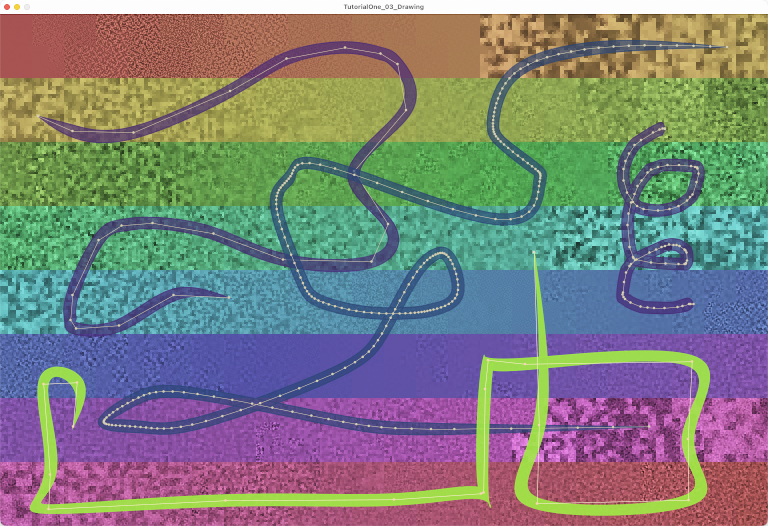
- Launch TutorialOne_03_Drawing. The display window opens with a pre-loaded file, "Saucer_mixdown.wav",
where audio data is displayed as grayscale values. A spectrum of rainbow colors overlaid on the
image follows the Signal Path, the mapping of the audio signal to the image pixels created
by the PixelMapGen
multigenand managed by the PixelAudioMappermapper. This particular PixelMapGen plots time from top to bottom, left to right, in eight rows. - Click on the image or press the spacebar with the cursor over the image to play a Sampler instrument sound.
- Press '/' to enable drawing. Drag the mouse to draw a line. Vary the speed of your gesture: it will be recorded to a PACurveMaker instance. When you release the mouse, a brushstroke appears.
- Activate the brushstroke with hover-spacebar or a mouse click. The Sampler instrument plays new brushstokes,
using the ALL_POINTS representation of the curve. Hover over the brushstroke and press the
'1', '2' or '3' key to change the representation of the curve.
- ALL_POINTS (1) draws every point recorded as you drew the line.
- REDUCED_POINTS (2) draws a simplified line using the Ramer-Douglas-Peucker (RDP) point reduction algorithm.
- CURVE_POINTS (3) draws a polygonized Bezier curve, a smooth curve with many more points.
- The Sampler instrument usually sounds good with ALL_POINTS or REDUCED_POINTS. It may produce distortion with CURVE_POINTS.
- Change the 'epsilon' value that controls the number of reduced points with the
'<'or'>'keys. - Change the number of curve steps with the '[' or ']' keys.
- Change the 'epsilon' value that controls the number of reduced points with the
- Draw a few more brushstrokes to experiment with drawing and the Sampler instrument. Draw fast and slow, right to left or left to right (forwards or backwards in time), vertically, horizontally, or diagonally.
- Noise: As with any polyphonic instrument, the number of overlapping audio events affects Sampler clipping and noise level. Instrument gain, envelope shape and duration, and low level noise reduction all influence output. Your audio source also matters: sources with greater RMS energy will be more likely to distort than sources with lower energy. A sample of street sounds has more energy than most instrumental samples and will distort more easily.
- To adjust Sampler audio output:
- RIGHT ARROW and LEFT ARROW change Sampler gain.
- 'e' steps through available envelope shapes.
- 'E' toggles automatic envelope duration based on gesture event density.
- 'm' steps through the low level noise reduction profiles.
Granular Instrument
- To switch a brushstroke to use the Granular instrument, hover over it and press 't'. The representation of the curve will change to CURVE_POINTS, the default for granular synthesis, which works by using many small overlapping windows to sample a signal. Click on the curve to play it. Experiment with the other representations. The curve steps representation of the brushstroke provides enough density to provide a continuous sound for the short envelopes used by grains. The reduced points representation may sound too sparse. Press 't' again to switch the curve back to use the Sampler instrument.
- When the Granular instrument plays a curve, it steps through the audio buffer in a non-linear way. Rather than advancing steadily through the file, it leaps from one curve point to the next. These points may be closely correlated with the audio buffer, and the sound may be close to linear audio buffer playback. It all depends on the PixelAudioMap you use.
- Various keys can change the sound of the Granular instrument. The granular instrument
is less susceptible to noise than the Sampler, but it can still distort if its gain is too high
or if it has too many overlapping steps or simultaneously playing brushstrokes.
- SHIFT-RIGHT ARROW and SHIFT-LEFT ARROW adjust the gain of a brush you are hovering over.
- The '[' and ']' keys adjust the number of steps in the CURVE_STEPS representation of the curve.
- The 'f' and 'g' keys toggle between FIXED and GESTURE playback. FIXED playback ignores
gesture timing and overlaps each audio sample by the time offset
hopSamples.
- Some adjustments will make the granular samples sound more like the underlying buffer.
Longer grains and short grains can sound very different. The Granular instrument can also play
linear sequences (bursts) of grains at each buffer index. Long grains with long bursts come
closest to reproducing the audio buffer. When you trigger a brushstroke, the bursts extend linearly
from each event point. When you trigger a point event, the bursts follow the signal path.
- 'r' key toggles between long grains (4096 milliseconds) and short grains (512 milliseconds).
- 'b' key toggles between long bursts (eight grains) and short bursts (one grain).
- 'y' key toggles between Granular and Sampler instruments for point events.
See the key commands for various ways to alter the sound of the granular synth
and other features. Check out the comments on the various methods for detailed
information about the features of TutorialOne_03_Drawing. For a GUI with greater control
over drawing, gesture, and audio synthesis, see the TutorialOne_05_GesturePlayground and Bagatelle sketches.
Points + Times = Gestures
The drawing tools and commands are a substantial addition. To implement them
we call on a whole new package of code, PixelAudio Curves Package. To turn gestures into timing information that can
be used to schedule audio events, particularly with granular synthesis, we
rely on the PixelAudio Schedule Package.
The workhorse of the Curves package is PACurveMaker,
which is used to capture point and time information when you draw. A PACurveMaker
instance is intialized with a list of unique points and a list of time offsets where
both lists have the same number of elements: Each point is paired to the relative
time when it was recorded. Points drawn on the display are stored in
PACurveMaker's ALL_POINTS representation of the gesture points.
PACurveMaker can also reduce the number of points captured, using the
Ramer-Douglas-Peucker (RDP) algorithm, to create the REDUCED_POINTS
representation of a gesture. RDP controls point reduction with a numerical
value, epsilon, which you can vary to control the number of
reduced points in a gesture. PACurveMaker can turn the reduced points
representation of a drawn line into a Bezier curve, the CURVE_POINTS
representation of the gesture. The curve can be divided into line segments,
with the potential to generate an audio event at each vertex. The number of
divisions is controlled by the PACurveMaker.setCurveSteps(int
curveSteps) method. In the GesturePlayground sketch you can vary the
curve divisions with the GUI.
The CURVE_POINTS curve is used to create a stylized brushstroke. The
brushstroke is an PABezShape object. PABezShape provides a
pointInPoly() method that you can use to detect the mouse
hovering over or clicking within a brushstroke. TutorialOne_03_Drawing shows
how the brushstroke can be activated as an animated UI element and used to
trigger audio events.
Bounds Policy: When you are drawing, points may be captured outside
the display window bounds. The BoundsPolicy class provides methods
to bring these points in bounds before they are saved as a gesture to a
PACurveMaker object. When a gesture is represented as a Bezier curve, points
may be moved outside the display window bounds. BoundsPolicy can
also bring these points back in bounds. Points must be in bounds to play
audio events, since only in-bounds points correspond to audio buffer samples.
If you do a search on "boundsPolicy", you will see how it is initialized in
setup() and used in getPlaybackScheduleForBrush(...).
It's a fairly simple but critical aspect of using drawing to create audio
instrument events in PixelAudio. For the sake of simplicity, I've implemented
it in a somewhat redundant form here. In performance, a caching scheme might
be useful--this may eventually show up in the Bagatelle example sketch.
Audio Processing
The PAGranularInstrumentDirector
class manages the high level processes for granular synthesis. Probably all
the functionality you will commonly need is available in its methods. The
various playGestureNow(...) methods allow you to control the timing,
panning, pitch, and gain of individual grains, if you want to. Parameters for
grain shaping are set with the GestureGranularParams class. The
GestureEventParams class supports arrays of values to set timing, pan, gain,
and pitch for individual grains. The timing and pan settings for individual
grains can also be passed as arrays to overloaded playGestureNow(...)
methods.
If you're curious about how the granular synthesis engine works, there's an outline in
PAGranularInstrumentDirector.
This sketch and GesturePlayground provide a good introduction to the functions available in the granular synth. GesturePlayground goes into more detail than TutorialOne_03_Drawing, and provides a GUI to tweak almost every Granular instrument feature. In TutorialOne_03_Drawing we are principally concerned with showing how to create interactive brushstrokes by drawing on the screen. Finally, the Bagatelle example sketch provides a tested model for real time performance, reading and writing brushstroke data as JSON files, implementing a cue-based Performance Preset model, and communicating with Max over UDP.
 Here are the key commands for this sketch:

 Press UP ARROW to increase audio gain by 3 dB.
 Press DOWN ARROW to decrease audio gain by 3 dB.
 Press RIGHT ARROW to increase Sampler audio gain by 3 dB.
 Press LEFT ARROW to decrease Sampler audio gain by 3 dB.
 Press SHIFT-RIGHT ARROW to increase Granular audio gain by 3 dB.
 Press SHIFT-LEFT ARROW to decrease Granular audio gain by 3 dB.
 Press ' ' (spacebar) to trigger a brush if we're hovering over a brush, otherwise trigger a point event.
 Press '1' to set brushstroke under cursor to PathMode ALL_POINTS.
 Press '2' to set brushstroke under cursor to PathMode REDUCED_POINTS.
 Press '3' to set brushstroke under cursor to PathMode CURVE_POINTS.
 Press 't' to set brushstroke under cursor to use Sampler or Granular synth.
 Press 'f' to set brushstroke under cursor to FIXED hop mode for granular events.
 Press 'g' to set brushstroke under cursor to GESTURE hop mode for granular events.
 Press 'y' to select granular or sampler synth for click response.
 Press 'r' to select long or short grain duration .
 Press 'b' to toggle between long burst grains and short burst grains.
 Press 'p' to jitter the pitch of granular gestures.
 Press 'P' to adjust pitch of current brushstroke.
 Press '>' or '.' to increment epsilon value of current brush (reduced points decrease).
 Press '<' or ',' to decrement epsilon value of current brush (reduced points increase).
 Press ']' to increment curve steps value of current brush.
 Press '[' to decrement curve steps value of current brush.
 Press 'm' to change the Sampler noise reduction profile.
 Press 'e' to change the envelope we're using .
 Press 'E' to toggle whether we adjust envelope duration in relation to gesture duration.
 Press 'a' to  start or stop animation (bitmap rotation along the signal path).
 Press 'd' to toggle play audio on new brush .
 Press 'c' to apply color from image file to display image.
 Press 'k' to apply the hue and saturation in the colors array to mapImage (not to baseImage).
 Press 'K' to apply hue and saturation in colors to baseImage and mapImage.
 Press 'j' to turn audio and image blending on or off.
 Press 'n' to normalize the audio buffer to -6.0dB.
 Press 'L' or 'l' to determine whether to load a new file to both image and audio or not.
 Press 'o' or 'O' to open an audio or image file and load to image or audio buffer or both.
 Press 's' to save display image to a PNG file.
 Press 'S' to save audio buffer to a .wav file.
 Press 'w' to write the image HSB Brightness channel to the audio buffer as transcoded sample values .
 Press 'W' to write the audio buffer samples to the image as color values.
 Press 'x' to delete the current active brush shape or the oldest brush shape.
 Press 'X' to delete the most recent brush shape.
 Press 'u' to mute audio.
 Press 'V' to record a video.
 Press 'h' or 'H' to show help message in the console.
Rendering rule: mapper.mapSigToImgShifted(audioSignal, mapImage.pixels, chan, totalShift);
Click rule: int signalPos = mapper.lookupSignalPosShifted(x, y, totalShift);
-
Nested Class Summary
Nested ClassesModifier and TypeClassDescriptionstatic final classA light-weight version of theAudioBrushclass for combining gestures and audio synthesis.static final classDefines the curve drawing model for a brush using PACurveMaker.static final classA class to store a hit-test result, recording an AudioBrushLite instance and its index in brush list.static enumSelect audio synthesis modelstatic enumSelect audio gesture sequence timing model.static enumSelect PACurveMaker gesture points model. -
Field Summary
FieldsModifier and TypeFieldDescriptionArrayList<processing.core.PVector>(package private) int(package private) File(package private) int(package private) String(package private) String(package private) String(package private) int(package private) ddf.minim.AudioOutput(package private) float[](package private) processing.core.PImage(package private) PABoundsPolicy.PABoundaryMode(package private) PABoundsPolicy(package private) float(package private) int(package private) PixelAudioMapper.ChannelNames(package private) intprocessing.core.PVector(package private) PACurveMakerint(package private) String(package private) String(package private) ADSRParams(package private) float(package private) int(package private) int(package private) boolean(package private) booleanintfloat(package private) int(package private) int(package private) int(package private) String[]float(package private) float(package private) int(package private) intint(package private) GestureGranularParams(package private) GestureGranularParams(package private) ArrayList<TimedLocation>(package private) int(package private) intfloat[]floatfloat(package private) float(package private) int(package private) int(package private) int(package private) intint(package private) File(package private) int(package private) String(package private) String(package private) String(package private) int(package private) boolean(package private) boolean(package private) boolean(package private) booleanboolean(package private) boolean(package private) boolean(package private) boolean(package private) boolean(package private) int(package private) int(package private) float(package private) processing.core.PImage(package private) PixelAudioMapper(package private) int(package private) float(package private) int(package private) int(package private) ddf.minim.Minim(package private) MultiGen(package private) final int(package private) boolean(package private) float(package private) float(package private) float(package private) PixelAudio(package private) ddf.minim.MultiChannelBuffer(package private) ArrayList<TimedLocation>int(package private) PASamplerInstrumentPool(package private) int(package private) int(package private) int(package private) int(package private) int(package private) int(package private) int(package private) float(package private) float(package private) int(package private) float(package private) ArrayList<SamplerBrushEvent>(package private) int(package private) int(package private) int(package private) int(package private) boolean(package private) int(package private) int[]int(package private) int(package private) int(package private) boolean(package private) boolean(package private) boolean(package private) boolean(package private) int(package private) int(package private) com.hamoid.VideoExportFields inherited from class processing.core.PApplet
args, ARGS_BGCOLOR, ARGS_DISABLE_AWT, ARGS_DISPLAY, ARGS_EDITOR_LOCATION, ARGS_EXTERNAL, ARGS_FULL_SCREEN, ARGS_HIDE_STOP, ARGS_LOCATION, ARGS_PRESENT, ARGS_SKETCH_FOLDER, ARGS_STOP_COLOR, ARGS_UI_SCALE, ARGS_WINDOW_COLOR, DEFAULT_HEIGHT, DEFAULT_WIDTH, disableAWT, displayHeight, displayWidth, dmouseX, dmouseY, emouseX, emouseY, exitCalled, EXTERNAL_MOVE, EXTERNAL_STOP, finished, firstMouse, focused, frameCount, frameRate, frameRateLastNanos, g, height, insideDraw, javaPlatform, javaVersion, javaVersionName, key, keyCode, keyEvent, keyPressed, keyRepeatEnabled, looping, matchPatterns, mouseButton, mouseEvent, mousePressed, mouseX, mouseY, pixelDensity, pixelHeight, pixels, pixelWidth, platform, pmouseX, pmouseY, ratioLeft, ratioScale, ratioTop, recorder, redraw, rheight, rmouseX, rmouseY, rwidth, surface, useNativeSelect, width, windowX, windowYFields inherited from interface processing.core.PConstants
ADD, ALPHA, ALT, AMBIENT, ARC, ARGB, ARROW, BACKSPACE, BASELINE, BEVEL, BEZIER_VERTEX, BLEND, BLUR, BOTTOM, BOX, BREAK, BURN, CENTER, CHATTER, CHORD, CLAMP, CLOSE, CODED, COMPLAINT, CONTROL, CORNER, CORNERS, CROSS, CURVE_VERTEX, CUSTOM, DARKEST, DEG_TO_RAD, DELETE, DIAMETER, DIFFERENCE, DILATE, DIRECTIONAL, DISABLE_ASYNC_SAVEFRAME, DISABLE_BUFFER_READING, DISABLE_DEPTH_MASK, DISABLE_DEPTH_SORT, DISABLE_DEPTH_TEST, DISABLE_KEY_REPEAT, DISABLE_NATIVE_FONTS, DISABLE_OPENGL_ERRORS, DISABLE_OPTIMIZED_STROKE, DISABLE_STROKE_PERSPECTIVE, DISABLE_STROKE_PURE, DISABLE_TEXTURE_MIPMAPS, DODGE, DOWN, DXF, ELLIPSE, ENABLE_ASYNC_SAVEFRAME, ENABLE_BUFFER_READING, ENABLE_DEPTH_MASK, ENABLE_DEPTH_SORT, ENABLE_DEPTH_TEST, ENABLE_KEY_REPEAT, ENABLE_NATIVE_FONTS, ENABLE_OPENGL_ERRORS, ENABLE_OPTIMIZED_STROKE, ENABLE_STROKE_PERSPECTIVE, ENABLE_STROKE_PURE, ENABLE_TEXTURE_MIPMAPS, ENTER, EPSILON, ERODE, ESC, EXCLUSION, FX2D, GIF, GRAY, GROUP, HALF_PI, HAND, HARD_LIGHT, HINT_COUNT, HSB, IMAGE, INVERT, JAVA2D, JPEG, LANDSCAPE, LEFT, LIGHTEST, LINE, LINE_LOOP, LINE_STRIP, LINES, LINUX, MACOS, MACOSX, MAX_FLOAT, MAX_INT, MIN_FLOAT, MIN_INT, MITER, MODEL, MODELVIEW, MOVE, MULTIPLY, NORMAL, OPAQUE, OPEN, OPENGL, ORTHOGRAPHIC, OTHER, OVERLAY, P2D, P3D, PATH, PDF, PERSPECTIVE, PI, PIE, platformNames, POINT, POINTS, POLYGON, PORTRAIT, POSTERIZE, PROBLEM, PROJECT, PROJECTION, QUAD, QUAD_BEZIER_VERTEX, QUAD_STRIP, QUADRATIC_VERTEX, QUADS, QUARTER_PI, RAD_TO_DEG, RADIUS, RECT, REPEAT, REPLACE, RETURN, RGB, RIGHT, ROUND, SCREEN, SHAPE, SHIFT, SOFT_LIGHT, SPAN, SPHERE, SPOT, SQUARE, SUBTRACT, SVG, TAB, TARGA, TAU, TEXT, THIRD_PI, THRESHOLD, TIFF, TOP, TRIANGLE, TRIANGLE_FAN, TRIANGLE_STRIP, TRIANGLES, TWO_PI, UP, VERTEX, WAIT, WHITESPACE, WINDOWS, X, Y, Z -
Constructor Summary
Constructors -
Method Summary
Modifier and TypeMethodDescriptionvoidaddDrawingPoint(int x, int y) While user is dragging the mouses and isDrawMode == true, accumulates new points to allPoints and event times to allTimes.voidadjustAudioGain(float g) Adjusts audioOut.gain.voidadjustGranGain(float g) Sets Granular instrument gain in dB.voidadjustPoolGain(float g) Sets Sampler instrumentpoolgain in dB.voidanimate()int[]applyColor(int[] colorSource, int[] graySource, int[] lut) Utility method for applying hue and saturation values from a source array of RGB values to the brightness values in a target array of RGB values, using a lookup table to redirect indexing.voidapplyColorMapToDisplay(boolean updateBaseImage) Apply color map hue and saturation to mapImage or baseImage.int[]applyColorShifted(int[] colorSource, int[] graySource, int[] lut, int shift) Utility method for applying hue and saturation values from a source array of RGB values to the brightness values in a target array of RGB values, using a lookup table to redirect indexing, taking into account any pixels that were shifted.voidapplyImageColor(File imgFile, processing.core.PImage targetImage) Apply the hue and saturation of a chosen image file to the brightness channel of the display image.voidaudioFileSelectedWrite(File selection) static voidblendInto(ddf.minim.MultiChannelBuffer dest, ddf.minim.MultiChannelBuffer src, float weight, boolean normalize, float targetDB) Blends audio data from buffer "src" into buffer "dest" in place.buildGranSynth(ddf.minim.AudioOutput out, ADSRParams env, int numVoices) Initializes a new PAGranularSynth instance that you probably would pass to a PAGranularInstrumentDirector.intintcalcSampleLen(int durMs, double mean, double variance) calculateEnvelopeDb(float gainDb, int totalSamples, float sampleRate) Calculate an envelope of length totalSamples.calculateEnvelopeLinear(float gainDb, float totalMs) Calculate an envelope of length totalSamples.voidCall to initiate process of opening an image file to get its color data.voidWrapper method for Processing's selectInput commandintclipToHeight(int i) Clips parameter i to the interval (0..width-1)intclipToWidth(int i) Clips parameter i to the interval (0..width-1)voidcolorFileSelected(File selectedFile) callback method for chooseColorImage()voidvoidWrites the mapImage, which may change with animation, to the baseImage, a reference image that usually only changes when a new file is loaded.voidcommitNewBaseImage(processing.core.PImage img) Copies the supplied PImage to mapImage and baseImage, sets totalShift to 0 (the images are identical).(package private) intcomputeEnvDurationMs(GestureSchedule sched, String envName, int fallbackMs) (package private) TutorialOne_03_Drawing.PathModeDetermines the path mode for a particular BrushOutput.voiddraw()voidDraw brushstrokes on the display image.voidEntry point for drawing brushstrokes on the screen.voiddrawCircle(int x, int y) Draws a circle at the location of an audio trigger (mouseDown event).(package private) voidEnsures that all resources and variable necessary for the Granular synth are ready to go.(package private) voidEnsures that all resources and variable necessary for the Sampler synth are ready to go.(package private) static ADSRParamsvoidfileSelected(File selectedFile) callback method for chooseFile(), handles standard audio and image formats for Processing.(package private) TutorialOne_03_Drawing.BrushHit(package private) float[]generateJitterPitch(int length, float deviationPitch) Generates an array of Gaussian values for shifting pitch, where 1.0 = no shift.(package private) float[]generateJitterPitch(int length, float deviationPitch, float centerPitch) Generates an array of Gaussian values for shifting pitch, where 1.0 = no shift.int[]getColors(int size) Generates an array of rainbow colors using the HSB color space.processing.core.PVectorgetCoordFromSignalPos(int pos) Calculates the display image coordinates corresponding to a specified audio sample index.(package private) ArrayList<processing.core.PVector>Get the path points of a brushstroke, with the representation determined by the BrushConfig's path mode.(package private) GestureScheduleintgetSamplePos(int x, int y) Calculates the index of the image pixel within the signal path, taking the shifting of pixels and audioSignal into account.Get a GestureSchedule (points + timing) for an AudioBrushLite instance.inthandleClickOutsideBrush(int x, int y) voidHandles user's drawing actions: draws previously recorded brushstrokes, tracks and generates interactive animation and audio events.voidimageFileSelectedWrite(File selection) voidInitializes allPoints and adds the current mouse location to it.voidCALL THIS METHOD IN SETUP() Initializes Minim audio library and audio variables.Initializes a PACurveMaker instance with allPoints as an argument to the factory method PACurveMaker.buildCurveMaker() and then fills in PACurveMaker instance variables from variables in the calling class (TutorialOneDrawing, here).voidInitializes drawing and drawing interaction variables.voidInitializes global variables gParamsGesture and gParamsFixed, which provide basic settings for granular synthesis the follows gesture timing or fixed hop timing between grains.voidInitializes mapImage with the colors array.(package private) voidprocessing.core.PVectorjitterCoord(int x, int y, int deviationPx) Displaces a supplied point by a random Gaussian variable.voidBuilt-in keyPressed handler, forwards events to parseKey.voidvoidloadAudioFile(File audFile) Attempts to load audio data from a selected file into playBuffer, then calls writeAudioToImage() to transcode audio data and write it to mapImage.voidloadImageFile(File imgFile) Attempts to load image data from a selected file into mapImage, then calls writeImageToAudio() to transcode HSB brightness channel to audio and writes it to playBuffer and audioSignal.static voidvoidvoidbooleanmouseInPoly(ArrayList<processing.core.PVector> poly) voidThe built-in mousePressed handler for Processing, clicks are handled in mouseClicked().voidstatic voidnormalize(float[] signal, float targetPeakDB) Normalizes a single-channel signal array to a target RMS level in dBFS (decibels relative to full scale).voidparseKey(char key, int keyCode) Handles key press events passed on by the built-in keyPressed method.voidplayGranularGesture(float[] buf, GestureSchedule sched, GestureGranularParams params, float pitchRatio) Calls PAGranularInstrumentDirector gDir to play a granular audio event.intplaySample(int samplePos, int samplelen, float amplitude, float pan) Plays an audio sample with default envelope and stereo pan.intplaySample(int samplePos, int samplelen, float amplitude, ADSRParams env, float pan) Plays an audio sample with a custom envelope and stereo pan.intplaySample(int samplePos, int samplelen, float amplitude, ADSRParams env, float pitch, float pan) Plays an audio sample with with a custom envelope, pitch and stereo pan.voidpreloadFiles(String path, String filename) Preload an audio file using a file path and a filename.voidWrites baseImage to mapImage with an index position offset of totalShift.voidRemoves the current active AudioBrushLite instance.voidRemoves the most recent AudioBrushLite instance.voidrenderAudioToMapImage(PixelAudioMapper.ChannelNames chan, int shift) Transcodes audio data in audioSignal and writes it to color channel chan of mapImage.voidrenderFrame(int step) Renders a frame of pixel-shifting animation: moving along the signal path, copies baseImage pixels to mapImage pixels, adjusting the index position of the copy using totalShift -- i.e.voidWrites a specified channel of mapImage to audioSignal.voidTracks and runs TimedLocation events in the grainLocsArray list, which is associated with granular synthesis gestures.voidTracks and runs TimedLocation events in the timeLocsArray list, which is associated with mouse clicks that trigger audio a the click point.voidExecute audio / animation events for Sampler brushstrokes.voidsaveAudioToFile(float[] samples, float sampleRate, String fileName) Saves audio data to 16-bit integer PCM format, which Processing can also open.voidsaveImageToFile(processing.core.PImage img, String fileName) voidCalls Processing's selectOutput method to start the process of saving the current audio signal to a .wav file.voidCalls Processing's selectOutput method to start the process of saving the mapImage (the offscreen copy of the display image) to a .png file.(package private) voidSchedule a Granular brush audio / animation event.(package private) voidSchedule a Sampler brush audio / animation event.static intsetAlpha(int argb, int alpha) Sets the alpha channel of an RGBA color.intsetAlphaWithBlack(int argb, int alpha) Sets the alpha channel of an RGBA color, conditionally setting alpha = 0 if all other channels = 0.voidSets epsilon value for the PACurveMaker associated with an AudioBrushLite instance.voidsetBrushEpsilon(TutorialOne_03_Drawing.AudioBrushLite b, float e) Sets epsilon value for the PACurveMaker associated with an AudioBrushLite instance.voidsettings()voidsetup()voidshowHelp()to generate help output, run RegEx search/replace on parseKey case lines with: // case ('.'): // (.+) // println(" * Press $1 to $2.");voidStep through the animation, called by the draw() method.voidstop()turn off audio processing when we exitvoidstoreGranularCurveTL(GestureSchedule sched, int startTime, boolean isGesture) Store scheduled granular synth / animation events for future activation.voidstoreSamplerCurveTL(TutorialOne_03_Drawing.AudioBrushLite b, GestureSchedule sched, int startTime) Store scheduled sampler synth / animation events for future activation.(package private) voidupdateAudioChain(float[] sig) (package private) voidupdateAudioChain(float[] sig, float bufferSampleRate) Bottleneck "commit" method for audio state.(package private) voidUpdate the hoverBrush and hoverIndex global variables.voidwriteAudioToImage(float[] sig, PixelAudioMapper mapper, processing.core.PImage img, PixelAudioMapper.ChannelNames chan, int shift) Transcodes audio data in sig[] and writes it to color channel chan of img using the lookup tables in mapper to redirect indexing.voidwriteImageToAudio(processing.core.PImage img, PixelAudioMapper mapper, float[] sig, PixelAudioMapper.ChannelNames chan, int shift) This method writes a color channel from an image to playBuffer, fulfilling a central concept of the PixelAudio library: image is sound.voidwriteToScreen(String msg, int x, int y, int weight, boolean isWhite) Displays a line of text to the screen, usually in the draw loop.Methods inherited from class processing.core.PApplet
abs, abs, acos, alpha, ambient, ambient, ambient, ambientLight, ambientLight, append, append, append, append, append, append, applyMatrix, applyMatrix, applyMatrix, applyMatrix, applyMatrix, arc, arc, arraycopy, arraycopy, arraycopy, arrayCopy, arrayCopy, arrayCopy, asin, atan, atan2, attrib, attrib, attrib, attribColor, attribNormal, attribPosition, background, background, background, background, background, background, background, beginCamera, beginContour, beginPGL, beginRaw, beginRaw, beginRecord, beginRecord, beginShape, beginShape, bezier, bezier, bezierDetail, bezierPoint, bezierTangent, bezierVertex, bezierVertex, binary, binary, binary, binary, blend, blend, blendColor, blendMode, blue, box, box, brightness, calcSketchPath, camera, camera, ceil, checkAlpha, checkExtension, choice, choice, circle, clear, clip, color, color, color, color, color, color, color, color, colorMode, colorMode, colorMode, colorMode, concat, concat, concat, concat, concat, concat, concat, constrain, constrain, copy, copy, copy, cos, createFont, createFont, createFont, createGraphics, createGraphics, createGraphics, createImage, createInput, createInput, createInputRaw, createOutput, createOutput, createPath, createPath, createPrimaryGraphics, createReader, createReader, createReader, createShape, createShape, createShape, createWriter, createWriter, createWriter, cursor, cursor, cursor, cursor, curve, curve, curveDetail, curvePoint, curveTangent, curveTightness, curveVertex, curveVertex, dataFile, dataPath, day, debug, degrees, delay, dequeueEvents, desktopFile, desktopPath, die, die, directionalLight, displayDensity, displayDensity, dispose, dist, dist, edge, ellipse, ellipseMode, emissive, emissive, emissive, endCamera, endContour, endPGL, endRaw, endRecord, endShape, endShape, exec, exec, exit, exitActual, exitCalled, exp, expand, expand, expand, expand, expand, expand, expand, expand, expand, expand, expand, expand, expand, expand, expand, expand, expand, expand, fill, fill, fill, fill, fill, fill, filter, filter, filter, floor, flush, focusGained, focusLost, frameMoved, frameRate, frustum, fullScreen, fullScreen, fullScreen, fullScreen, get, get, get, getExtension, getGraphics, getMatrix, getMatrix, getMatrix, getSurface, green, handleDraw, handleKeyEvent, handleMethods, handleMouseEvent, hex, hex, hex, hex, hideMenuBar, hint, hour, hue, image, image, image, imageMode, initSurface, insertFrame, isLooping, join, join, keyPressed, keyReleased, keyTyped, keyTyped, launch, lerp, lerpColor, lerpColor, lightFalloff, lights, lightSpecular, line, line, link, listFiles, listFiles, listPaths, loadBytes, loadBytes, loadBytes, loadFont, loadImage, loadImage, loadJSONArray, loadJSONArray, loadJSONObject, loadJSONObject, loadPixels, loadShader, loadShader, loadShape, loadShape, loadStrings, loadStrings, loadStrings, loadStrings, loadTable, loadTable, loadXML, loadXML, log, loop, mag, mag, main, main, main, makeGraphics, map, mask, match, matchAll, max, max, max, max, max, max, method, millis, min, min, min, min, min, min, minute, modelX, modelY, modelZ, month, mouseClicked, mouseDragged, mouseEntered, mouseEntered, mouseExited, mouseExited, mouseMoved, mouseMoved, mousePressed, mouseReleased, mouseWheel, mouseWheel, nf, nf, nf, nf, nf, nf, nfc, nfc, nfc, nfc, nfp, nfp, nfp, nfp, nfs, nfs, nfs, nfs, noClip, noCursor, noFill, noise, noise, noise, noiseDetail, noiseDetail, noiseSeed, noLights, noLoop, norm, normal, noSmooth, noStroke, noTexture, noTint, orientation, ortho, ortho, ortho, parseBoolean, parseBoolean, parseBoolean, parseBoolean, parseByte, parseByte, parseByte, parseByte, parseByte, parseByte, parseByte, parseByte, parseChar, parseChar, parseChar, parseChar, parseFloat, parseFloat, parseFloat, parseFloat, parseFloat, parseFloat, parseFloat, parseInt, parseInt, parseInt, parseInt, parseInt, parseInt, parseInt, parseInt, parseInt, parseInt, parseInt, parseInt, parseJSONArray, parseJSONObject, parseXML, parseXML, pause, perspective, perspective, pixelDensity, point, point, pointLight, pop, popMatrix, popStyle, postEvent, postWindowMoved, postWindowResized, pow, print, print, print, print, print, print, print, print, print, printArray, printCamera, println, println, println, println, println, println, println, println, println, println, println, printMatrix, printProjection, printStackTrace, push, pushMatrix, pushStyle, quad, quadraticVertex, quadraticVertex, radians, random, random, randomGaussian, randomSeed, rect, rect, rect, rectMode, red, redraw, registerMethod, requestImage, requestImage, resetMatrix, resetShader, resetShader, resume, reverse, reverse, reverse, reverse, reverse, reverse, reverse, rotate, rotate, rotateX, rotateY, rotateZ, round, runSketch, runSketch, runSketch, saturation, save, saveBytes, saveBytes, saveBytes, saveFile, saveFrame, saveFrame, saveJSONArray, saveJSONArray, saveJSONObject, saveJSONObject, savePath, saveStream, saveStream, saveStream, saveStream, saveStream, saveStrings, saveStrings, saveStrings, saveTable, saveTable, saveXML, saveXML, scale, scale, scale, screenX, screenX, screenY, screenY, screenZ, second, selectCallback, selectFolder, selectFolder, selectFolder, selectInput, selectInput, selectInput, selectOutput, selectOutput, selectOutput, set, set, setMatrix, setMatrix, setMatrix, setSize, shader, shader, shape, shape, shape, shapeMode, shearX, shearY, shell, shininess, shorten, shorten, shorten, shorten, shorten, shorten, shorten, showDepthWarning, showDepthWarningXYZ, showMethodWarning, showMissingWarning, showSurface, showVariationWarning, sin, size, size, size, sketchDisplay, sketchFile, sketchFullScreen, sketchHeight, sketchOutputPath, sketchOutputStream, sketchPath, sketchPath, sketchPixelDensity, sketchRenderer, sketchSmooth, sketchWidth, sketchWindowColor, smooth, smooth, sort, sort, sort, sort, sort, sort, sort, sort, sort, sort, specular, specular, specular, sphere, sphereDetail, sphereDetail, splice, splice, splice, splice, splice, splice, splice, splice, splice, splice, splice, splice, splice, split, split, splitTokens, splitTokens, spotLight, sq, sqrt, square, start, startSurface, str, str, str, str, str, str, str, str, str, str, stroke, stroke, stroke, stroke, stroke, stroke, strokeCap, strokeJoin, strokeWeight, style, subset, subset, subset, subset, subset, subset, subset, subset, subset, subset, subset, subset, subset, subset, subset, subset, subset, subset, tan, text, text, text, text, text, text, text, text, text, text, text, textAlign, textAlign, textAscent, textDescent, textFont, textFont, textLeading, textMode, textSize, texture, textureMode, textureWrap, textWidth, textWidth, textWidth, thread, tint, tint, tint, tint, tint, tint, translate, translate, triangle, trim, trim, unbinary, unhex, unregisterMethod, updatePixels, updatePixels, urlDecode, urlEncode, vertex, vertex, vertex, vertex, vertex, windowMove, windowMoved, windowRatio, windowResizable, windowResize, windowResized, windowTitle, year
-
Field Details
-
pixelaudio
PixelAudio pixelaudio -
multigen
MultiGen multigen -
genWidth
int genWidth -
genHeight
int genHeight -
mapper
PixelAudioMapper mapper -
mapSize
int mapSize -
baseImage
processing.core.PImage baseImage -
mapImage
processing.core.PImage mapImage -
chan
-
spectrum
int[] spectrum -
audioFile
File audioFile -
audioFilePath
String audioFilePath -
audioFileName
String audioFileName -
audioFileTag
String audioFileTag -
audioFileLength
int audioFileLength -
imageFile
File imageFile -
imageFilePath
String imageFilePath -
imageFileName
String imageFileName -
imageFileTag
String imageFileTag -
imageFileWidth
int imageFileWidth -
imageFileHeight
int imageFileHeight -
isLoadToBoth
boolean isLoadToBoth -
isBlending
boolean isBlending -
minim
ddf.minim.Minim minim -
audioOut
ddf.minim.AudioOutput audioOut -
outputGain
float outputGain -
isBufferStale
boolean isBufferStale -
sampleRate
float sampleRate -
fileSampleRate
float fileSampleRate -
bufferSampleRate
float bufferSampleRate -
doResample
boolean doResample -
audioSignal
float[] audioSignal -
playBuffer
ddf.minim.MultiChannelBuffer playBuffer -
samplePos
int samplePos -
audioLength
int audioLength -
noteDuration
final int noteDuration- See Also:
-
envDuration
int envDuration -
isAdjustEnvelope
boolean isAdjustEnvelope -
envPresets
String[] envPresets -
presetIndex
int presetIndex -
overlapFactor
float overlapFactor -
envMinDurationMs
int envMinDurationMs -
envMaxDurationMs
int envMaxDurationMs -
samplelen
int samplelen -
samplerGain
float samplerGain -
samplerPointGain
float samplerPointGain -
isMuted
boolean isMuted -
pool
-
poolSize
int poolSize -
samplerMaxVoices
int samplerMaxVoices -
isWrapAround
boolean isWrapAround -
maxAmplitude
float maxAmplitude -
defaultEnv
ADSRParams defaultEnv -
pitchScaling
float pitchScaling -
defaultPitchScaling
float defaultPitchScaling -
lowPitchScaling
float lowPitchScaling -
highPitchScaling
float highPitchScaling -
useGranularSynth
boolean useGranularSynth -
granEnvDuration
int granEnvDuration -
granSignal
public float[] granSignal -
gSynth
-
gDir
-
granularGain
public float granularGain -
granularPointGain
public float granularPointGain -
useShortGrain
boolean useShortGrain -
longSample
int longSample -
shortSample
int shortSample -
granSamples
int granSamples -
hopSamples
int hopSamples -
gParamsGesture
GestureGranularParams gParamsGesture -
gParamsFixed
GestureGranularParams gParamsFixed -
curveSteps
public int curveSteps -
gMaxVoices
public int gMaxVoices -
useLongBursts
boolean useLongBursts -
maxBurstGrains
int maxBurstGrains -
minBurstGrains
int minBurstGrains -
burstGrains
int burstGrains -
usePitchedGrains
boolean usePitchedGrains -
shift
int shift -
totalShift
int totalShift -
isAnimating
boolean isAnimating -
oldIsAnimating
boolean oldIsAnimating -
videoSteps
int videoSteps -
isRecordingVideo
boolean isRecordingVideo -
videoFrameRate
int videoFrameRate -
step
int step -
videx
com.hamoid.VideoExport videx -
curveMaker
PACurveMaker curveMaker -
isDrawMode
public boolean isDrawMode -
epsilon
public float epsilon -
currentPoint
public processing.core.PVector currentPoint -
allPoints
-
allTimes
-
startTime
public int startTime -
dragColor
public int dragColor -
dragWeight
public float dragWeight -
polySteps
public int polySteps -
brushes
-
hoverBrush
-
hoverIndex
public int hoverIndex -
activeBrush
-
readyBrushColor
int readyBrushColor -
hoverBrushColor
int hoverBrushColor -
selectedBrushColor
int selectedBrushColor -
readyBrushColor1
int readyBrushColor1 -
hoverBrushColor1
int hoverBrushColor1 -
selectedBrushColor1
int selectedBrushColor1 -
readyBrushColor2
int readyBrushColor2 -
hoverBrushColor2
int hoverBrushColor2 -
selectedBrushColor2
int selectedBrushColor2 -
lineColor
int lineColor -
dimLineColor
int dimLineColor -
circleColor
int circleColor -
dimCircleColor
int dimCircleColor -
samplerTimeLocs
ArrayList<SamplerBrushEvent> samplerTimeLocs -
pointTimeLocs
ArrayList<TimedLocation> pointTimeLocs -
grainTimeLocs
ArrayList<TimedLocation> grainTimeLocs -
animatedCircleColor
int animatedCircleColor -
boundaryMode
PABoundsPolicy.PABoundaryMode boundaryMode -
boundsPolicy
PABoundsPolicy boundsPolicy -
doPlayOnNewBrush
boolean doPlayOnNewBrush -
shiftIsDown
boolean shiftIsDown -
daPath
String daPath -
daFile
String daFile
-
-
Constructor Details
-
TutorialOne_03_Drawing
public TutorialOne_03_Drawing()
-
-
Method Details
-
main
-
settings
public void settings()- Overrides:
settingsin classprocessing.core.PApplet
-
setup
public void setup()- Overrides:
setupin classprocessing.core.PApplet
-
stop
public void stop()turn off audio processing when we exit- Overrides:
stopin classprocessing.core.PApplet
-
getColors
public int[] getColors(int size) Generates an array of rainbow colors using the HSB color space.- Parameters:
size- the number of entries in the colors array- Returns:
- an array of RGB colors ordered by hue
-
initImages
public void initImages()Initializes mapImage with the colors array. MapImage handles the color data for mapper and also serves as our display image. BaseImage is intended as a reference image that typically only changes when you load a new image. -
initDrawing
public void initDrawing()Initializes drawing and drawing interaction variables. -
preloadFiles
Preload an audio file using a file path and a filename.- Parameters:
path- the fully qualified path to the file's directory, ending with a '/'filename- the name of the file
-
draw
public void draw()- Overrides:
drawin classprocessing.core.PApplet
-
animate
public void animate() -
stepAnimation
public void stepAnimation()Step through the animation, called by the draw() method. Will also record a frame of video, if we're recording. -
renderFrame
public void renderFrame(int step) Renders a frame of pixel-shifting animation: moving along the signal path, copies baseImage pixels to mapImage pixels, adjusting the index position of the copy using totalShift -- i.e. we don't actually rotate the pixels, we just shift the position they're copied to.- Parameters:
step- current animation step
-
handleDrawing
public void handleDrawing()Handles user's drawing actions: draws previously recorded brushstrokes, tracks and generates interactive animation and audio events. -
findHoverHit
TutorialOne_03_Drawing.BrushHit findHoverHit()- Returns:
- a reference to the brushstroke the mouse is over, or null if there's no brushstroke.
-
updateHover
void updateHover()Update the hoverBrush and hoverIndex global variables. -
writeToScreen
Displays a line of text to the screen, usually in the draw loop. Handy for debugging. typical call: writeToScreen("When does the mind stop and the world begin?", 64, 1000, 24, true);- Parameters:
msg- message to writex- x coordinatey- y coordinateweight- font weightisWhite- if true, white text, otherwise, black text
-
mousePressed
public void mousePressed()The built-in mousePressed handler for Processing, clicks are handled in mouseClicked().- Overrides:
mousePressedin classprocessing.core.PApplet
-
mouseDragged
public void mouseDragged()- Overrides:
mouseDraggedin classprocessing.core.PApplet
-
mouseReleased
public void mouseReleased()- Overrides:
mouseReleasedin classprocessing.core.PApplet
-
mouseClicked
public void mouseClicked()- Overrides:
mouseClickedin classprocessing.core.PApplet
-
keyPressed
public void keyPressed()Built-in keyPressed handler, forwards events to parseKey.- Overrides:
keyPressedin classprocessing.core.PApplet
-
keyReleased
public void keyReleased()- Overrides:
keyReleasedin classprocessing.core.PApplet
-
parseKey
public void parseKey(char key, int keyCode) Handles key press events passed on by the built-in keyPressed method. By moving key event handling outside the built-in keyPressed method, we make it possible to post key commands without an actual key event. Methods and interfaces and even other threads can call parseKey(). This opens up many possibilities and a some risks, too.- Parameters:
key- the key that was pressed, as a charkeyCode- keyCode for the key that was pressed
-
showHelp
public void showHelp()to generate help output, run RegEx search/replace on parseKey case lines with: // case ('.'): // (.+) // println(" * Press $1 to $2."); -
adjustAudioGain
public void adjustAudioGain(float g) Adjusts audioOut.gain.- Parameters:
g- value to add to audioOut.gain, in decibels
-
adjustPoolGain
public void adjustPoolGain(float g) Sets Sampler instrumentpoolgain in dB.- Parameters:
g- gain increment or decrement, in decibels
-
adjustGranGain
public void adjustGranGain(float g) Sets Granular instrument gain in dB.- Parameters:
g- gain value for audioOut, in decibels
-
applyColor
public int[] applyColor(int[] colorSource, int[] graySource, int[] lut) Utility method for applying hue and saturation values from a source array of RGB values to the brightness values in a target array of RGB values, using a lookup table to redirect indexing.- Parameters:
colorSource- a source array of RGB data from which to obtain hue and saturation valuesgraySource- a target array of RGB data from which to obtain brightness valueslut- a lookup table, must be the same size as colorSource and graySource- Returns:
- the graySource array of RGB values, with hue and saturation values changed
- Throws:
IllegalArgumentException- if array arguments are null or if they are not the same length
-
applyColorShifted
public int[] applyColorShifted(int[] colorSource, int[] graySource, int[] lut, int shift) Utility method for applying hue and saturation values from a source array of RGB values to the brightness values in a target array of RGB values, using a lookup table to redirect indexing, taking into account any pixels that were shifted.- Parameters:
colorSource- a source array of RGB data from which to obtain hue and saturation valuesgraySource- a target array of RGB data from which to obtain brightness valueslut- a lookup table, must be the same size as colorSource and graySourceshift- pixel shift from array rotation, windowed buffer, etc.- Returns:
- the graySource array of RGB values, with hue and saturation values changed
- Throws:
IllegalArgumentException- if array arguments are null or if they are not the same length
-
applyColorMapToDisplay
public void applyColorMapToDisplay(boolean updateBaseImage) Apply color map hue and saturation to mapImage or baseImage.- Parameters:
updateBaseImage- if true, update baseImage, otherwise just update mapImage
-
chooseColorImage
public void chooseColorImage()Call to initiate process of opening an image file to get its color data. -
colorFileSelected
callback method for chooseColorImage()- Parameters:
selectedFile- the File the user selected
-
applyImageColor
Apply the hue and saturation of a chosen image file to the brightness channel of the display image.- Parameters:
imgFile- selected image file, source of hue and saturation valuestargetImage- target image where brightness will remain unchanged
-
chooseFile
public void chooseFile()Wrapper method for Processing's selectInput command -
fileSelected
callback method for chooseFile(), handles standard audio and image formats for Processing. If a file has been successfully selected, continues with a call to loadAudioFile() or loadImageFile().- Parameters:
selectedFile- the File the user selected
-
loadAudioFile
Attempts to load audio data from a selected file into playBuffer, then calls writeAudioToImage() to transcode audio data and write it to mapImage. If you want to load the image file and audio file separately, comment out writeAudioToImage().- Parameters:
audFile- an audio file
-
loadImageFile
Attempts to load image data from a selected file into mapImage, then calls writeImageToAudio() to transcode HSB brightness channel to audio and writes it to playBuffer and audioSignal.- Parameters:
imgFile- an image file
-
blendInto
public static void blendInto(ddf.minim.MultiChannelBuffer dest, ddf.minim.MultiChannelBuffer src, float weight, boolean normalize, float targetDB) Blends audio data from buffer "src" into buffer "dest" in place. The formula per sample is: dest[i] = weight * src[i] + (1 - weight) * dest[i]- Parameters:
dest- Destination buffer (will be modified)src- Source buffer to blend into destweight- Blend ratio (0.0 = keep dest, 1.0 = replace with src)
-
normalize
public static void normalize(float[] signal, float targetPeakDB) Normalizes a single-channel signal array to a target RMS level in dBFS (decibels relative to full scale). 0 is the maximum digital amplitude. -6.0 dB is 50% of the maximum level.- Parameters:
signal-targetPeakDB-
-
renderAudioToMapImage
Transcodes audio data in audioSignal and writes it to color channel chan of mapImage.- Parameters:
chan- A color channelshift- number of index positions to shift the audio signal
-
writeAudioToImage
public void writeAudioToImage(float[] sig, PixelAudioMapper mapper, processing.core.PImage img, PixelAudioMapper.ChannelNames chan, int shift) Transcodes audio data in sig[] and writes it to color channel chan of img using the lookup tables in mapper to redirect indexing. Calls mapper.mapSigToImgShifted(), which will throw an IllegalArgumentException if sig.length != img.pixels.length or sig.length != mapper.getSize().- Parameters:
sig- an array of float, should be audio data in the range [-1.0, 1.0]mapper- a PixelAudioMapperimg- a PImagechan- a color channelshift- the number of indices to shift when writing audio
-
setAlphaWithBlack
public int setAlphaWithBlack(int argb, int alpha) Sets the alpha channel of an RGBA color, conditionally setting alpha = 0 if all other channels = 0.- Parameters:
argb- an RGBA color valuealpha- the desired alpha value to apply to argb- Returns:
- the argb color with changed alpha channel value
-
setAlpha
public static int setAlpha(int argb, int alpha) Sets the alpha channel of an RGBA color.- Parameters:
argb- an RGBA color valuealpha- the desired alpha value to apply to argb- Returns:
- the argb color with changed alpha channel value
-
writeImageToAudio
public void writeImageToAudio(processing.core.PImage img, PixelAudioMapper mapper, float[] sig, PixelAudioMapper.ChannelNames chan, int shift) This method writes a color channel from an image to playBuffer, fulfilling a central concept of the PixelAudio library: image is sound. Calls mapper.mapImgToSig(), which will throw an IllegalArgumentException if img.pixels.length != sig.length or img.width * img.height != mapper.getWidth() * mapper.getHeight(). Sets totalShift = 0 on completion: the image and audio are now in sync.- Parameters:
img- a PImage, a source of datamapper- a PixelAudioMapper, handles mapping between image and audio signalsig- a target array of float in audio formatchan- a color channelshift- number of indices to shift
-
renderMapImageToAudio
Writes a specified channel of mapImage to audioSignal.- Parameters:
chan- the selected color channel
-
commitMapImageToAudio
public void commitMapImageToAudio() -
commitMapImageToBaseImage
public void commitMapImageToBaseImage()Writes the mapImage, which may change with animation, to the baseImage, a reference image that usually only changes when a new file is loaded. -
commitNewBaseImage
public void commitNewBaseImage(processing.core.PImage img) Copies the supplied PImage to mapImage and baseImage, sets totalShift to 0 (the images are identical).- Parameters:
img-
-
refreshMapImageFromBase
public void refreshMapImageFromBase()Writes baseImage to mapImage with an index position offset of totalShift. -
saveToAudio
public void saveToAudio()Calls Processing's selectOutput method to start the process of saving the current audio signal to a .wav file. -
audioFileSelectedWrite
- Parameters:
selection- a File to write as audio
-
saveAudioToFile
public void saveAudioToFile(float[] samples, float sampleRate, String fileName) throws IOException, UnsupportedAudioFileException Saves audio data to 16-bit integer PCM format, which Processing can also open. This same method can be called as a static method in AudioUtility.- Parameters:
samples- an array of floats in the audio range (-1.0f, 1.0f)sampleRate- audio sample rate for the filefileName- name of the file to save to- Throws:
IOException- an Exception you'll need to handle to call this methodUnsupportedAudioFileException- another Exception
-
saveToImage
public void saveToImage()Calls Processing's selectOutput method to start the process of saving the mapImage (the offscreen copy of the display image) to a .png file. -
imageFileSelectedWrite
-
saveImageToFile
-
initAudio
public void initAudio()CALL THIS METHOD IN SETUP() Initializes Minim audio library and audio variables. -
ensureSamplerReady
void ensureSamplerReady()Ensures that all resources and variable necessary for the Sampler synth are ready to go. -
ensureGranularReady
void ensureGranularReady()Ensures that all resources and variable necessary for the Granular synth are ready to go. -
initTimedEventLists
void initTimedEventLists() -
initGranularParams
public void initGranularParams()Initializes global variables gParamsGesture and gParamsFixed, which provide basic settings for granular synthesis the follows gesture timing or fixed hop timing between grains. -
handleClickOutsideBrush
public int handleClickOutsideBrush(int x, int y) - Parameters:
x-y-
-
getSamplePos
public int getSamplePos(int x, int y) Calculates the index of the image pixel within the signal path, taking the shifting of pixels and audioSignal into account. See MusicBoxBuffer for use of a windowed buffer in this calculation.- Parameters:
x- an x coordinate within mapImage and display boundsy- a y coordinate within mapImage and display bounds- Returns:
- the index of the sample corresponding to (x,y) on the signal path
-
getCoordFromSignalPos
public processing.core.PVector getCoordFromSignalPos(int pos) Calculates the display image coordinates corresponding to a specified audio sample index.- Parameters:
pos- an index into an audio signal, must be between 0 and width * height - 1.- Returns:
- a PVector with the x and y coordinates
-
drawCircle
public void drawCircle(int x, int y) Draws a circle at the location of an audio trigger (mouseDown event).- Parameters:
x- x coordinate of circley- y coordinate of circle
-
playSample
public int playSample(int samplePos, int samplelen, float amplitude, float pan) Plays an audio sample with default envelope and stereo pan.- Parameters:
samplePos- position of the sample in the audio buffersamplelen- length of the sample (will be adjusted)amplitude- amplitude of the sample on playback- Returns:
- the calculated sample length in samples
-
playSample
Plays an audio sample with a custom envelope and stereo pan.- Parameters:
samplePos- position of the sample in the audio buffersamplelen- length of the sample (will be adjusted)amplitude- amplitude of the sample on playbackenv- an ADSR envelope for the samplepan- position of sound in the stereo audio field (-1.0 = left, 0.0 = center, 1.0 = right)- Returns:
- the calculated sample length in samples
-
playSample
public int playSample(int samplePos, int samplelen, float amplitude, ADSRParams env, float pitch, float pan) Plays an audio sample with with a custom envelope, pitch and stereo pan.- Parameters:
samplePos- position of the sample in the audio buffersamplelen- length of the sample (will be adjusted)amplitude- amplitude of the sample on playbackenv- an ADSR envelope for the samplepitch- pitch scaling as deviation from default (1.0), where 0.5 = octave lower, 2.0 = octave higherpan- position of sound in the stereo audio field (-1.0 = left, 0.0 = center, 1.0 = right)- Returns:
-
calcSampleLen
public int calcSampleLen(int durMs, double mean, double variance) - Returns:
- a length in samples with some Gaussian variation
-
calcSampleLen
public int calcSampleLen()- Returns:
- a length in samples with some Gaussian variation
-
buildGranSynth
public PAGranularInstrument buildGranSynth(ddf.minim.AudioOutput out, ADSRParams env, int numVoices) Initializes a new PAGranularSynth instance that you probably would pass to a PAGranularInstrumentDirector.- Parameters:
out- and AudioOutput, most likely the one used by this sketchenv- an ADSRParams envelopenumVoices- the number of voices to use for synthesizing simultaneous grains- Returns:
- a PAGranularSynth instance
-
envPreset
- Parameters:
name- the name of the ADSRParams envelope to return- Returns:
- the specified ADSRParams envelope
-
updateAudioChain
void updateAudioChain(float[] sig, float bufferSampleRate) Bottleneck "commit" method for audio state. Takes an arbitrary input signal and installs it as the canonical audio signal used by the application. This method: - Resizes/pads/truncates the input to mapper.getSize() - Copies the data to ensure no external aliasing - Updates audioSignal (canonical signal handled by application code) - Updates playBuffer (audio buffer used by Minim audio library methods) - Propagates the buffer to active instruments: edit for your own instruments This is the ONLY method that should mutate the global audio signal state. In PixelAudio examples, the signal is typically loaded from a file, but it could also be signal cached in memory, a signal generated by code, audio captured live, etc.- Parameters:
sig- an audio signalbufferSampleRate- audio sample rate for sig, usually obtained when reading from an audio file
-
updateAudioChain
void updateAudioChain(float[] sig) -
playGranularGesture
public void playGranularGesture(float[] buf, GestureSchedule sched, GestureGranularParams params, float pitchRatio) Calls PAGranularInstrumentDirector gDir to play a granular audio event.- Parameters:
buf- an audio signal as an array of floatsched- an GestureSchedule with coordinate and timing informationparams- a bundle of control parameters for granular synthesis
-
calculateEnvelopeDb
Calculate an envelope of length totalSamples.- Parameters:
gainDb- desired gain in dB, currently ignoredtotalSamples- number of samples the envelope should coversampleRate- sample rate of the audio buffer the envelope is applied to- Returns:
- and ADSRParams envelope
-
calculateEnvelopeLinear
Calculate an envelope of length totalSamples.- Parameters:
gainDb- desired gain in dB, currently ignoredtotalMs- desired duration of the envelope in milliseconds- Returns:
- an ADSRParams envelope
-
initAllPoints
public void initAllPoints()Initializes allPoints and adds the current mouse location to it. -
addDrawingPoint
public void addDrawingPoint(int x, int y) While user is dragging the mouses and isDrawMode == true, accumulates new points to allPoints and event times to allTimes. Sets sampleX, sampleY and samplePos variables. We constrain points outside the bounds of the display window. An alternative approach is be to ignore them, which may give a more "natural" appearance for fast drawing.- Parameters:
x- x-coordinate of point to add to allPointsy- y-coordinate of point to add to allPoints
-
clipToWidth
public int clipToWidth(int i) Clips parameter i to the interval (0..width-1)- Parameters:
i- integer to clip to width- Returns:
- value within the range 0..width-1
-
clipToHeight
public int clipToHeight(int i) Clips parameter i to the interval (0..width-1)- Parameters:
i- integer to clip to height- Returns:
- value within the range 0..height-1
-
jitterCoord
public processing.core.PVector jitterCoord(int x, int y, int deviationPx) Displaces a supplied point by a random Gaussian variable.- Parameters:
x- x-coordinatey- y-coordinatedeviationPx- average deviation, in pixels- Returns:
- a displaced coordinate point as a PVector
-
generateJitterPitch
float[] generateJitterPitch(int length, float deviationPitch) Generates an array of Gaussian values for shifting pitch, where 1.0 = no shift.- Parameters:
length- length of the returned arraydeviationPitch- expected average deviation of the pitch- Returns:
- an array of Gaussian values centered on 1.0
-
generateJitterPitch
float[] generateJitterPitch(int length, float deviationPitch, float centerPitch) Generates an array of Gaussian values for shifting pitch, where 1.0 = no shift.- Parameters:
length- length of the returned arraydeviationPitch- expected average deviation of the pitch around center pitch ratiocenterPitch- ratio of center pitch, 1.0 => no change in source- Returns:
- an array of Gaussian values centered on 1.0
-
initCurveMakerAndAddBrush
Initializes a PACurveMaker instance with allPoints as an argument to the factory method PACurveMaker.buildCurveMaker() and then fills in PACurveMaker instance variables from variables in the calling class (TutorialOneDrawing, here). -
defaultPathModeFor
Determines the path mode for a particular BrushOutput.- Parameters:
out- a BrushOutput (SAMPLER of GRANULAR)- Returns:
- a PathMode (ALL_POINTS for Sampler instruments, CURVE_POINTS for Granular instruments)
-
drawBrushShapes
public void drawBrushShapes()Entry point for drawing brushstrokes on the screen. -
drawBrushes
Draw brushstrokes on the display image.- Parameters:
list- a list of all the brushstrokes (AudioBrushLite)
-
setBrushEpsilon
Sets epsilon value for the PACurveMaker associated with an AudioBrushLite instance.- Parameters:
b- an AudioBrushLite instancee- desired epsilon value to control point reduction
-
setBrushCurveSteps
Sets epsilon value for the PACurveMaker associated with an AudioBrushLite instance.- Parameters:
b- an AudioBrushLite instancecs- desired epsilon value to control point reduction
-
getPathPoints
Get the path points of a brushstroke, with the representation determined by the BrushConfig's path mode.- Parameters:
b- an AudioBrushLite instance- Returns:
- an all points, reduced, or curve representation of the path points of an AudioBrushLite instance
-
getScheduleForBrush
Get a GestureSchedule (points + timing) for an AudioBrushLite instance.- Parameters:
b- an AudioBrushLite instance- Returns:
- GestureSchedule for the current pathMode of the brush
-
getPlaybackScheduleForBrush
- Parameters:
b- an AudioBrushLIte instance- Returns:
- a GestureSchedule filtered by boundsPolicy to provide only in-bounds points
-
computeEnvDurationMs
- Parameters:
sched- aGestureScheduleto access for calculating an envelope durationenvName- name of an envelope presetfallbackMs- default duration in milliseconds- Returns:
- calculated sample length in samples of an envelope
-
scheduleSamplerBrushClick
Schedule a Sampler brush audio / animation event.- Parameters:
b- an AudioBrushLite instance
-
storeSamplerCurveTL
public void storeSamplerCurveTL(TutorialOne_03_Drawing.AudioBrushLite b, GestureSchedule sched, int startTime) Store scheduled sampler synth / animation events for future activation.- Parameters:
sched- a GestureSchedule (points + timing for a brush)startTime- time to start a series of events
-
runSamplerBrushEvents
public void runSamplerBrushEvents()Execute audio / animation events for Sampler brushstrokes. -
scheduleGranularBrushClick
Schedule a Granular brush audio / animation event.- Parameters:
b- an AudioBrushLite instance
-
storeGranularCurveTL
Store scheduled granular synth / animation events for future activation.- Parameters:
sched- a GestureSchedule (points + timing for a brush)startTime- time to start a series of eventsisGesture- is the schedule for a GESTURE or FIXED granular event (ignored)
-
runGrainEvents
public void runGrainEvents()Tracks and runs TimedLocation events in the grainLocsArray list, which is associated with granular synthesis gestures. -
runPointEvents
public void runPointEvents()Tracks and runs TimedLocation events in the timeLocsArray list, which is associated with mouse clicks that trigger audio a the click point. -
mouseInPoly
- Parameters:
poly- a polygon described by an ArrayList of PVector- Returns:
- true if the mouse is within the bounds of the polygon, false otherwise
-
removeHoveredOrOldestBrush
public void removeHoveredOrOldestBrush()Removes the current active AudioBrushLite instance. -
removeNewestBrush
public void removeNewestBrush()Removes the most recent AudioBrushLite instance.
-